How to Generate an Extract File For OCT
This screen is used to run a background process that generates an extract file from the K212 HRP database containing Board Employees' Social Insurance Numbers. The Ontario College of Teachers uses the extract file to match against their database.
The file contains the following information:
•Social Insurance Number, Ministry ID, Surname, First Name, Date Of Birth and OCT Registration Number.
•The OCT produces a file of teacher qualifications which are loaded into K212 HRP through the Employee TI Update screen, located on the Staff Development menu.
•Employee Group Maintenance > Transmit to OCT? > When Yes is selected, the Generate Extract File only reports employees in either of the following two situations;
A) They hold a current active position (or leave) record in an employee group with Transmit to OCT set to Yes.
B) They hold ANY current active position or leave record regardless of Employee Group Code and their OCT Number (on Staffing > Identification) is populated.
•The default value for all existing records is Yes. There will be no default for new records created in K212 HRP.
Use the following steps to Generate an Extract File for OCT:
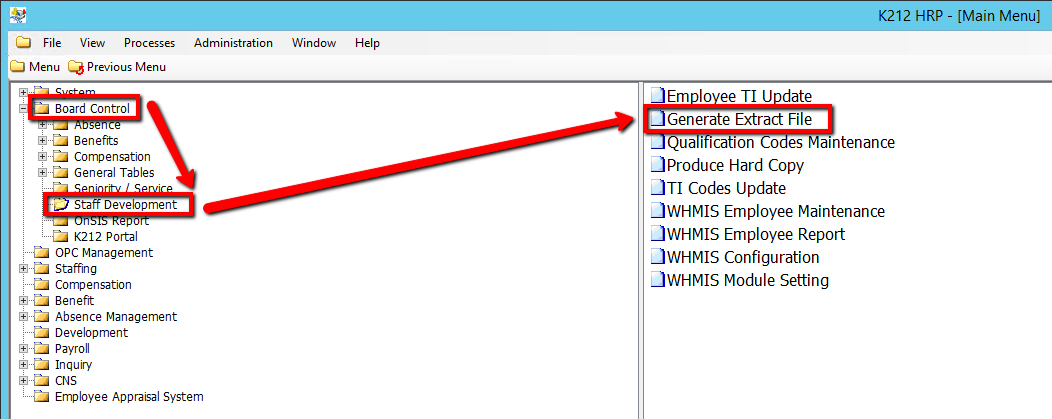
1. Click on Board Control
2. Click on Staff Development
3. Click on Generate Extract File
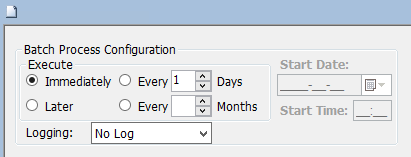
4. Click on the Submit button to generate the Extract File
.png)