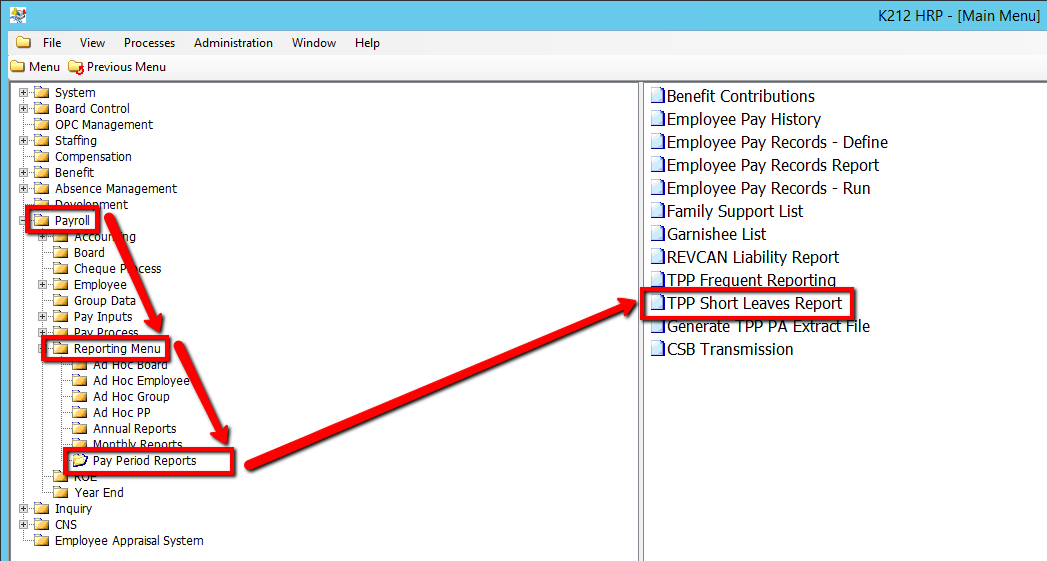
How to Run a TPP Short Leaves Report
This process creates a report that includes specific data for TPP Short Absence Reporting. This report will show DNP data where OMERS_LEAVE_TYPE = SH.
Use the following steps to Run a TPP Short Leaves Report:
1. Click on Payroll
2. Click on Reporting Menu
3. Click on Pay Period Reports
4. Click on TPP Short Leaves Report
.png)
5. Select an Employee Group value
6. Select a From Cheque Date value
7. Select a To Cheque Date value
8. Select a Report SIN? value
9. Click on the Submit button to generate the report
.png)