How to Import WEB ROE Serial Numbers
This process will import Serial #s into K212 HRP from the XML file downloaded from the Service Canada Website. Maintaining the Serial# in K212 HRP enables K212 HRP to be used to issue amended ROEs via ROE Payroll extract file transfer - by providing the Serial Number of amended ROEs in Block #2. This process should be run right after the Print ROE(s) process is complete and the ROEs have been uploaded to ROE Web / Service Canada’s website.
Use the following steps to Import WEB ROE Serial Numbers:
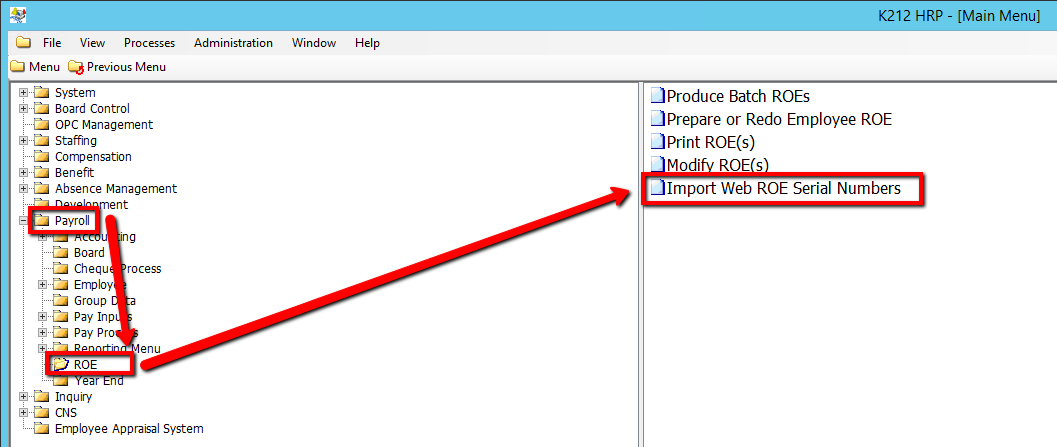
1. Click on Payroll
2. Click on ROE
3. Click on Import WEB ROE Serial Numbers
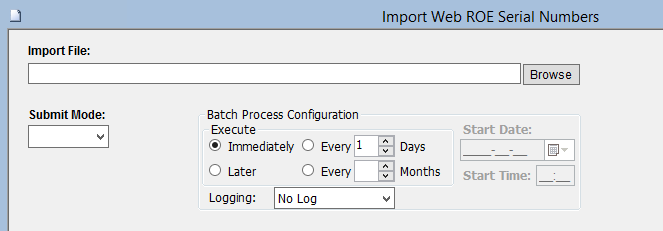
5. Browse an Import File value
6. Select a Submit Mode value (i.e Trial)
Selecting 'Trial' mode will generate a test document of all updated records when submitted, but will not actually update the records within the database until submitted in 'Update' Mode.
7. Click on the Submit button to Import the file.
.png)