How to Add an Appraisal Type Code
Once the Appraisal Form Type Codes are defined, they can be linked to the Employee by using the Employee Appraisal Maintenance function. This screen is used to add, view and modify Appraisal Type Codes. The Appraisal Type Code defines the Appraisal Frequency, who initiates the Appraisal and the Number of Forms and Signatures required for completion.
Use the following steps to Add an Appraisal Form Type:
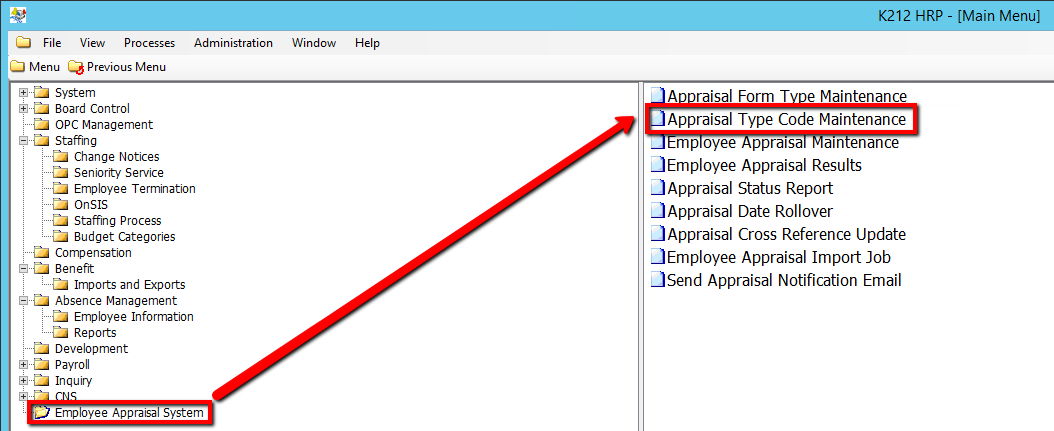
1. Click on Employee Appraisal System.
2. Click on Appraisal Type Code Maintenance.
.png)
3. Click the Find button at top of the menu bar to see all current Type Codes in the database.

4. If K212 HRP dialog box displays, click Yes to continue.
.png)
5. Click the New button at the top of the menu bar to add a new Type Code

6. Enter a unique Description for the Type Code (i.e Learning)
7. Enter a unique Abbreviation for the Type Code. This will show up in the columns when viewing, selecting or editing a record.
8. Select a Status.
Default when adding new record is ‘Active’ When the Type Code Status is changed to ‘Inactive’ it can no longer be attached to an Employee record. Changing a Type Code to ‘Inactive’ does not affect employees whose Appraisal is still in progress.
9. Enter an Employee Notification Due/#of Days value (If applicable).
This field defines the date on which an Employee should be notified that an Appraisal is due. It is used in the calculation of the Notification Due Date on the Employee Appraisal Maintenance Screen by adding the # of days to the Appraisal Start Date. It is also displayed on the Employee Appraisal List / Status on the K212 Portal, it gives Managers an overview of which Employees are due to be notified. Number must be greater than zero (0). Negative (-) is not allowed.
10. Enter an Appraisal Period # of Months value (i.e 12 months)
The value entered is used in the calculation of the Appraisal End Date on the Employee Appraisal Maintenance Screen, it adds the # of Months to the Appraisal Start Date. Number must be greater than zero (0)Negative (-) is not allowed. Default when adding a new record is 12.
11. Select a Next Type Code Due value (if applicable)
This field identifies the Appraisal Type Code of the Next Appraisal that is Due. Appraisal Type Code must have been previously defined. This field is optional, if left blank Employee records will not be automatically rolled forward to the Next Appraisal Due.
12. Select if the current year is the Year of Appraisal (i.e N)
13. Click Save to save your Type Code

The User can now link the appraisal forms they created in the Appraisal Form Type Maintenance Screen to the Appraisal Type Code they have just created.