How to Modify Employee Appraisal Results
This screen is used to modify Employee Appraisal Results and view Appraisal Forms. It allows you to Override incomplete Appraisals to ensure that the process continues to move forward. The number of forms and signatures required to complete an Appraisal are pre-defined in the Appraisal Code Maintenance screen, Appraisal Type Codes and Appraisal Form Type Codes are then attached to an employee through the Employee Appraisal Maintenance screen.
Use the following steps to Modify Employee Appraisal Results:
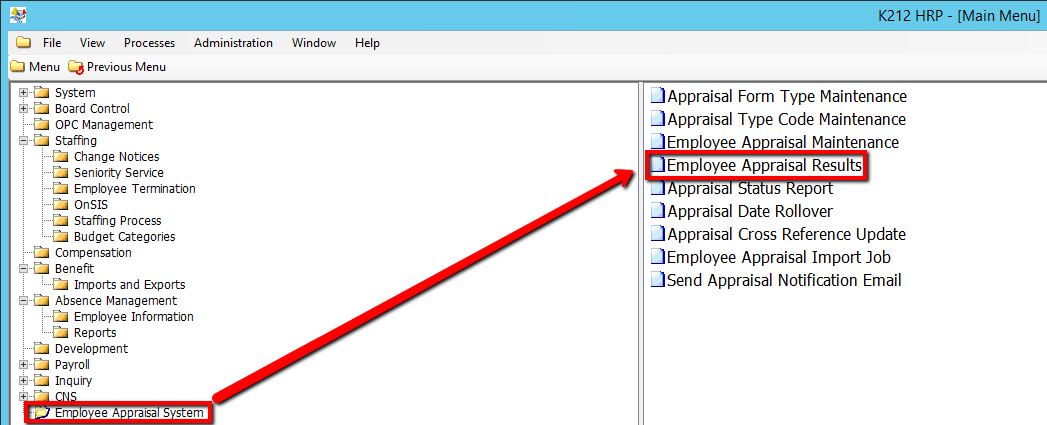
1. Click on Employee Appraisal System
2. Click on Employee Appraisal Results
.png)
3. Click the Find button at top of the menu bar to see all current records in the database. OR Enter in a Specific parameter such as Employee ID or Employee Group to narrow your search.

4. If K212 HRP dialog box displays, click Yes to continue.
.png)
5. Select the Employee record you wish to modify in the left hand column.
6. Edit the relevant parameters
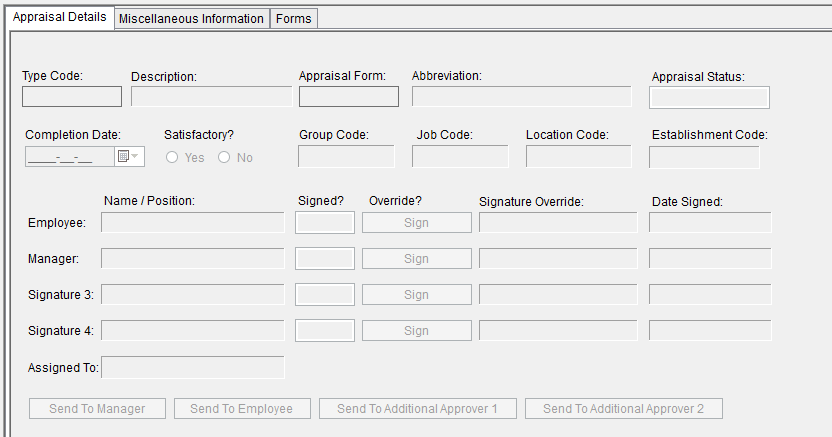
7. Click the Save button to save the edits.
