How to Import/Export Position Tables
This screen is used to run batch processes to allow boards to extract distinct position information from EC_EMPLOYEE_POSITIONS tables, and load data from the resulting .csv file back into the OPC table, EC_POSITIONS. Audit process/report are included to enable boards to maintain the OPC records.
Use the following steps to Import/Export Position Tables:
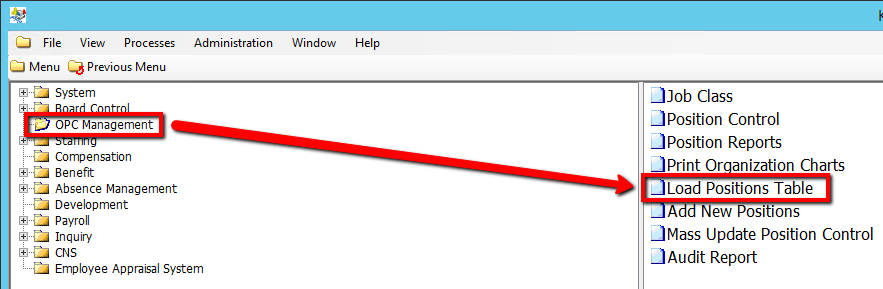
1. Click on OPC Management
2. Click on Load Positions Table
.png)
3a. To export a Position Table, Select Yes for the Extract Distinct Positions from EC_EMPLOYEE_POSITIONS? value and Enter a Distinct Positions As Of date
4a. Click on the Submit button to export the table
.png)
3b. To import a Position Table, Select No for the Extract Distinct Positions from EC_EMPLOYEE_POSITIONS? value and Select a Use Default File? value
4b. IF you select Yes, Simply Click on the Submit button to import the table
5b. IF you select No, Click the Browse button beside the Import .csv file to EC_POSITIONS field and locate the default file to import
.png)
6b. Click on the Submit button to import the table