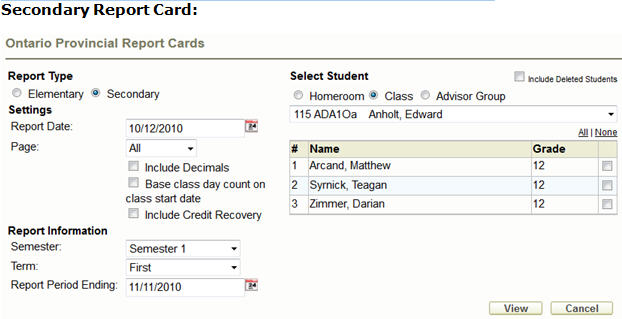
Settings:
Teachers can print the official Ontario Provincial Report Card from Maplewood connectEd.
Select the Report Type of Elementary or Secondary.
Please note, a PDF viewer must be installed on the local machine in order to view the report cards
Settings:
Report Date: Date printed at the top right-hand corner of the report card.
Page: Select the page(s) to include from the report card. Options will change based on the selected Term.
Include Decimals: marks will be printed with decimals.
Base class day count on class start date: for attendance calculations, the start date of the class will be used instead of the student’s start date in that class
Replace All - you must choose a word from the list of Suggestions or type a new word into the Change To box, then click Replace All to replace ALL instances of the word for all students in this class/homeroom.
Include Credit Recovery: Classes with a Course Type of Credit Recovery will be included on the report card.
Report Information:
Semester: choose between 1 and 2 if your school is semestered.
Term: choose between First and Final for semestered schools or First, Second & Final in a non-semestered school.
Report Period Ending: When calculating attendance totals, this date is used.
Selecting Students
Check the Include Deleted Students box to include students who have dropped the course and students who have left the school in the list. They will appear with a line through their name (strikeout) but will still be available for selection.
Choose Homeroom, Class or Advisor Group from the radio buttons to see the appropriate list of students. Choose the All or None link at the top of the selection column to make mass selection of students quicker.
Once all settings are correct, click the View button to see the report.
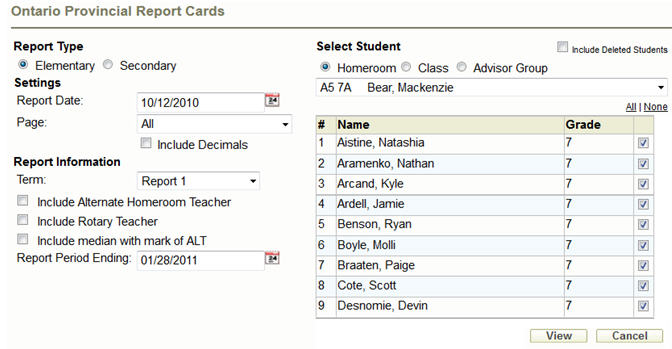
Settings:
Report Date: Date printed at the top right-hand corner of the report card.
Page: Select the page(s) to include from the report card. Options will change based on the selected Term.
Include Decimals: marks will be printed with decimals.
Report Information:
Term: Choose between Progress, Report 1 and Report 2
Include Alternate Homeroom Teacher: Alternate homeroom teacher name will appear in the top of the report card.
Include Rotary Teacher: Will include teacher’s name beside subject if that teacher is different from the homeroom teacher.
Include Median with mark of ALT: If the student’s mark is ALT, the course median will be included.
Report Period Ending: When calculating attendance totals, this date is used.
Selecting Students
Check the Include Deleted Students box to include students who have dropped the course and students who have left the school in the list. They will appear with a line through their name (strikeout) but will still be available for selection.
Choose Homeroom, Class or Advisor Group from the radio buttons to see the appropriate list of students. Choose the All or None link at the top of the selection column to make mass selection of students quicker.
Once all settings are correct, click the View button to see the report.