Individually - Main Screen:
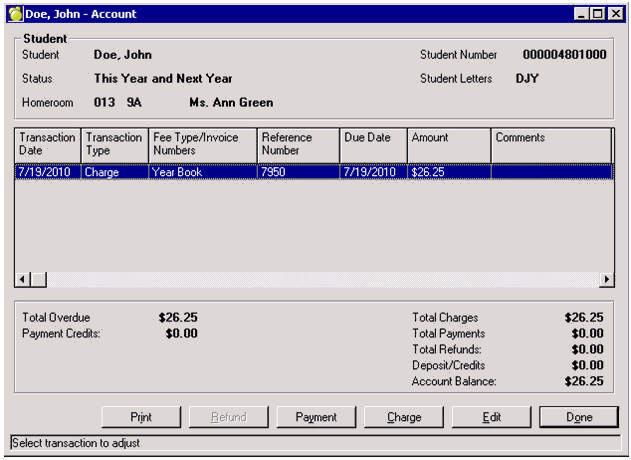
Total Overdue
Displays the total amount of money overdue, based on due dates of charges entered.
Payment Credits
Displays the total amount of overpayments that a student has made or if a charge has been edited such to result in a surplus for a student the amount is automatically categorized as a Payment Credit.
Current
By default, the student Accounts tab is set to the current Accounts database.
Archived
If a school wishes to print/view archived transactions, simply toggle to this drop down.
Total Charges
Total amount of monies that have been assigned (charged) to the student from the school.
Total Payments
Total amount of monies that have been collected (paid) by the student.
Total Refunds
Total amount of monies of payments that have been returned to the student.
Deposits/Credits
Total amount of excess payments, edited decreased charges with associated payments that result in a surplus for the student.
Account Balance
The sum of all charges, payments, refunds and deposit credits for a student. If the number appears as a whole number (i.e. $150.00) then the student owes the school money. If the number appears in brackets (i.e. ($150.00) ), then the school owes the student money.
Print
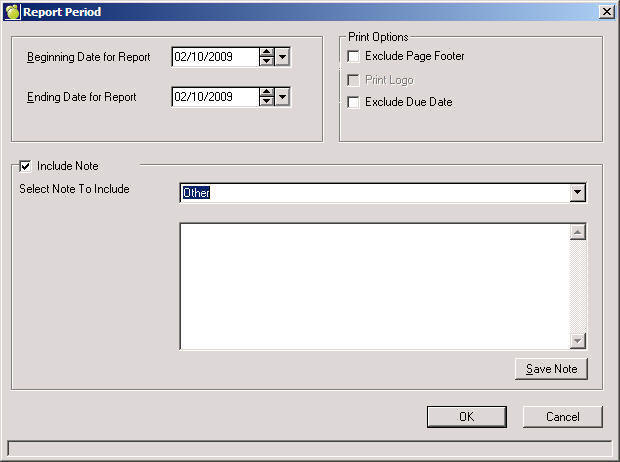
Click Print for an individual Account Bill report for the entire current (or archived) year or specify a date range. Reports can be viewed, printed and/or saved to PDF format.
the Print Logo option is available if a logo.bmp, logo.gif or logo.jpg file exists in the picture directory.
to include a note (if predefined under Setup, Report Notes), check the box and either select a note or create a new note. To add the new note the defined list of Report Notes, click Save Note.