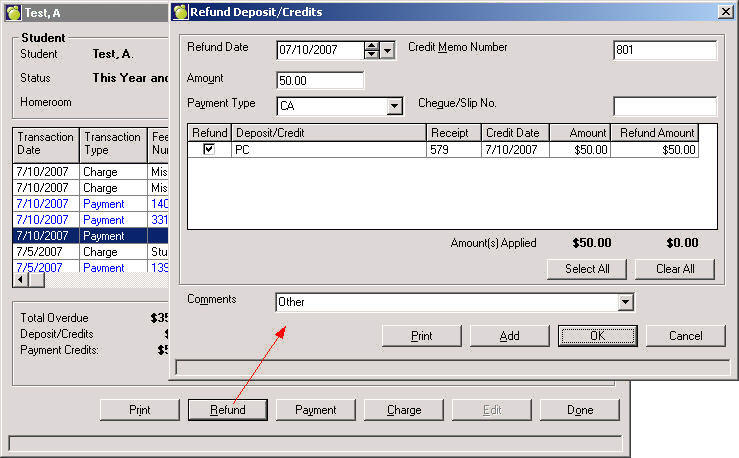
The Refund button only appears only if a student has payment credits or deposit credits. It is only applicable to Payments (i.e. a school wishes to refund a student the money paid). In short, a student must have money in credit.
Refunds appear as pink entries on the student record and will appear on Account Bills and other similar reports as an R with their respective receipt number.
Refunds are only available if there is a payment credit or a Deposit/Credit from the Main Accounts screen a value greater than 0 in the Deposit/Credit or the Payment Credits in the totals section of form then Refund is available.
From within the edit on the student's Account tab on the Edit Student Account window click Refund.
Enter the Date, Amount and Payment Type.
Click the Refund checkbox for which the refund applies, or click Select All to select more than one line.
Click Print to print a credit memo or OK to record the transaction.