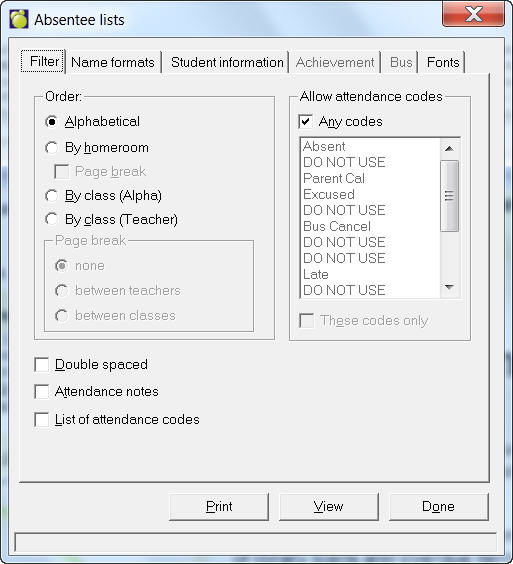
Today's Absentees is often printed after homeroom attendance (or first period attendance) has been taken and entered into Maplewood. To access an Absentee Lists print box choose Attendance, Print Today's Absentees. The report will give a list of students who are absent and those students who warned the school of their absence at the beginning of the day will appear with an asterisk (*) beside their name and those who did not warn the school will appear without an asterisk (*). Often the school will place a call home to those students without an asterisk (*), who did not warn the school of his/her absenteeism from homeroom (or first class) to find out why he/she is absent and if he/she will be returning sometime during the day.
Print Today's Absentees has been changed to only display an asterisk if the school is running Deviation Attendance. In deviation attendance, the asterisk displays when there is a deviation between what the teacher has entered and what has been entered into the office side.
On the Filter tab specify the print order: Alphabetical, By Homeroom, By Class (Alphabetical) or By Class (Teacher). Check one or all of: Double Spaced, Have teachers entered attendance yet, Attendance Notes and List of Attendance Codes. Choose to print any of the attendance codes to allow by checking Any Codes or specify codes by choosing from the list.
On the Name Formats tab, select the Given name and middle name or the Usual name, to be printed. Then check if you want to print the Student 3 letter code and the Student number. For Teacher Name, choose Given Name or Initial. Check if you want the Title included.
On the Student Information tab, select either Student Name Only or select from the available fields by checking the ones you want.
On the Fonts tab, use the Header/Footer, Title, Student Name and Student Info buttons to select the type of font. Select if you want to print the Operating System date, the Administration System date or no date. Finally, specify if you want condensed line spacing, left justified student information and indented text for a 3 hole punch binder.