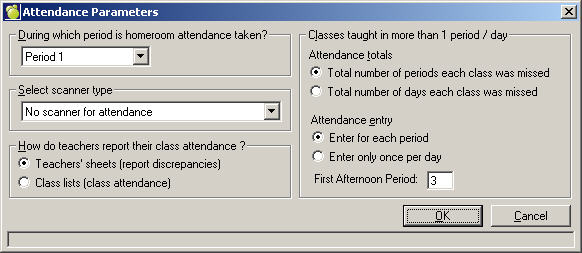
To set up Attendance Parameters, choose Attendance, Attendance Parameters.
First, specify in which period homeroom attendance is taken or selected "not taken" if there is no homeroom attendance at your school. If you are using a scanner to take attendance, select the scanner type from the pull-down menu.
Next, select how teachers report class attendance. Teachers' sheets is the recommended way of taking attendance. This is when the teachers report the attendance discrepancies on their teacher sheets. Class lists means you will be taking attendance in every class. When you set the Attendance Parameter to use Scanner Attendance, you now have the option to do the class attendance manually or by scanner.
For classes taught in more than one day/period frame, there are two options to complete. The first is Attendance Totals, where you can select to include the Total number of periods each class was missed or the Total number of days each class was missed. The second is Attendance Entry, where you choose to either have attendance entered for each period, or only once per day (this will include the classes taught in more than one period/day).
Finally, enter the First Afternoon Period (numeric value). Note: The Print Attendance programs and Report Builder program will refer to this setting to calculate students' full-day equivalent attendance.