Description Title
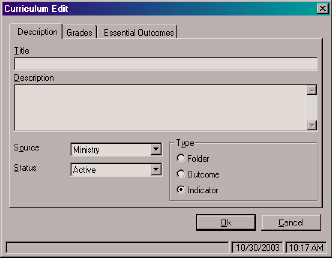
To add a new curriculum select a branch from the tree and click the Add New Curriculum icon or choose New Curriculum from the File menu. The following editing screen will appear:
Description Title
Shows the selected Curriculum item title.
Description
This general descriptor outlines where the student is expected to be by the end of the listed third grade. This is meant to act as a guide for teachers relating a student's total performance to the standards.
Shows detailed information for the selected Curriculum item. Use the scroll arrows to see additional lines of information.
Editing the Description Source
To choose a different source, click the drop-down arrow and select a source from the list.
Editing Description Status
To choose a different status, click the drop-down arrow and select a status from the list.
Curriculum Type
Select a level for your new item.
Notes: You cannot add a curriculum item to the main Curriculum Tree level.
Depending on the access rights given you according to your login ID and Password, editing may or may not be allowed.