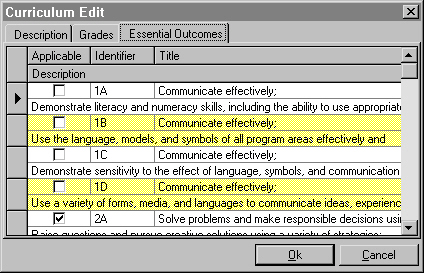
Open an item, click Edit and click the Essential Outcomes tab. Use the following graphic to see help on editing Essential Outcomes.
Applicable Checkbox
To make the selected essential outcome applicable, click the checkbox. A check mark will appear when applicable.
Essential Outcomes Identifier
This Identifier refers to the code for a specific level and sublevel of an Essential Outcome.
Editing Essential Outcomes Title
Click in the title area and enter a new description. A title could be something like "Communicate Effectively".
Editing Essential Outcomes Descriptions
This is more detailed information describing the level of achievement. Open an item, click the Edit button and then click the Essential Outcomes tab. Click on a description and enter new text.
Editing Essential Outcomes Descriptions
Open an item, click Edit and click the Essential Outcomes tab. Use the following graphic to see help on editing Essential Outcomes.
Applicable Checkbox
To make the selected essential outcome applicable, click the checkbox. A check mark will appear when applicable.
Essential Outcomes Identifier
This Identifier refers to the code for a specific level and sublevel of an Essential Outcome.
Editing Essential Outcomes Title
Click in the title area and enter a new description. A title could be something like "Communicate Effectively".
Editing Essential Outcomes Descriptions
This is more detailed information describing the level of achievement. Open an item, click the Edit button and then click the Essential Outcomes tab. Click on a description and enter new text.