Supervisor - Add/Edit User
Only signing on as the supervisor will give you this menu. You will find these commands under the Supervisor menu:
Only the supervisor can add and edit user information. Choose Add/Edit Users from the Supervisor menu. This graphic shows what you will see when you click the Add button. Enter a user ID and click OK.
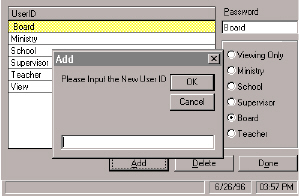
·To add a user click add and enter and ID. Then assign access right status by clicking one of the option buttons.
·To edit a user, select the name and enter new text. Select a different access right status if necessary.
·To delete a user highlight the line and click Delete. This automatically removes the user.