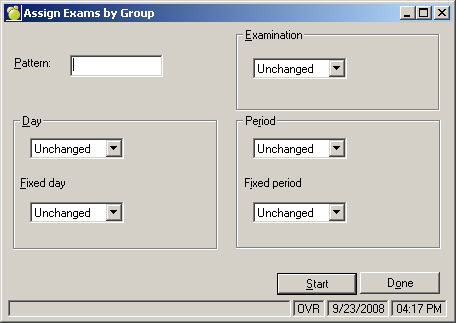
Each course in the school's courses file needs to be correctly indicated as to whether an exam should be scheduled for the course. Rather than setting up examination information on an individual course basis via the courses file, choose Exams, Assign Exams For A Group to quickly specify the required examination information.
You must indicate any course that will be scheduled into an examination period. Select the courses for examinations by choosing Exams, Assign Exams for a Group of Courses. To set the information for single courses (or there is no common pattern to the course codes), enter the information directly in the courses file File, School Setup, Courses. Select the course, click Edit and click the Exam check box.
Note: Courses that are not taught during the specified semester are not scheduled into an examination period even if the course is indicated as having an exam.
Set placement restrictions on examinations through File, School Setup, Courses or through Exams, Assign Exams For A Group. Each course can be restricted to a specific examination time. By "fixing" a course in a specific day and/or period, the fixed day and/or period cannot be changed by the computer when Automatic Assignment schedules the courses into examination periods.
Exams, Assign Exams For A Group: As an example, all English courses may be restricted to any period within the first day of the examination schedule (by fixing them into day 1 but leaving the period unassigned) and all grade 12 math courses may be fixed into day 3, period A.
File, School Setup, Courses: Examination information may be entered for an individual course. For example, MAT1A may be fixed in the third examination period (period C) of the second day of exams. When all the specifications have been entered, click Set and the computer will search through all courses in the courses file and then display the number of courses located that match the course pattern entered.
Pattern
Enter the pattern of the courses which are to be modified. The selection of the group of courses is done through pattern matching and using an asterisk (*) to represent any character in that position. Here are some examples of pattern matching:
Examination
Select Yes if the courses are to have an examination scheduled. If the courses do not have an examination, select No. The day and the period are not entered if the courses do not have examinations. Select Unchanged if the examination specification is to be unchanged.
Note: Courses which are not taught during the specified semester are not scheduled into an examination period even if the course is indicated as having an exam.
Day
If the courses are to have their examinations scheduled on the same day, enter the day of the exam. If the examinations do not need to be held on a specific day, select Unassigned. If the day is Unassigned', the automatic placement feature will assign the examination on the day which will produce the fewest conflicts.
To leave the examination day as it was previously, select Unchanged.
When you enter the day, the courses may be "fixed" into the specified day. By fixing courses in a specific day, the fixed day may not be changed by the computer when the automatic placement feature schedules the courses into examination periods. If the day is not fixed and the courses are considered in the automatic placement feature, the computer has the flexibility to change the day if it will reduce the number of conflicts.
Period
If the courses are to have their examinations scheduled into the same period, do not check the select the period from the list.
If the examinations do not need to be held in a specific period, select Unassigned. If the day is Unassigned, the automatic placement feature will assign the examination in the period that will produce the fewest conflicts.
When you enter the period, the courses may be "fixed" into the specified period. By fixing courses in a specific period, the fixed period may not be changed by the computer when the automatic placement feature schedules the courses into examination periods. If the period is not fixed and the courses are considered in the automatic placement feature, the computer has the flexibility to change the period if it will reduce the number of conflicts.