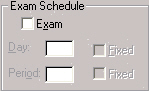
Set restrictions on examination placements by choosing File, School Setup, Courses. Each course may be restricted to a specific examination time. By "fixing" a course in a specific day and/or period, the fixed day and/or period may not be changed by the computer when the automatic placement feature schedules the courses into examination periods.
For example, restrict all English courses to any period within the first day of the examination schedule (by fixing them into day 1 but leaving the period unassigned).
To see the results of Automatic Assignment, use Exams, Print Students' Exam Timetables or File, School Setup, Courses.