Inquiry - Religion Fields
Under Transportation you will find the following criteria:
Wildcards
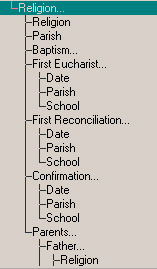
Religion - Select a Religion type from the list provided. Then specify if you want to include students who have or who don't have the religion that you specified.
Parish - Select a Parish type from the list provided. Then specify if you want to include students who have or who don't have the Parish that you specified.
Baptism - You will see the following fields under Baptism:
Date - Select a Year, Month and Day or check No Date. Once the Year, Month and Day have been entered specify if you want to search for that date, that date and earlier or that date and later.
Parrish - Select a Parish type from the list provided. Then specify if you want to include students who have or who don't have the Parish that you specified.
First Eucharist - You will see the following fields under First Eucharist:
Date - Select a Year, Month and Day or check No Date. Once the Year, Month and Day have been entered specify if you want to search for that date, that date and earlier or that date and later.
Parrish - Select a Parish type from the list provided. Then specify if you want to include students who have or who don't have the Parish that you specified.
School - Select a First Eucharist School type from the list provided. Then specify if you want to include students who have or who don't have the School that you specified.
First Reconciliation - You will see the following fields under First Reconciliation:
Date - Select a Year, Month and Day or check No Date. Once the Year, Month and Day have been entered specify if you want to search for that date, that date and earlier or that date and later.
Parrish - Select a Parish type from the list provided. Then specify if you want to include students who have or who don't have the Parish that you specified.
School - Select a First Reconciliation School type from the list provided. Then specify if you want to include students who have or who don't have the School that you specified.
Confirmation - You will see the following fields under Confirmation:
Date - Select a Year, Month and Day or check No Date. Once the Year, Month and Day have been entered specify if you want to search for that date, that date and earlier or that date and later.
Parrish - Select a Confirmation type from the list provided. Then specify if you want to include students who have or who don't have the Parish that you specified.
School - Select a Confirmation School type from the list provided. Then specify if you want to include students who have or who don't have the School that you specified.
Parents - You will see the following fields under Parents:
Father - You will see the following fields under Father:
Religion - Select a Religion type from the list provided. Then specify if you want to include students whose Fathers have or who don't have the Religion that you specified.
Parish - Select a Parish type from the list provided. Then specify if you want to include students whose Fathers have or who don't have the Parish that you specified.
Mother - You will see the following fields under Mother:
Religion - Select a Religion type from the list provided. Then specify if you want to include students whose Mothers have or who don't have the Religion that you specified.
Parish - Select a Parish type from the list provided. Then specify if you want to include students whose Fathers have or who don't have the Parish that you specified.
Guardian - You will see the following fields under Guardian:
Religion - Select a Religion type from the list provided. Then specify if you want to include students whose Fathers have or who don't have the Religion that you specified.
Parish - Select a Parish type from the list provided. Then specify if you want to include students whose Mothers have or who don't have the Parish that you specified.