Special Education Enrolment - Select Yes or No to perform an Inquiry search for Special Education or Not Special Education Students.
Special Education
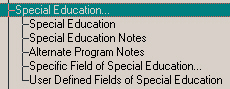
Under Special Education you will find the following criteria:
Special Education Enrolment - Select Yes or No to perform an Inquiry search for Special Education or Not Special Education Students.
Special Education Notes - On this form you can enter Special Education information that you want to include in your Inquiry search.
Include Students: click the option that you want for the search. With special education notes: will produce a list of students who have special education notes. Without special education notes: produces a list of students without special education notes. With specific special education notes: enables the additional option in the Specifics and Include students frames.
Specifics: if you want to search for a specific date, click the Selected Date option and enter the date in the Note Date box. Enter the date according to your Windows system date settings. If you want to search for a specific date or earlier, click the Selected date or earlier option and enter the date in the Note Date box. Enter the date according to your Windows system date settings. If you want to search for a specific date or later, click the Selected date or later option and enter the date in the Note Date box. Enter the date according to your Windows system date settings.
Include Students: in this frame, you can enter a string to search in the String box. Then select if you want to or don't want to include students who have this string in their special education notes.
Alternate Program Notes - On this form you can enter Alternate Program notes information that you want to include in your Inquiry search.
Include Students: click the option that you want for the search. With Alternate Program notes: will produce a list of students who have Alternate Program notes. Without special Alternate Education notes: produces a list of students without Alternate Program notes. With specific Alternate Program notes: enables the additional option in the Specifics and Include students frames.
Specifics: if you want to search for a specific date, click the Selected Date option and enter the date in the Note Date box. Enter the date according to your Windows system date settings. If you want to search for a specific date or earlier, click the Selected date or earlier option and enter the date in the Note Date box. Enter the date according to your Windows system date settings. If you want to search for a specific date or later, click the Selected date or later option and enter the date in the Note Date box. Enter the date according to your Windows system date settings.
Include Students: in this frame, you can enter a string to search in the String box. Then select if you want to or don't want to include students who have this string in their Alternate Program notes.
Specific Field of Special Education - You will find the following criteria:
- Status - Select Active or Inactive.
File Number - The File Number refers to the paper file for the student. Enter the Special Education File Number. If you wish, you can click the Wildcards checkbox and enter a wildcard string. Specify to include students with that number or students without that number.
Admitted Date - Select the Year, Month and Day or click the No Date checkbox. Specify to include students with that date, with dates before, or with dates after. Dates before and After will be enabled only once you have selected a Year, Month and Day.
Demitted Date - Select the Year, Month and Day or click the No Date checkbox. Specify to include students with that date, with dates before, or with dates after. Dates before and After will be enabled only once you have selected a Year, Month and Day.
Reassess Date - Select the Year, Month and Day or click the No Date checkbox. Specify to include students with that date, with dates before, or with dates after. Dates before and After will be enabled only once you have selected a Year, Month and Day.
School - Select a school. Specify to include or exclude students from this school.
Parental Acceptance - Say Yes or No to whether the parents have accepted their child into the Special Ed program.
Parental Acceptance Date - Select the Year, Month and Day or click the No Date checkbox. Specify to include students with that date, with dates before, or with dates after. Dates before and After will be enabled only once you have selected a Year, Month and Day.
Parents Notified Date - Select the Year, Month and Day or click the No Date checkbox. Specify to include students with that date, with dates before, or with dates after. Dates before and After will be enabled only once you have selected a Year, Month and Day.
Board Notified Date - Select the Year, Month and Day or click the No Date checkbox. Specify to include students with that date, with dates before, or with dates after. Dates before and After will be enabled only once you have selected a Year, Month and Day.
Exceptionalities - Select from the list, then specify to include or exclude students with the exceptionality.
Program - Select from the list, then specify to include or exclude students with the exceptionality.
Support Services - Select from the list, then specify to include or exclude students with the support services.
Resources - Select from the list, then specify to include or exclude students with the resources.- Placements - You will find the following criteria:
- Placement Assigned - Include Students with or without Placements.
- Date - Select the Year, Month and Day or click the No Date checkbox. Specify to include students with that date, with dates before, or with dates after. Dates before and After will be enabled only once you have selected a Year, Month and Day.
- Setting - Select from the list, then specify to include or exclude students with that Setting.
- Location - Select a Location and Placement. Specify if you would like All Placement Detail Records or a Specific one. Then specify if you want to include student with or without the selected Location.
- Status - Select a Location and Placement. Specify if you would like All Placement Detail Records or a Specific one. Then specify if you want to include student with or without the selected Location.
- Accepted - Select a Placement. Specify if you want to include students who have or have not been accepted. Specify if you would like All Placement Detail Records or a Specific one.
- Review Date - Select the Year, Month and Day or click the No Date checkbox. Specify to include students with that date, with dates before, or with dates after. Dates before and After will be enabled only once you have selected a Year, Month and Day.
- Termination Date - Select the Year, Month and Day or click the No Date checkbox. Specify to include students with that date, with dates before, or with dates after. Dates before and After will be enabled only once you have selected a Year, Month and Day.
User Defined Fields of Special Education - Click the User Defined Field that you want to use in your Inquiry search. It will appear in the User defined fields box.