Inquiry - Transportation Fields
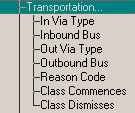
Under Transportation you will find the following criteria:
Wildcards
In Via Type - Select a via type from the list provided. Then specify if you want to include students who have or who don't have the Via Type that you specified. Click the appropriate option button.
Inbound Bus - Select a Bus Route and Number from the list provided. Select a Bus Stop from the list provided. Click the option to include the First, Second or Any Bus in the Inquiry search. Specify if you want to include students who are picked up at this bus stop, or if you want to include students who are picked up anywhere but this bus stop.
Out Via Type - Select a via type from the list provided. Then specify if you want to include students who have or who don't have the Via Type that you specified. Click the appropriate option button.
Outbound Bus - Select a Bus Route and Number, a Bus Stop from the list provided. Next select the First, Second, Late or Any Bus in the Inquiry search. Choose if you want to include students who are picked up at this bus stop, or if you want to include students who are picked up anywhere but this bus stop. Finally, select a Bus Route and Number from the list provided.
Reason Code - Select a Transportation reason from the list provided. Specify if you want to include students who have or who don't have the Transportation Reason that you specified. Click the appropriate option button.
Class Commences - Enter the time that you want to use for your Inquiry search. Specify if you want to include students with the specified time, the specified time or earlier or the specified time or later. Click the appropriate option button.
Class Dismisses - Enter the time that you want to use for your Inquiry search. Specify if you want to include students with the specified time, the specified time or earlier or the specified time or later. Click the appropriate option button.