Conversion of the current Library Database to a Union Library Database
Converting your library to a Union Library Data base will enable two or more schools to use the same library (Catalogue).
Until now there was a limited way to loan books from another school’s library, to students in the local school. This method included first logging in from Central Office, and using the Parameters menu to give permission for one school to loan books that belong to other schools. No other kind of sharing books between schools was possible. Once schools are using the same Catalogue librarians can edit item information in the Catalogue, and also run the circulation for any student in any of the schools.
For example, the same building or area has both Elementary and Secondary separated school (each uses its own Maplewood System) but the Library is used as if it’s their own.
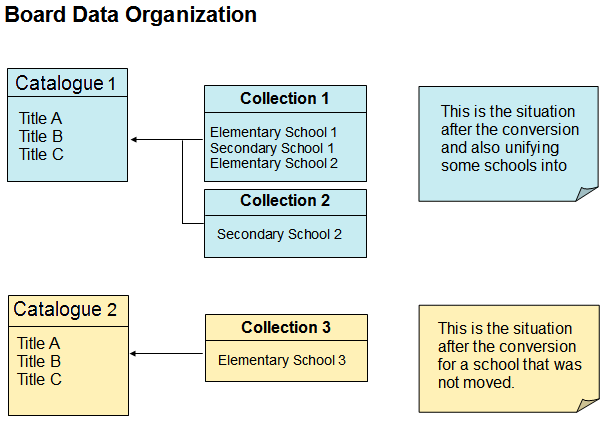
It is important to remember that although Maplewood connectEd only lets you log as one user from one school, once you have accessed the Library area and are ready to loan items through circulation, a dropdown list of the other schools using the same Catalogue will be available. Once you select another school, the list of students/Classes/Homerooms etc. will be associated with the other school.
1. Terms
Collection – a group of schools.
Catalogue – Titles (Items) shared by one or more Collections.
Copies of each item in a Catalogue are assigned to a Collection but can be maintained and circulate by any School in any Collection that uses the Catalogue.
2. Moving Current Library to Union Library Version
In order to complete this conversion, the new Web installation (3.5 Framework) is needed. In addition, users will need the latest Maplewood Library for Windows applications: MwLi32.exe and MwAdm32.exe. Once this has been installed, a Board could still postpone the conversion to the Union Library, but only until another update is released to customers.
- To move the current Library database to a Union Library database, users will have to run the Maplewood Windows application from a Central Office entry point.
- To begin the process, first choose Library, Maintenance, Modify Catalogues or Modify Collections.
- The program will run the conversion once, and will change it for ALL the schools in the Board that are using Maplewood Library in SQL DB version.
After the initial conversion one Catalogue and one Collection are created for each school. So at that point the school belongs to its own Collection and using its own Catalogue and
there are almost no visual differences from the previous version. The changes are all behind the scene.
2a. Sharing the Same Catalogue Among Two or More Schools
In order to share the same Catalogue among two or more schools, a school has to be moved from its current single Collection to another Collection that uses the desired Catalogue.
- This is done by running the Maplewood Windows application, from a Central Office entry point and selecting Transfer School.
- In a similar way it possible to later move a whole Collection that uses one Catalogue, to another Catalogue (by selecting Transfer Collection) but there is hardly any need for that.
- Changing a school’s Collection may involve the need to move Library Items from one Catalogue to another. In such case some title should be combined if they found to be of the same Item.
- Follow the application Interface steps for such operation. All schools that will share the same Catalogue should have the same Calendar, mainly if they set their parameter to count loan days by School Calendar, to ensure accurate days counting.
Library Parameters (for Catalogue and Circulation) are shared among all schools in the same Collection. Changing any parameters from one school, will affect other schools on the same collection.
In case that more than one Collection will be using the same Catalogue, each Collection still has its own set of Library Parameters.
3. Changes to the Web application Interface
If more than one school is in the same Collection, the Circulation pages like Loans and Reservations will allow selecting specific school that the Student, Staff Member or Class/Homeroom are from.
Reporting of current or previous Loans and Reservation for an Item, will include the school of the patron, if it is other than the current school.
Copy details will include the name of the Collection that the Copy assigned to.
The menu item of Initialize Circulation was taken out. If there is a need for such operation, in special case, consult Maplewood.