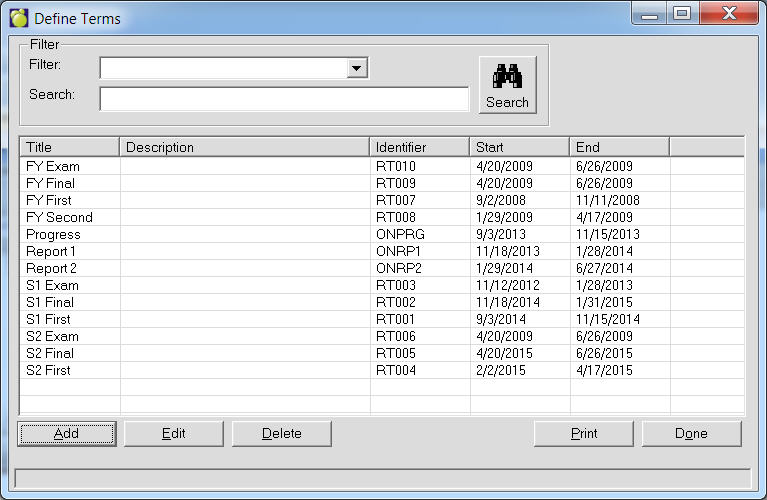
Classroom Manager reads term information stored in the main administration system. Terms must be defined and named using the Administration System. This will enable teachers to enter marks and comments for specified periods. To define Terms,
1. Choose Marks, Topic-based Marks, Define Terms.
2. To print the list of terms, click Print.
3. To add a term, click Add. To edit a term select from the list and click Edit.
Note: If the feature ‘Teachers determine if achievement is published’ is enabled in Maplewood connectEd Security, Configure Maplewood connectEd, an additional date field will appear in the Define Terms screen, Report Card Review Date. If this box is not checked, administrative/all-classes users will not be able to see teachers’ achievement (marks/comments) until the teachers have marked it as complete. If this box is checked and a date entered (mandatory if the box is checked), then administrative users will be able to see the achievement as of this date, even if the teachers have not marked their achievement as complete. For more information on the ‘Teachers determine if achievement is complete’ feature, please see the Maplewood connectEd Security manual.
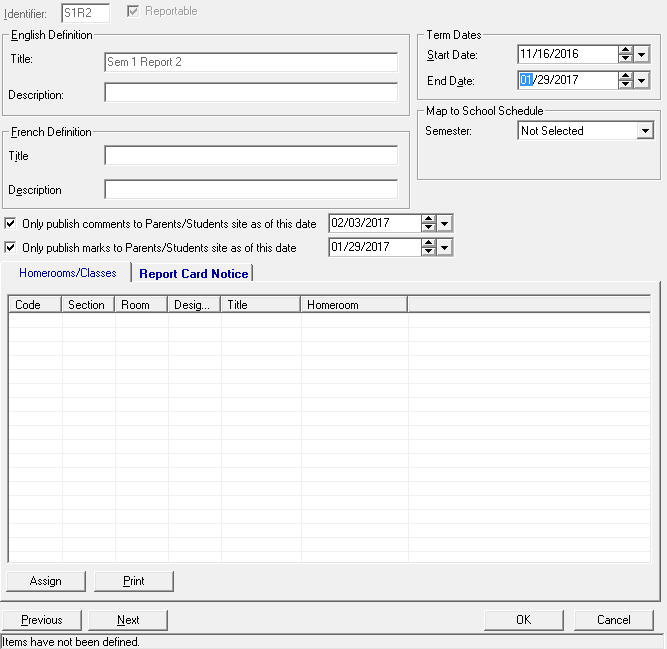
Only publish marks to Parents/Students site as of this date: Parents will only be able to see report cards marks from this particular term as of the specified date. The parents/students will still be able to see markbook marks, assuming items and categories are published by the teacher, but they will not be able to see the report card term mark until this date.
Homerooms/Classes tab: displays the classes and homerooms that currently have this term selected. Click the Assign button to assign more, or the Print button to print the list to PDF.