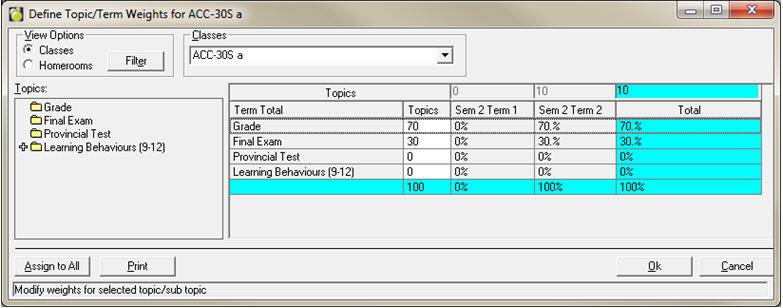
Weights can be adjusted for topics and terms to automatically calculate a final mark.
1. Choose Marks, Topic-based Marks, Define Weights.
2. Select the class or homeroom from the drop-down list. Make your changes in the cells available and make sure to exit a cell to accept the change before selecting a different class/homeroom or clicking OK.
In a cumulative markbook setup, Term Weights cannot be edited – the last chronological term will always be 100% of the total.
Please note, weight values do not need to add up to 100, as long as the ratio is correct. For example, as in the screen shot above, Sem 2 Term 2 has 10, but it is 100% of the total of term weights so it is considered to be 100%. Similarly, if 7 and 3 were provided for the Grade and Final Exam weights that would be exactly the same as having 70 and 30 as is shown.
If you make changes then select a different class from the dropdown list you will be asked if you want to save your changes.
If you choose Yes, you will be asked if you wish to run a recalculate. We recommend you answer Yes.
If you choose Yes, you will be asked if you want to erase overrides. This is completely up to the individual school. If you are aware that teachers are using the override feature, we recommend you choose No.
Assign to All: This button will assign the selected weights to all selected classes, based on the filter. If there are classes in your filter that have different terms and/or topics assigned, you will receive an error report indicating which classes were not changed. You will have to either change those classes manually or redefine your filter to narrow the list down more.
Weights of subtopics: If the topics are expanded on the left side, and the subtopic weights are shown on the right, if there are weights defined they will cause a mark to roll up into the main topic. If the main topic has a weight of zero (as does Learning Behaviours 9-12 in the first screen shot provided) these subtopic weights will not affect the final mark.
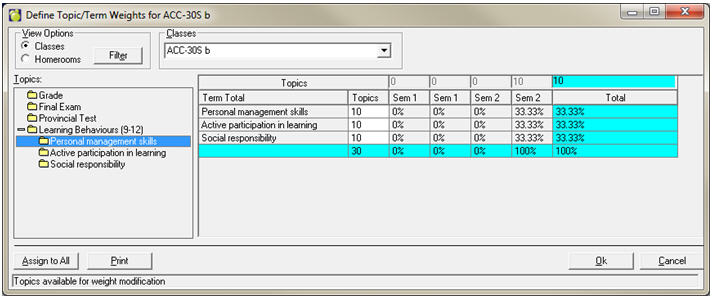
Weights of zero: To have teachers manually enter an accumulated/final mark, make all topic and terms weights zero.