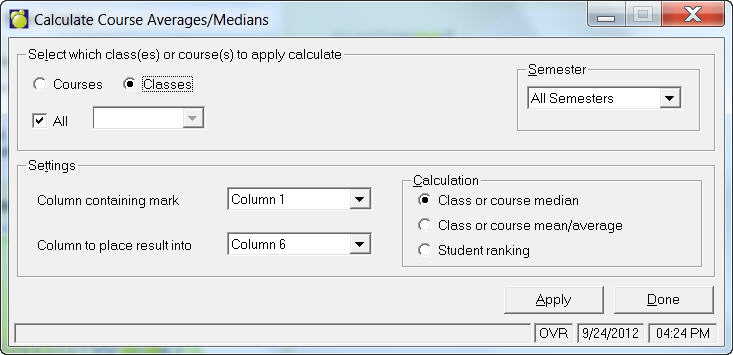
Often you may want to place a mark/grade in one marking/grading column representing a course median. The marks/grades feature of the administration system provides a feature for you to calculate course/class medians and means. Calculate Averages/ Medians will only calculate averages and medians for numerical marks/grades in the marking/grading columns.
Example
You may want marking/grading column 3 to represent the course median for each course each student is taking and you may want the course median to be calculated from the marks/grades entered in marking/grading column 2.
The course median is the mark/grade that has the same number of students in the course with marks/grades higher and lower than itself. The median is the mark/grade situated in the middle of all marks.
Enter the marking/grading column from where the median will be calculated (e.g. 2) along with the marking/grading column where the median will be placed (e.g. 3). The computer will calculate the course median for each course in the school using the students' marks/grades entered into the second marking/grading column. The course medians will be placed into the third marking/grading column for each student in the school.
Note: The averages and medians must be calculated again if the related marks/grades are subsequently changed.
The marks/grades feature of the administration system provides a feature for you to calculate course and class averages. See graphic below.
In the Calculation frame you can choose to calculate the Class or course median, Class or course mean/average or Student Ranking.
Click Apply to make the calculation.