Choose Marks, Automatic Transcript Update, Credit Requirements Achieved and an editing box will appear.
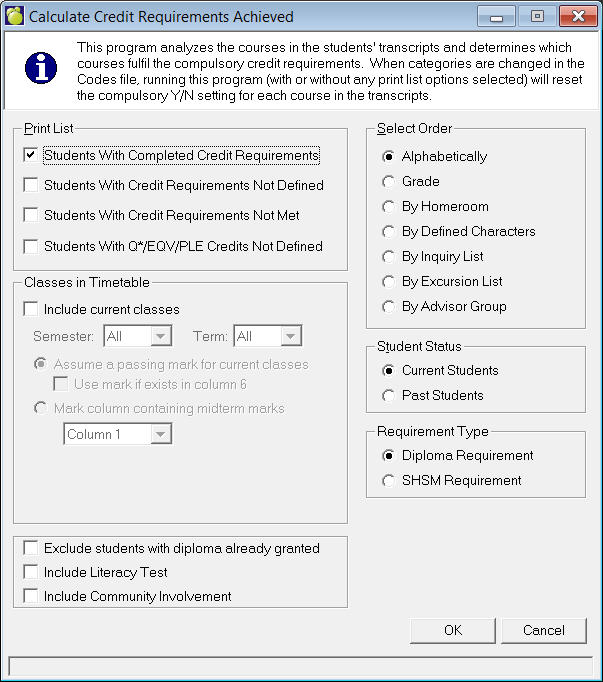
Select a Print List type, a Grade, Student Status and finally the Select By removal method. Select one of the following methods: Alphabetical, Grade, Homeroom, Defined Character, Inquiry List.
- You can also Include current classes and or Exclude students who already have diplomas.
- Checkbox 'Include Literacy Test', if checked, will report only students who have completed the literacy test and completed credit requirements. The report will not show the literacy test (YES) but will report on YES/NO of Community Hrs.
- Include Community Involvement: when this checkbox is checked, the program will only report students who have completed their credit requirements as well as completed the required community hours.
- Checkbox 'Include Community Involvement', if checked, this will report only students who have completed the community hrs and completed credit requirements. The report will not show the community hrs (YES) but will report YES/NO on the Literacy Test
- Checkbox to 'Exclude students with diploma already granted', if checked, will not report the students who have already received a (any) diploma.
- You can use Credit Requirements Achieved to include specific Semester/Term of students' timetable in its calculations. It will report the students who have achieved the requirements based on selection from the students' timetable.
Note: When both checkboxes are checked, the program will report students who have completed their credit requirements as well as completed their community hours and literacy test.