Schools can easily export and import required information to take advantage of Maplewood’s integration with InteGrade. This integration first populates InteGrade with class lists and student information which in turn allows for teachers to record assessment information within InteGrade. When a school is ready to produce report cards the office simply imports the information into Maplewood for the production of report cards and Ministry mark reporting requirements through Maplewood. Please note, our expertise and support extends to the Maplewood area of the integration, any questions pertaining the InteGrade software should be directed accordingly.
Please note, all functionality as it pertains to InteGrade and Maplewood is contained within the Conventional Marks area of Maplewood. For schools that exceed two semesters, it is not possible to use Conventional Marks, and therefore not possible to import and export to InteGrade. It is also recommended that schools restrict security to the Topic Based area of Maplewood if using the integration with InteGrade so as not to create confusion.
Set Up
Although there is no technical set up required to export files to InteGrade, it is recommended that schools verify the following areas:
Exporting Files
Marks, Conventional Marks, Import, From InteGrade.
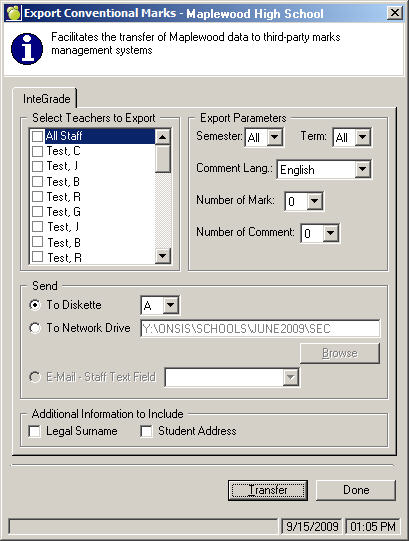
Maplewood creates a unique file for each staff member and it is based on their two letter Maplewood code (i.e. CLab.GRD). In terms of information, the file contains all the classes and students assigned to each class. If selected, the file will also include minimal demographic information on the student as contained in the Maplewood Family Tab. Many schools choose to export all semesters so that teachers can set up their information in InteGrade for the entire year. This field, along with all under Export Parameters, are at the discretion of the school.
The school should decide how they wish to save the files as well as alert the teacher to which file is their own to import into InteGrade.
Marks, Conventional Marks, Import, From InteGrade.
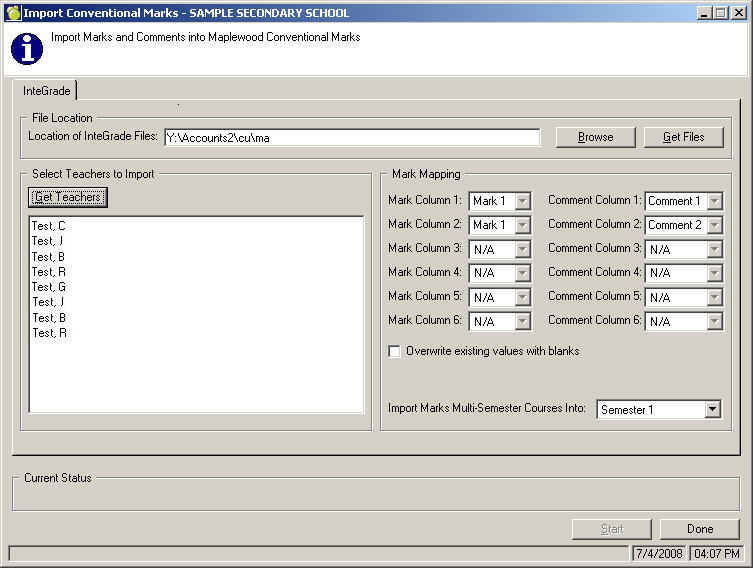
Prior to the producing report cards from Maplewood, schools must import the marks and/or comments from InteGrade. Additionally, prior changing the teachers of a class, if marks exist, it is recommended that the file be imported if appropriate and close to a reporting period.
Have teachers save their exported InteGrade files to the specified location (MKab.GRD) and then Browse to the location, once specified click Get Files. A list of the teacher files will appear, simply check the staff members for whom you will import marks and/or comments.
Under the Mark Mapping, this is where the marks and/or comments will be stored in Maplewood. Pay particular attention to the check box to Overwrite existing with blanks, this means that if there is no mark on the InteGrade file, then if there exists a Mark in Maplewood, overwrite it with the blank mark. All marks, with the exception of the blank question, are overwritten when imported.
Please note, Mark Column 6 should be reserved for a final mark in a class.