
To only print a class if there is a mark in the topic of GRD
Print school address with PO Box only if a PO Box number exists
To print all absences from the beginning of school to the report date
Print Class Teacher’s name only if different from Homeroom Teacher
Cause Ministry Number (OEN, MET, DEN, ASN) to print the word “Pending” if no Ministry Number exists
Changing the properties of a control based on a value in the data (script field)
Print student’s usual name in brackets when different from given name
Select the Classes.Topics band and go to Scripts - Before Print. Enter this code between the Private Sub and the End Sub:
Dim curStu As Student = DirectCast(GetCurrentRow(), Student)
If curStu IsNot Nothing Then
For Each stuCls As StudentClass In curStu.Classes
For Each topic As ClassTopic In stuCls.Topics
topic.Marks.Filter = "FinalTopic = False And FinalTerm = False And Mark != '0'"
Next topic
stuCls.Topics.Filter = "(Marks.Count > 0) OR (Comments.Count > 0)"
Next stuCls
curStu.Classes.Filter = "Topics.Count > 0"
End If
Select the main Detail band, Scripts - Before Print:
Dim curStu As Student = DirectCast(GetCurrentRow(), Student)
If curStu IsNot Nothing Then
For Each stuClass As StudentClass In curStu.Classes
For Each topic As ClassTopic In stuClass.Topics
topic.Marks.Filter = "FinalTopic = False And FinalTerm = False And Mark != '0'"
Next topic
stuClass.Topics.Filter = "Marks.Count > 0 And TopicCode = 'GRD'"
Next stuClass
curStu.Classes.Filter = "Topics.Count > 0"
End If
Original script (pink text is what you will get rid of):
Dim curStu As Student = DirectCast(GetCurrentRow(),
Student)
Dim result As Decimal = 0D
If curStu IsNot Nothing Then
Dim curTerm As Term = Nothing
curTerm = curStu.School.Terms.FindTermByTermCode("T1")
If curTerm IsNot Nothing Then
result += curStu.Attendance.DaysAbsent(curTerm.StartDate, curTerm.EndDate)
End If
End If
Dim control As XRControl = DirectCast(sender, XRControl)
control.Text = result
Change to (pink text is what you will put in):
Dim
curStu As Student = DirectCast(GetCurrentRow(), Student)
Dim result As Decimal = 0D
If curStu IsNot Nothing Then
Dim startDate As New DateTime(2010,9,1)
Dim endDate As New DateTime(2010,9,30)
result += curStu.Attendance.DaysAbsent(startDate,
endDate)
End If
Dim control As XRControl = DirectCast(sender, XRControl)
control.Text = result
Dim control As XRControl = DirectCast(sender, XRControl)
Dim curStu As Student = DirectCast(GetCurrentRow(), Student)
Dim curTerm As Term = Nothing
Dim result As String = String.Empty
Dim result2 As String = String.Empty
Dim result3 As String = String.Empty
If curStu IsNot Nothing Then
curTerm = curStu.School.Terms.FindTermByTermCode("S1")
If curTerm IsNot Nothing Then
result = curTerm.StartDate.ToString("MMMM, d, yyyy")
result2 = curTerm.EndDate.ToString("MMMM, d, yyyy")
result3 = result + " to " + result2
End If
End If
control.Text = result3
First, bind the field using Format Address, picking some options (doesn’t
matter what exactly – can be edited in the script afterwards). Then, replace
this line:
result = curStu.School.ContactInformation.Address.ToString("{HouseNumber}
{Street}, {City}, {Province} {PostalCode}")
with this block of code:
If String.IsNullOrEmpty(curStu.School.ContactInformation.Address.BoxNumber)
Then
result = curStu.School.ContactInformation.Address.ToString("{HouseNumber}
{Street}, {City}, {Province} {PostalCode}")
Else
result = curStu.School.ContactInformation.Address.ToString("P.O. Box
{BoxNumber}, {City}, {Province} {PostalCode}")
End If
Similar changes can be made to the Student’s
Address (format address) field.
Private Sub label3_BeforePrint(ByVal sender As Object, ByVal e As System.Drawing.Printing.PrintEventArgs)
Dim control As XRControl = DirectCast(sender, XRControl)
Dim report As XtraReport = control.Report
Dim curStu As Student = DirectCast(GetCurrentRow(), Student)
Dim result As Decimal = 0D
If curStu IsNot Nothing Then
Dim startDate As New DateTime(2011,9,1)
Dim endDate As DateTime = DirectCast(report.Parameters("ReportDate").Value, DateTime)
result += curStu.Attendance.DaysAbsent(startDate, endDate)
End If
control.Text = result
End Sub
Dim curStu
As Student = DirectCast(GetCurrentRow(),
Student)
Dim result As Decimal
= 0D
If curStu IsNot
Nothing Then
Dim startDate
As New DateTime(2010,9,1)
Dim endDate
As New DateTime(2010,9,30)
result += curStu.Attendance.DaysLate(startDate, endDate)
End If
Dim control As XRControl = DirectCast(sender,
XRControl)
control.Text = result
In a class band, this script will cause the teacher's name to print only if it's different than the homeroom teacher.
The actual format of the teacher name can be edited through script.
Dim
control As XRControl = DirectCast(sender, XRControl)
Dim detailBand
As DetailReportBand = Nothing
Dim curControl
As XRControl = control
While curControl IsNot Nothing
If TypeOf curControl Is DetailReportBand Then
detailBand = DirectCast(curControl, DetailReportBand)
Exit While
Else
curControl = curControl.Parent
End If
End While
Dim result
As String = String.Empty
If detailBand IsNot Nothing Then
Dim stuClass
As StudentClass = DirectCast(detailBand.GetCurrentRow(), StudentClass)
Dim curStu As Student = DirectCast(GetCurrentRow(), Student)
If stuClass IsNot Nothing AndAlso stuClass.Teacher IsNot Nothing AndAlso
curStu IsNot Nothing Then
If curStu.Homeroom Is Nothing OrElse curStu.Homeroom.Teacher Is Nothing
OrElse Not (curStu.Homeroom.Teacher.Id.Equals(stuClass.Teacher.Id)) Then
result = stuClass.Teacher.ToString("{Title} {GivenName.Substring(0,1)}.
{Surname}")
End If
End If
End If
control.Text = result
Then, set this as the script:
Dim control As XRControl
= DirectCast(sender, XRControl)
Dim curStu as Student = DirectCast(GetCurrentRow(), Student)
Dim result As String = "Pending"
If curStu IsNot Nothing Then
If Not String.IsNullOrEmpty(curStu.MinistryNumber) Then
result = curStu.MinistryNumber
End If
End If
control.Text = result
Dim curStu As Student = DirectCast(GetCurrentRow(), Student)
Dim nextGrade As String = String.Empty
If curStu IsNot Nothing Then
Select Case curStu.Scheduling.Grade
Case "K"
nextGrade = " Senior Kindergarten"
Case "1"
nextGrade = " Grade 1"
Case "J"
nextGrade = " Junior Kindergarten"
End Select
End If
DirectCast(sender, XRControl).Text = nextGrade
Decimal value (this will cause the box/cell to print “N/A” by default, then a letter value depending on the range of numeric values:
control.Text="N/A"
Select Case result
Case <1.5
control.Text="BEG"
Case <2.5
control.Text="APPR"
Case <3.5
control.Text="PROF"
Case <5
control.Text="MAST"
End Select
Change background colour of control based on alpha value:
Select Case result
Case "S"
control.BackColor = Color.Red
Case "U"
control.BackColor = Color.Blue
Case "B"
control.BackColor = Color.Green
Case else
control.BackColor = Color.GreenYellow
End Select
If students have received marks above 100 but you wish for a maximum value of 100 to print on the report card, find this line
And replace it with these lines:
Dim rounded As Decimal = Math.Round(cmMark.NumericMark.Value, 0, MidpointRounding.AwayFromZero)
If rounded > 100 Then
rounded = 100
End If
result = rounded
Bind a Personal Details – Format Name field as usual, but remove the adjoining curly brackets and replace with a question mark. This will cause the field to print the first field (e.g., LegalName) if it exists, and if not, the second.
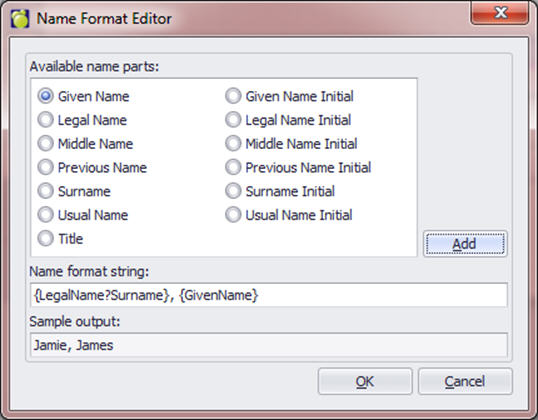
The resulting script will be this (difference highlighted in red):
Dim curStu As Student = DirectCast(GetCurrentRow(), Student)
Dim result As String = String.Empty
If curStu IsNot Nothing Then
result = curStu.PersonalDetails.ToString("{LegalName?Surname}, {GivenName}")
End If
Dim control As XRControl = DirectCast(sender, XRControl)
control.Text = result
The issue here is that students with an enrolment status of This Year Only technically do not have a Next Year Grade in this school. We have to force the field with a script. Basically it assumes that if the student is This Year Only, they are passing into the next grade. This script also assumes you are using numeric grades (i.e., grade 8 going on to grade 9 in a different school).
Instead of pulling the Scheduling – Grade field, make a blank label or cell and use this as the BeforePrint script. (The sentence text in the last line is optional - to have just the grade print, you could just use
control.Text = (nyGrade)
Dim control As XRControl = DirectCast(sender, XRControl)
Dim curStu As Student = DirectCast(GetCurrentRow(), Student)
Dim nyGrade As String = String.Empty
If curStu IsNot Nothing Then
If curStu.IsThisYearOnly Then
Dim tyGrade As Integer = -1
If Integer.TryParse(curStu.Grade, tyGrade) Then
nyGrade = (tyGrade + 1).ToString()
Else
nyGrade = curStu.Grade
End If
Else
nyGrade = curStu.Scheduling.Grade
End If
End If
control.Text = "Next school year, your child will be in Grade "+ nyGrade +"."
When a field has a script, you will need to add to the script that gets created when you bind the field. If you are using is a non-script field (e.g., the student’s grade), you can use a formatting rule. Please consult the Advanced Use part of the manual.
At the end of the script (right before the End Sub), paste the Case set with the appropriate values in each line (add lines as necessary):
Select Case result
Case "S"
control.BackColor = Color.Red
Case "U"
control.BackColor = Color.Blue
Case "B"
control.BackColor = Color.Green
Case else
control.BackColor = Color.GreenYellow
End Select
List of available properties (BackColor, ForeColor, BorderWidth, etc):
https://documentation.devexpress.com/#XtraReports/DevExpressXtraReportsUIXRControlMembersTopicAll
List of available colours:
http://msdn.microsoft.com/en-us/library/system.drawing.color%28v=vs.110%29.aspx
In the standard fields, there are basically two options for pulling the teacher’s name: create class bands and use the Teacher fields under the Class branch, or use the Classes Specific Field where you must enter a specific course code. If neither of these options is feasible, you can use one of the following scripts to print the teacher’s name for a group of course codes, using the StartsWith or EndsWith command:
To print the teacher’s name for all classes beginning with “FR”:
Dim control As XRControl = DirectCast(sender, XRControl)
Dim curStu As Student = DirectCast(GetCurrentRow(), Student)
Dim result As String = String.Empty
If curStu IsNot Nothing Then
Dim stuClass As StudentClass = Nothing
For Each stuClass In curStu.Classes
If stuClass.CourseCode.StartsWith("FR") Then
result = stuClass.Teacher.ToString("{Title} {GivenName.Substring(0,1)}. {Surname}")
End If
Next stuClass
control.Text = result
End If
To print the teacher’s name for all classes ending in “AM”:
Dim control As XRControl = DirectCast(sender, XRControl)
Dim curStu As Student = DirectCast(GetCurrentRow(), Student)
Dim result As String = String.Empty
If curStu IsNot Nothing Then
Dim stuClass As StudentClass = Nothing
For Each stuClass In curStu.Classes
If stuClass.CourseCode.EndsWith("AM") Then
result = stuClass.Teacher.ToString("{Title} {GivenName.Substring(0,1)}. {Surname}")
End If
Next stuClass
control.Text = result
End If
Create a calculated field inside the Classes branch of the field tree. Give it a name that makes sense (e.g., NumSemesters). Go to the Scripts pane at the bottom of the screen, then with your new field selected from the first dropdown, select Get a Value from the second dropdown list.
The text “DetailReport” will change depending on the name of the detail report in the report you are working on.
Copy and paste this text between the Private Sub and End Sub(this field can then be used in a conditional formatting rule, to determine whether or not certain elements within the classes band are visible):
Dim semesters As Integer = 0
Dim sem1 As Boolean = False
Dim sem2 As Boolean = False
Dim curClass As StudentClass = DirectCast(DetailReport.GetCurrentRow(), StudentClass)
If curClass IsNot Nothing Then
For Each cst As ClassSemesterTerm In curClass.SemesterTerm
If cst.Semester = 1 Then
sem1 = True
Else If cst.Semester = 2 Then
sem2 = True
End If
Next cst
If sem1 AndAlso sem2 Then
semesters = 3
Else If sem1 Then
semesters = 1
Else If sem2 Then
semesters = 2
End If
End If
e.Value = semestersThese scripts will produce results (teacher name, mark, comment, etc) from a course code BEGINNING with the specified characters: Class Title, Teacher Name (change course code beginning characters as necessary):
Dim control As XRControl = DirectCast(sender, XRControl)
Dim curStu As Student = DirectCast(GetCurrentRow(), Student)
Dim result As String = String.Empty
If curStu IsNot Nothing Then
Dim stuClass As StudentClass = curStu.Classes.FindClassByCourseCode("ENG")
For Each stuClass In curStu.Classes
If stuClass.CourseCode.StartsWith("ENG") Then
result = String.Format("{0}{1}{2} {3}{4}", stuClass.Title, " (", stuClass.Teacher.Title, stuClass.Teacher.Surname, ")")
End If
Next stuClass
control.Text = result
Mark (change course code beginning characters, topic ID and term ID as necessary):
Dim control As XRControl = DirectCast(sender, XRControl)
Dim curStu As Student = DirectCast(GetCurrentRow(), Student)
Dim result As String = String.Empty
If curStu IsNot Nothing Then
Dim stuClass As StudentClass = Nothing
For Each stuClass In curStu.Classes
If stuClass IsNot Nothing Then
If stuClass.CourseCode.StartsWith("ENG") Then
Dim stuTopic As ClassTopic = stuClass.Topics.FindByTopicCode("MARK")
If stuTopic IsNot Nothing Then
Dim comment As TopicTermComment = stuTopic.Comments.FindComment("MARK",False,"T1",3)
If comment IsNot Nothing Then
result = comment.Comment
End If
End If
End If
End If
Next stuClass
control.Text = result
End If
Mark (change course
code beginning characters, topic ID and term ID as necessary):
Dim control As XRControl = DirectCast(sender, XRControl)
Dim curStu As Student = DirectCast(GetCurrentRow(), Student)
Dim result As String = String.Empty
If curStu IsNot Nothing Then
Dim stuClass As StudentClass = Nothing
For Each stuClass In curStu.Classes
If stuClass IsNot Nothing Then
If stuClass.CourseCode.StartsWith("ENG") Then
Dim stuTopic As ClassTopic = stuClass.Topics.FindByTopicCode("MARK")
If stuTopic IsNot Nothing Then
Dim mark As TopicTermMark = stuTopic.Marks.FindMark("MARK",False,"T1",False)
If mark IsNot Nothing Then
If Not String.IsNullOrEmpty(mark.Mark) Then
Dim cmMark As CMMark = CMMarkUtility.GetCMMark(mark)
If cmMark IsNot Nothing Then
If cmMark.IsNumeric Then
result = cmMark.NumericMark(0)
Else
result = cmMark.LetterEquivalent
End If
Else
result = mark.Mark
End If
Else
result = mark.Mark
End If
End If
End If
End IF
End If
Next stuClass
control.Text = result
End If
1. Create a calculated field under the classes branch of the tree
2. Set one of the below scripts as the GetValue script for this calculated field
To determine if the class has this one specific topic:
Private Sub HasNumericMark_GetValue(ByVal sender As Object, ByVal e As DevExpress.XtraReports.UI.GetValueEventArgs)
e.Value = "False"
Dim stuClass As StudentClass = DirectCast(e.Row, StudentClass)
If stuClass IsNot Nothing Then
Dim stuTopic As ClassTopic = stuClass.Topics.FindByTopicCode("MKNJR")
If stuTopic IsNot Nothing Then
e.Value = "True"
End If
End If
End Sub
To determine if the class has one of two specific topics:
Private Sub HasMark_GetValue(ByVal sender As Object, ByVal e As DevExpress.XtraReports.UI.GetValueEventArgs)
e.Value = "False"
Dim stuClass As StudentClass = DirectCast(e.Row, StudentClass)
If stuClass IsNot Nothing Then
Dim stuTopic As ClassTopic = stuClass.Topics.FindByTopicCode("MKJR")
If stuTopic Is Nothing Then
stuTopic = stuClass.Topics.FindByTopicCode("MKNJR")
If stuTopic IsNot Nothing Then
e.Value = "True"
End If
Else
e.Value = "True"
End If
End If
End Sub
3. Set your filter on your class band appropriately, to display only if this field’s value is True or False. (Of course, the values can be whatever you want, True and False just happen to make sense)
Dim curStu As Student = DirectCast(GetCurrentRow(), Student)
Dim result As String = String.Empty
If curStu IsNot Nothing Then
If curStu.PersonalDetails.UsualName.Length > 0 AndAlso Not curStu.PersonalDetails.GivenName.Equals(curStu.PersonalDetails.UsualName) Then
result = curStu.PersonalDetails.ToString("{GivenName} ({UsualName}) {Surname}")
Else
result = curStu.PersonalDetails.ToString("{GivenName} {Surname}")
End If
End If
Dim control As XRControl = DirectCast(sender, XRControl)
control.Text = result
Determine GUID for your custom field.
Bind your custom field. Then go to your scripts tab and find and copy the information in the script that was just created that looks something like this for a List Field,
“CusLstID = '4df8b1f7-05ca-4293-b18e-af07c9ff81aa'” or this for a Text Field, "FieldID = '5dcec993-7e09-40a3-952b-c21bb62c8d60'"
In the scripts below, replace the orange text with your custom field’s GUID.
You will also need to edit the result= information (below in “blue” text) to match the information that has been selected or entered in your custom fields. A check will appear if the information within the quotes matches the information in the student record.
List Field
Dim control As XRCheckBox = DirectCast(sender, XRCheckBox)
Control.Checked = False
Dim curStu As Student = ReportScriptUtil.GetContainingRecord(Of Student)(control)
Dim result As String = String.Empty
If curStu IsNot Nothing AndAlso curStu.CustomListFields IsNot Nothing Then
curStu.CustomListFields.Filter = "CusLstID = '4df8b1f7-05ca-4293-b18e-af07c9ff81aa'"
If curStu.CustomListFields.Count > 0 Then
Dim curCustomListFields As CustomListField = curStu.CustomListFields(0)
If curCustomListFields IsNot Nothing Then
result = curCustomListFields.FieldTitle.ToString()
End If
End If
curStu.CustomListFields.RemoveFilter()
End If
If result="Yes" Then
control.Checked = True
End If
Text Field
Dim control As XRCheckBox = DirectCast(sender, XRCheckBox)
Control.Checked = False
Dim curStu As Student = ReportScriptUtil.GetContainingRecord(Of Student)(control)
Dim result As String = String.Empty
If curStu IsNot Nothing AndAlso curStu.CustomFields IsNot Nothing Then
curStu.CustomFields.Filter = "FieldID = '88e3fc8e-3726-4c3b-b792-732c308e53f2'"
If curStu.CustomFields.Count > 0 Then
Dim curCustomField As CustomField = curStu.CustomFields(0)
If curCustomField IsNot Nothing Then
result = curCustomField.CusFieldValue.ToString()
End If
End If
curStu.CustomFields.RemoveFilter()
End If
If result="Home" Then
control.Checked = True
End If