The XML file you can download from PASIprep is not saved in the expected format (it is a XML Spreadsheet 2003 type and we require CSV). After downloading the files from PASIprep, you will have to open each in Excel and Save as CSV (Comma delimited).
From each school’s Maplewood menu, select Reports, PASI, Import PASI Files (Transcript Marks)
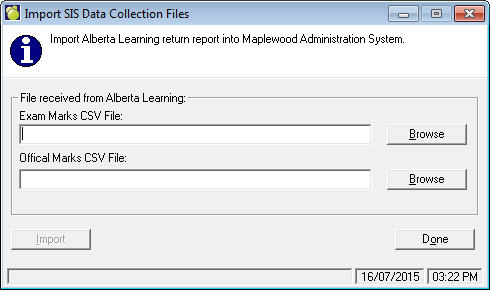
Simply browse to find the Exam Marks and the Official Marks files. Users must select both Exam and Mark file to import.
Once both files are specified, press the import button. The progress will show the status of the import. Once the import is complete if there are courses found on the file that are not in the students’ History record, a report will appear. The appropriate and corresponding marks (based on course number) will be imported into the students’ history.
It is recommended, if using Requirements on the students’ history tab, to run Credit Requirements Achieved to ensure graduation requirements are correctly updated and reflected.
As with its predecessor, this is only for Current Students. Thus, you must run this prior to Transferring to Current and it must be run at the school level as the PASI file has no school reference for the file.
The Mark on the student transcript will not be altered, this is the school mark. This import will only write to the Exam and Final fields of matching courses (number) in the students’ transcripts.
If a course exists in the PASIprep file but it is not in the student’s transcript, then the course will not be processed and they will appear on the log file.
If only the exam mark is present in the PASIprep file (course is only present in the exam file with an exam mark), the is “Exam Written On Date” is what will be used to match to the transcript (since this was the only date available for the course).
If applicable, Maplewood will create the following four log files:
1. admin\logs\AlCmRe\StuNotFound_YYYYMMDD_HHMM.log
2. Admin\logs\AlCmRe\StuMarkImp_YYYYMMDD_HHMM.log
Log contains: "STUDENT INFORMATION (Surname, Given Name, ASN)|Course|Exam Mark|Offical Mark|Credit Value|CSV Mark File|CSV Exam File|User|Computer"
3. Admin\logs\AlCmRe\StuMissingMark_YYYYMMDD_HHMM.log
4. Admin\logs\AlCmRe\StuCrseNotFound_YYYYMMDD_HHMM.log