The British Columbia Ministry of Education collects data for each student in your school. This data is used to calculate the funding for your school and for research purposes. The name 1701 represents the number of the original form previously submitted with this information.
The 1701 data collection takes place twice a year. Once in October, which is based on the students enrolled in your school on September 30th, and once in February, which is used to capture the movement of students since September 30th. The actual snapshot date for the collection in February will vary from year to year.
Using your Maplewood system, you can create a file containing all the 1701 data as explained in this document. If you require further assistance, please call our support staff at 1-800-265-3482.
Before creating the 1701 Data Collection file in the Maplewood System, please ensure that the following information is accurate for each student.
|
1701 Header Record |
|||
|
Item |
Size |
Offset |
Maplewood Description |
|
Transaction Code |
3 |
0 |
Always 'FFI' - automatically appears |
|
Ministry School Code |
8 |
3 |
File, School Set-up, School Information, School Number |
|
School Name |
40 |
11 |
File, School Set-up, School Information, School Name |
|
Report Date |
8 |
51 |
Reports, 1701 and PEN Data Collection, Create 1701 Data Collection File, Report Date |
|
1701 Detail Record |
|||
|
Item |
Size |
Offset |
Maplewood Description |
|
Transaction Code |
3 |
0 |
Always 'SRM' - automatically appears |
|
Local Student ID The student number is extremely important for updating the school database with PENs from the Ministry. It should never change, and it should be unique to each student. |
12 |
3 |
Biographics, Name, Student Number Note: If you assign a student to a number that is already used, a warning is produced. Therefore duplicates should not normally occur.
|
|
Student ID (PEN) New students will not yet have PENs |
10 |
15 |
Enrolment, Edit, PEN# |
|
Legal Surname |
25 |
25 |
Biographics, Name, Legal Surname (if different from usual surname) |
|
Legal Given Name |
25 |
50 |
Biographics, Name, Given Name |
|
Legal Middle Name |
25 |
75 |
Biographics, Name, Middle Name(s) |
|
Usual Surname |
25 |
100 |
Biographics, Name, Surname |
|
Usual Given Name |
25 |
125 |
Biographics, Name, Usual Name (first name in the field) |
|
Usual Middle Name |
25 |
150 |
Biographics, Name, Usual Name (second name in the field) |
|
Birthdate |
8 |
175 |
Biographics, Edit, Birthdate |
|
Gender (M or F) |
1 |
183 |
Biographics, Edit, Gender |
|
Special Education Category The Special Ed. tab appears when the Special Education Field is checked off on the Enrolment screen. |
1 |
184 |
Special Ed., Edit, Categories (first category)* To modify/setup table choose Students, Custom Fields/Tables, Special Education, Exceptionalities. *Note to Prelude users: The Special Ed. field must be checked off in the Enrolment tab. The Ministry's letter for the Category is entered into the 3rd Defined Character using Biographics, Edit, 3rd Defined Character. |
|
Unused (must be present and blank) |
3 |
185 |
Blank -automatically created by Maplewood |
|
School Funding Code |
2 |
188 |
Enrolment, Other Fields, Edit, School Funding Code Only these 3 entries should be used:
|
|
Native Indian Ancestry Indicator
|
1 |
190 |
Enrolment, Edit, Native Student If you check off the Native Student box you will need to specify the Indian Band. |
|
Home Language Spoken Code |
3 |
191 |
Enrolment, Edit, First Language To modify/setup table, choose Students, Custom Fields/Tables, Enrolment Tables, First Languages. Note: Enter the appropriate Ministry Code specified by the Ministry. |
|
Unused (must be present and blank) |
4 |
194 |
Blank -automatically created by Maplewood |
|
Other Courses -courses not required for graduation or college/university (course type is No Special Type). |
1 |
198 |
Timetable, Edit Number of courses in the students timetable that have a course type of 'No Special Type' Note: please change all courses with a course type of College Course to 'No Special Type'. As of the 2006/2007 school year, the number of college courses is no longer collected for the 1701 Data Transfer |
|
Unused (must be present and blank) |
1 |
199 |
Blank -automatically created by Maplewood |
|
Enrolled Grade Code
|
2 |
200 |
Biographics, Edit, Grade To set up your Maplewood system to accept letter grades of H, E, S, K, F, choose Students, Custom Fields/Tables, Table of Grades. You can enter each student's grade in the Maplewood system using any single letter or number. For example, you may want to use grade H for home schooler, E for elementary ungraded, S for secondary ungraded, K for kindergarten (half-time), and F for kindergarten (full-time), 1 through 12 for grades 1 through 12. When the 1701 file is created, you can translate each grade into the appropriate Ministry grade (explained later). |
|
Enrolled Program Code (occurs to 8 times per student) |
2 |
202 |
Enrolment, Other Fields, Edit, Enrolled Programs The following Enrolled Program Codes are valid: 05 PROGRAMME FRANCOPHONE 08 CORE FRENCH 11 EARLY FRENCH IMMERSION 14 LATE FRENCH IMMERSION 17 ENGLISH LANGUAGE LEARNING 29 ABORIGINAL LANGUAGE AND CULTURE 33 ABORIGINAL SUPPORT SERVICES 36 OTHER APPROVED ABORIGINAL PROGRAM 40 CAREER PREPARATION 41 CO-OP 42 APPRENTICESHIP 43 CAREER TECHNICAL CENTRE |
|
Career Program Code |
2 |
218 |
Enrolment, Other Fields, Edit, Career Program To modify/setup table, choose Students, Custom Fields/Tables, Enrolment Tables, Career Program Codes. The following Career Program Codes are valid: XA BUSINESS & APPLIED BUSINESS XB FINE ARTS, DESIGN & MEDIA XC FITNESS & RECREATION XD HEALTH & HUMAN SERVICES XE LIBERAL ARTS & HUMANITIES XF SCIENCE & APPLIED SCIENCE XG TOURISM, HOSPITALITY & FOODS XH TRADES & TECHNOLOGY
|
|
4 |
220 |
*For grade 11 and 12 courses, since credit values are generally 2 or 4 credits the credit value is divided by 4 to correctly calculate the number of courses for 1701. |
|
Indian Band The Indian Band is recorded for only students whose funding code is Status Indian Living on Reserve. |
4 |
224 |
Enrolment, Other Fields, Edit, Indian Band To modify/setup table, choose Students, Custom Fields/Tables, Enrolment Tables, Indian Band. |
|
Postal Code |
6 |
228 |
Family, Students, Edit, Postal Code |
|
1701 Trailer Record |
|||
|
Item |
Size |
Offset |
Maplewood Description |
|
Transaction Code |
3 |
0 |
Always 'BTR' - automatically appears |
|
Student Transaction Count |
6 |
3 |
Number of students included in the file - automatically populated by Maplewood |
|
Software Vendor Name |
100 |
9 |
Maplewood Computing Ltd. - Automatically populated by Maplewood |
|
Software Product Name |
100 |
109 |
Maplewood Educational Administration Software - Automatically populated by Maplewood |
|
Software Product ID |
15 |
209 |
Currently not collected by Ministry (Unused) |
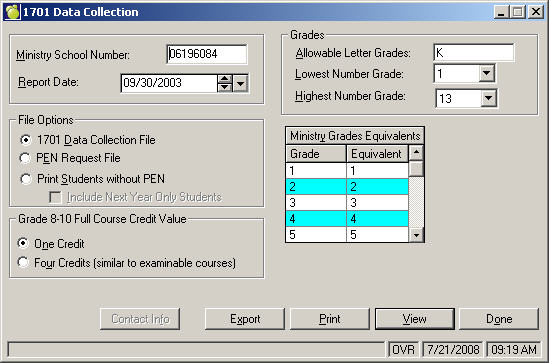
1. Once each student's information is accurate, create the Student Level Data collection information file by choosing Reports, 1701 and PEN Data Collection, Create 1701 Data Collection File.
2. On the following screen, check the information outlined below:
Verify your school’s number (assigned by the Ministry of Education).
Ensure that the report date is is correct ( i.e. September 30th of the current year for first transmission) as only students enrolled on this date are included.
Select one of the Full Courses Credits options. Since some schools use a single credit for grade 8 to 10 courses and others use 4 credits for a regular grade 8 to 10 class, select the credit value that represents a typical grade 8 to 10 course.
Verify the grades in use at your school. It will default the letter grades and numerical ranges defined in your Table of Grades. Only the students with these grades are included in the file.
The grades used in Maplewood will need to be converted into the Ministry's equivalent grades. The Ministry uses the numerical grades 1 to 12 and the following letter grades: HS (Home Schooler), KH (Kindergarten Half-time), KF (Kindergarten Full-time), EU (Elementary Ungraded), and SU (Secondary Ungraded). You may need to scroll down the list to check all of the grades.
When everything is correct, select the Export button.
Specify the drive, directory and filename (dddnnnnn.STD where ddd is the district # and nnnnn is the school #). Then select the Save button to save the file. A green progress bar will appear in the bottom right hand side of the screen to indicate the status of the file creation.
When the file has been completed, you can verify information by selecting the View button. Select the name of the file, and then select Open button to open the file.
Note: Any corrections should be made through the student's record. Re-create another Data Collection file if you have changed any information.
The Ministry of Education supplies a verification program to every school/district in British Columbia. This program is designed to help you easily identify any errors. Direct any verification program questions to the supplier.
After verifying information on the file, all public schools must send the file to the School District office. All Independent schools should send 1701 data directly to the Ministry, unless otherwise directed by their authority, using the Secure File Upload Access link found on the Ministry's data collection website.