| Item | Size | Offset | Description (where to find in student's record) |
| TX_ID | 3 | 3 | E02 will always appear. |
| VENDOR_ID | 1 | 3 | P will appear. |
| VERI_FLAG | 1 | 4 | blank |
| FILLER1 | 5 | 5 | blank |
| MINCODE | 8 | 10 | File, School Setup, School Information, Board number and School number. Contact Maplewood if these numbers are incorrect. |
| STUD_LOCAL_ID | 12 | 18 | Biographics Tab, Student NumberThe student number is extremely important for updating the school database with PENs from the Ministry. It should not change from year to year for a student, and it should be unique for each student in the school. |
| STUD_NO (PEN) | 10 | 30 | Enrolment tab, PEN#. |
| CRSE_CODE | 5 | 40 | The alpha part of the course code for a non-provincially examinable course in the student's timetable or transcript (e.g. EN). See below this chart for additional detail on course codes. |
| CRSE_LEVEL | 3 | 49 | The numeric part of the course code for a non-provincially examinable course in the student's timetable or transcript (e.g. 11). See below this chart for additional detail on course codes. |
| CRSE_YEAR | 4 | 74 | If the course is in the student's transcript: the year portion of the date in which the student completed the course. For currently enrolled classes: the year in which the course is expected to be completed based on when the class is scheduled. This date is recorded in the TRAX details within the class (File, School Setup, Classes, Edit Class, TRAX button). |
| CRSE_MONTH | 2 | 99 | The month in which the student completed or is expected to complete the course. It is calculated in the same way that the year is calculated (see above). |
| INTERIM_PERCENT | 2 | 124 | If interim marks are selected when creating the TRAX files (e.g. April submission), the user selects which mark column (1 to 6) contains the mark. The marks for the students are found in the student's record under the Achievement tab (with the Marks option selected). |
| INTERIM_LG | 3 | 164 | If interim marks are selected, the letter grade of the mark is automatically populated by Maplewood based on the numerical mark. |
| FINAL_PERCENT | 3 | 204 | The final mark must be in mark column 6 or in the student's transcript. If marks are in both locations, the transcript mark will be used. |
| FINAL_LG | 2 | 239 | The letter grade is automatically populated by Maplewood based on the numerical final mark |
| CRSE_STATUS | 1 | 246 | |
| STUD_SURNAME | 1 | 254 | Biographics Tab, Name, Legal Surname (if legal surname is blank, then Surname is sent). |
| NUM_CREDITS | 20 | 255 | The credit value of the course (File, School Setup, Classes (for current classes) or Codes (for courses in the transcript)). |
| RELATED_CRSE | 1 | 256 |
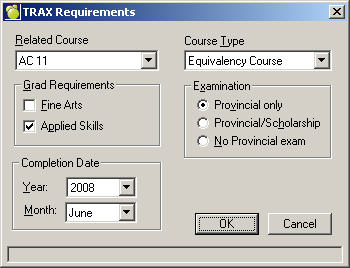
This is the alpha part of the related course code. If the course is/was an independent-directed study course, it requires a valid related course to be entered (File, School Setup, Classes or Codes, Edit, TRAX button). |
| RELATED_LEVEL | 25 | 258 |
This is the numeric part of the related course code. If the course is/was an independent-directed study course, it requires a valid related course to be entered (File, School Setup, Classes or Codes, Edit, TRAX button). |
| CRSE_DESC | 2 | 262 | Maplewood sends blank. The Ministry will default this field it it is blank. This is the description of a Fine Arts or Applied Skills course that should appear on the transcript. |
| CRSE_TYPE | 1 | 266 |
The Course Type field is available from the TRAX button when editing a class currently offered this year (File , School Setup, Classes) or offered in the past (File, School Setup, Codes). All courses will default “No special type” which is not reported to TRAX, however, it may be changed to any of the following (code only will be reported to TRAX): E = Equivalency Course C = Challenge Course R = Exam Rewrite D = External Credential Every student with that class will be assigned that course type option. For courses in the transcript, it is possible to change the course type at the student level.
|
| CRSE_GRAD_REQT | 1 | 270 | If a course meets the Fine Arts and/or Applied Skills graduation requirement, check the Fine Arts and/or Applied Skills box (File, School Setup, Classes or Codes, Edit code, TRAX button). Based on these check boxes, the following values may appear in the file: “F" - meets Fine Arts Req't only (must be at least 2 credits) "A" - meets Applied Skills Req't only (must be at least 2 credits) "B" - meets Fine Arts and Applied Skills Req't (must be at least 4 credits) Blank |
Ensure that each student has all subjects in his/her timetable. The Course Codes should match the Ministry course codes so that the software can determine which courses are provincially examinable courses (sent in the EXAM Registration Data file) and which are non-provincially examinable courses (sent in the COURSE Data file). The number of spaces between the alpha part of the Course Code and the numeric part of the code is not important.
For example, a course EN12, EN 12, EN..12, EN---12 are all sent on the file as EN 12. (This is what the program does: Anything before a number is considered the alpha part and the remainder is the numeric part. All non-alpha characters are removed from the alpha part and all non-numeric characters are removed from the numeric part. Five characters are sent in the alpha part and 3 are sent in the numeric part.) If your Course Codes will not be sent as the exact Ministry codes (you can call Maplewood to check), enter the exact Ministry Course Code in the Course Number field in the Courses File. The Course Number field will be sent first and then if it is empty, the Course Code field will be sent.
Note: If you have classes in the timetable which are never to be reported to the Ministry (e.g. supervised study classes), enter "X" for the course number in the Courses File.
1. To access the Classes File, choose File, School Setup, Classes. Select Edit or Add within the Classes file. Select the TRAX button, ensure the following items are defined:
the course’s expected completion date (year/month). This date should correspond to the months in which exam session are offered (e.g. November, January, April, June or August).
Indicate which courses have provincial examinations (defaults to No Provincial Exam for each course).
"Course Type" with the options of Equivalency or Challenge or No special type. Every student in that class will be assigned that course type option. It may be necessary to have a unique class which is given to just those students in either of these options.
There is a field called "Related course" which must have a valid course code if the class is an independent-directed study course, otherwise it is blank.
For Grade 11 BAA courses only, check Applied Skills and/or Fine Arts if the course satisfies both the Fine Arts and Applied Skills graduation requirements.
Check the credit value of each class. All provincially examinable courses should have full credits (4 credits) while non-provincially examinable courses may have partial credits.
2. The Code file contains information on courses that a student has completed in the past (e.g. in their transcript as seen in the History tab of the student's record). To access the Code File choose File, School Setup, Codes. Select the TRAX button, just as in the classes file explained above.For any student who has taken a provincially examinable course in a previous year, and will be included in the transfer, ensure the History records (transcripts) have the mark fields recorded (school percent, exam percent, and final percent; final letter grade is automatically calculated). To check a student’s transcript, choose Students, Student Records and select the student. Then select the History tab and select Edit.
3. The titles of non-examinable courses in the students’ current timetables must be recorded by choosing File, School Setup, Courses and click Edit.