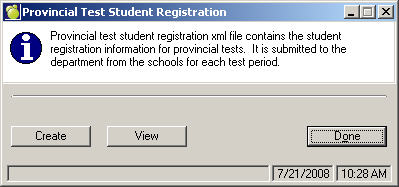
The Manitoba Department of Education now requires school to submit an export file called the Provincial Test Student Registration (PTSR) file.
This extract file contains the student registration information for provincial tests, and is submitted to the department from the schools for each test period. Once the file is created, it can be used to upload student registration information into the Provincial Test Student Registration application.
The student registration information is entered into the PTSR application two times each school year, corresponding to each provincial testing period. For the 2016/17 school year the application will be available for data entry:
Semester 1 September 28 - October 12, 2016
Semester 2 February 21 - March 10, 2017
Before the file can be created, please be sure to review the chart at the end of this document to ensure accuracy for those students enrolled in the school who are writing exams.
Note: If there are no valid Exam Numbers entered within the classes file, then the PTSR file will not be created.
1. Create the Provincial Test Student Registration File by choosing Reports, Department Data Transfers, Create PTSR File.
2. Select Create to create the file.
3. Choose the method in which students are to be included in the file.
4. Once the file is created, a message will appear, stating where the file was saved to (i.e. File created: F:\admin\export\PTSR\xxxxptsr.xml).
5. To view the information in the file, Select View choose the file from the Open File window and select Open.
6. Upload the resulting file into the Provincial Test Student Registration (PTSR) application and proceed as directed by the PTSR application. Please note that student adaptations and exemptions must be manually entered into the application. For each test for which adaptations or exemptions are reported, adaptation and/or exemption contact information must be entered on the “Registration” page of the PTSR application.
Electronic File Format
File Name: xxxxptsr.xml Where xxxx is the school number.
Elements and attributes used in the PTSR Schema:
|
Element/Attribute |
Description |
Maplewood |
|
School Number (schoolNbr) |
The number assigned to the school by the department, where the student is currently attending. |
File, School Set-up, School Information, School Info. Tab, School Number School number must be 4 digits |
|
Student Number (studentNbr) |
MET Student Number assigned to the student by the Department |
Students, Student Records, Enrolment, MET# Student number must be 9 digits |
|
Last Name |
Legal Surname of the student |
Students, Student Records, Biographics, Name, Legal Surname (if legal surname is blank then Surname is sent). |
|
First Name |
Legal Given Name(s) of the student |
Students, Student Records, Biographics, Name, First Name |
|
Birthdate |
Legal Birth Date of the student |
Students, Student Records, Biographics, Edit, Date of Birth |
|
Gender |
Legal Gender of the student (M or F) |
Students, Student Records, Biographics, Edit, Gender |
|
Grade |
Current grade of student. |
Students, Student Records, Biographics, Edit, This Year's Grade Grade values only the following values will be accepted in the XML file: |
|
Exam Number (examNbr) |
The number of the Provincial Test assigned by the Department that the student will be taking. |
File, School Set-up, Classes, Edit, Exam Number This is a 4 digit number assigned by the Manitoba Department of Education. These numbers will change from year to year. |
|
Class Number (classNbr) |
The test grouping assigned by the school for the provincial test |
File, School Set-up, Classes, Class Section (i.e. Section a = 1, Section b = 2 etc) |
|
Exemption Code |
The number of the exemption assigned by the Department requested for the student |
Not Currently Exported |
|
Adaptation Code |
The number of the adaptation assigned by the Department requested for the student. |
Not Currently Exported |
|
Category |
Indicates whether the adaptation is regular (0) or additional (1). |
Not Currently Exported |
|
Reason |
The reason for requesting the adaptation or the reason for requesting the exception and a description of the exception if the exemption is ‘other’ |
Not Currently Exported |