Beginning with student attendance for the month of February 2011, the Manitoba Department of Education is implementing a process to begin collecting average monthly attendance data from all public schools in Manitoba. School divisions are required to submit monthly attendance reports, to the Department on a school-by-school basis. The monthly attendance reports are due by the 15th day of the following month (i.e. March 15th).
These reports must:
Identify the average monthly attendance rate for each school in the division.
The number of students transferred into the school from outside the school division.
The number of students transferred out of the school division.
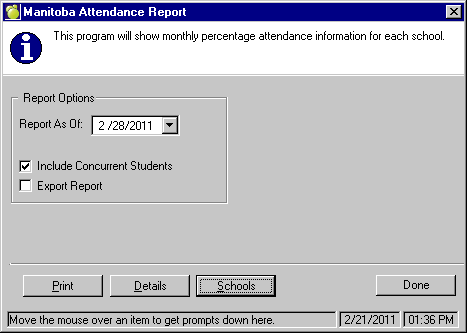
Accessing the Report within Maplewood: A new option has been added to the 'Reports' menu within Central Office. This new option is called 'Manitoba Attendance Report' and can be found just below the 'October/March Statistical Reports' option.
Here the user can select to Print or Export the information based on the Report Date (i.e. if you are looking to produce the Attendance Report for the Month of February - you should select the last 'normal' day in the calendar for the month of February).
Choosing the Print option - will provide you with a report that is the similar layout as that of the excel spreadsheet provided by Manitoba Education.
Choosing the Export option - Selecting the 'Export Report' checkbox will enable an 'Export' button. Select this option and the program will create a .csv file that can be imported into the excel spreadsheet provided by Manitoba Education. The default location where this file is saved is F:\Admin\Export\Attendance (where F:\Admin = the location of your Central Office data). The default naming convention is the report date followed by "_Stuattend.csv" (i.e. 20110228_Stuattend.csv - for the February report).
When creating the attendance report, the program will check to see if all students have a valid entry for the 'Origin Type' and/or the 'Year End Status' fields, if a student does not have an entry from the table (i.e. 'Unknown' has been selected) then an error report will be created and a message will appear prior to the creation of the report.

If this warning appears, Select 'Yes' to view the list of students. The printout will contain the school number (where the student is enrolled), the student name, and the error type. An example of an error type would be 'Invalid Origin Type'. The student most likely has an 'Origin Type' of 'Unknown' and therefore cannot be included in the report. Having the school correct this information, and then running the report again is recommended. Choosing the Details option is option will give you a list of all students that are included in the report (by school) as well as the total number of absences that have been calculated for that student for the reporting period. At the end of each report (by school) the total number of students included, as well as the total number of Days Absent will be printed.
The school name for which the data is being reported on.
Schools record attendance daily and calculate the daily percentage attendance rate. For the purpose of this calculation, a student who attends any part of the school day should be considered present.
Example: 302 students present on October 1 = 86% attendance
350 students enrolled on October 1
Should enrolment change during the month, the number would appear in the transferred in column but would not become part of the total number of students until the following month.
Recording Attendance Twice a Day
Where attendance is recorded twice daily, as in some early and middle years schools, the number of students in attendance each day would be the highest number at any time during the day. For example, If there were 352/366 students in attendance in the morning and 341/366 in the afternoon, the school would use the highest number to calculate the percentage (%) of students present in a single day.
High School Attendance
For high schools, including alternative schools, a student is considered present if he or she is in attendance for at least one section (class) in a day. The highest number of students in attendance at any time during the day should be used to calculate the daily attendance rate.
Suspensions
Suspensions – Students who are on out-of-school suspensions are not in attendance and should be recorded in the monthly attendance report as absent. Details can be provided in column C on the Monthly School Division Attendance Report (e.g. 5 students were suspended for 3 days each).
Within Maplewood
Only attendance codes that have been set to ‘Register: Absent’, ‘Register: Grant Day’ or ‘Register: Suspended’, as well as any days in the school calendar set to ‘Grant Day’ will be included in the average attendance calculation.
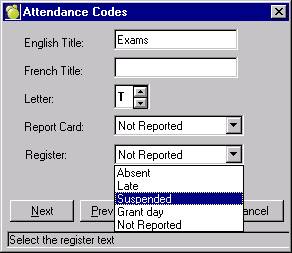
Only Full Day Absences (and Suspensions) are considered in the report calculation. The program then counts all possible days (all regular days in the calendar) for each student that was enrolled on the first teaching day of the month (the possible days are the same for all students, regardless if student left in the middle of the month - as required by report specifications).
100% - _________________________________________Total Full Day Absences________________________________________________ * 100 = Average Monthly Attendance
Total Number of Students in the School on the First Teaching Day of the Month * Total Possible Days of Attendance for the Month
Looking at the month of November, there are a possible 20 days where student attendance can be entered (any Day 0 in the calendar is NOT included in the calculation of possible days).
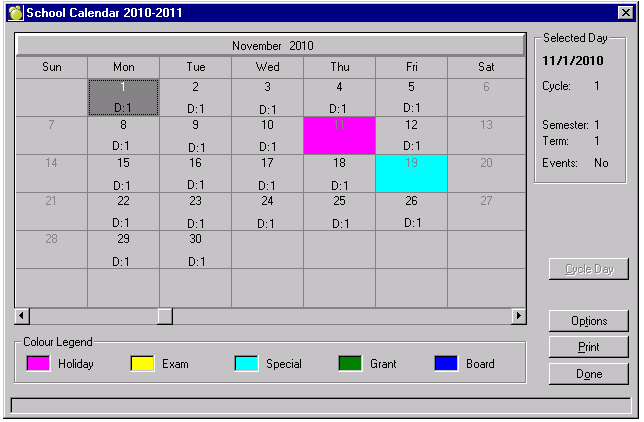
Now taking a look at the Monthly Attendance registers for the school (running the monthly attendance register by Grade will ensure that all students are printed - if you run the report via homeroom, some students may be excluded if they are not assigned a homeroom).
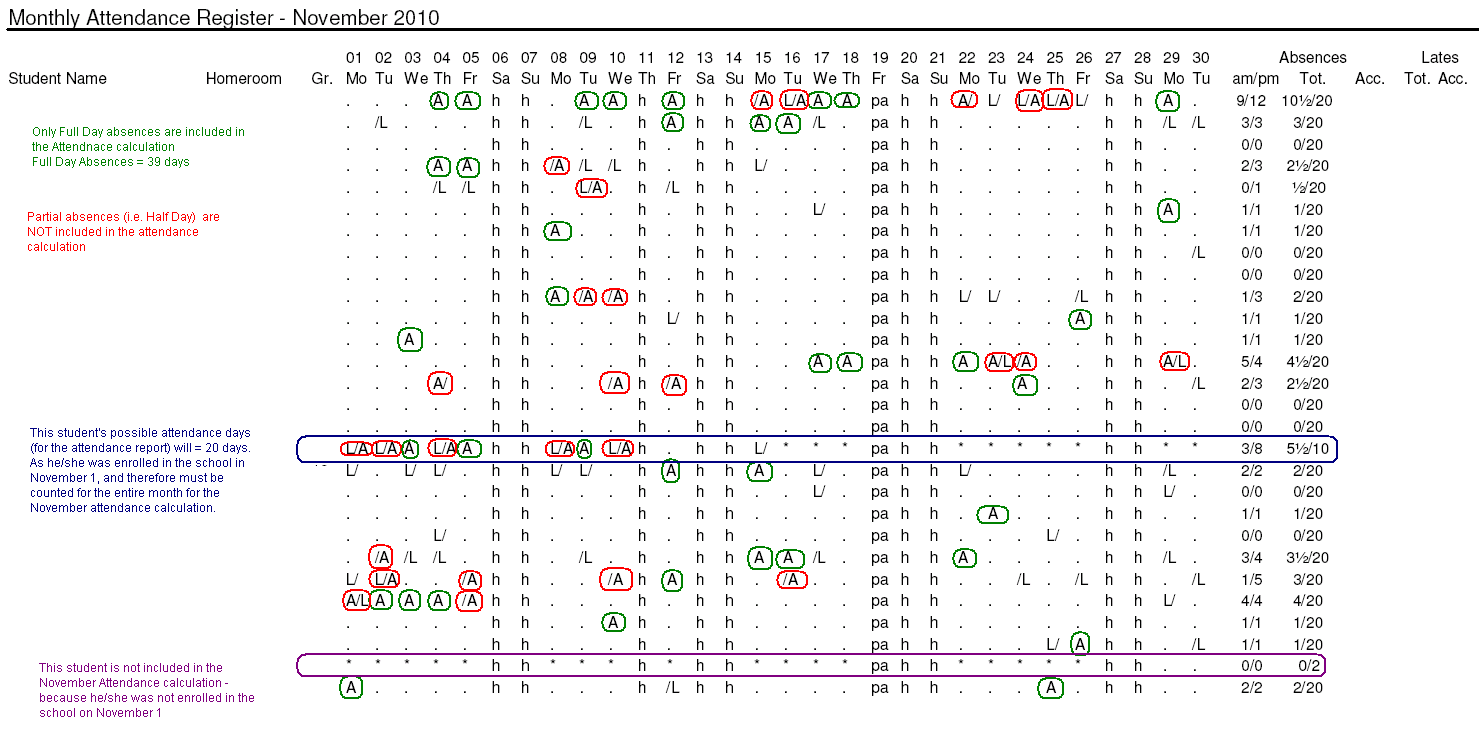
Based on the above information we can determine the following:
Number of Students = 27 (28 - 1 as one student not included as he/she was not enrolled on November 1)
Number of Possible Days = 20
Number of Full Day Absences = 39
Total percentage of students absent for the month of November
___39___ * 100 = 7.22%
27 * 20
100% - 7.22% = Total Present (students in attendance)
= 92.78%
Attendance of less than 90% is generally considered an issue regardless of the causes, therefore schools with monthly average attendance of less than 90% will be asked to provide brief contextual information as to what some of the causes for student absenteeism might be (e.g. high rate of illness, a winter storm affecting transportation, a number of unexcused absences). Manitoba Education will follow up with school divisions reporting schools with significant attendance challenges to explore ways to work together to address issues that have an impact on student attendance.
Within Maplewood: Maplewood does not populate this information. Users can export the attendance report, and import it into the blank report provided by Manitoba Education. For instances where attendance falls below 90%, users can enter the detailed information directly into the spreadsheet.
Any students who transfer into the school from another school division, province or country is to be included in the count for this column.
Within Maplewood: Total number of students who enrolled (Entry to this School Date) within the month of the report.
Maplewood will include any origin type that has a MIN# of 06 (or 6) and higher. Please verify your Origin Type table to ensure that all transfers/retirements outside the division comply with this rule. To modify this table, go to Students, Custom Fields/Tables, Enrolment Tables, Origin Types.
Any students who have left the school division are to be included in the count for this column.
Within Maplewood: Total number of students who has a retirement/transfer date within the month of the report is calculated based on the student's 'Year End Status'.
All students with retirement/transfer dates will be included in the total unless their 'Year End Status' code has been set to Continuing (MIN# 110) or Transfer - to Another School (MIN# 201)
Submission to Manitoba Education
School divisions can submit monthly data, with the subject Attendance Report, by email brenda.medeiros@gov.mb.ca, or fax: 204-948-3229.