In the spring, schools or divisions may receive a request from the University of Manitoba for high school mark information for students who have applied to the university, in particular, interim marks. A similar request for final marks may be received in June as well.
By following these steps, the required files may be easily generated in Maplewood. Although every effort is made to generate an accurate file, please carefully examine the results to ensure that the correct data is being included for the post secondary applicants to the University of Manitoba.
- The students who are to be included in the file need to be flagged. The University of Manitoba will provide a list of the students identified by their MET #. Hint: At the select student screen, use the Method button to select students by MET#.
For each student to be included in the file, check that their enrolment record has the following 2 fields set as follows:
Status = This Year Only (e.g. student is not expected to return next year) *
Destination School = University of Manitoba **
* students in the highest grade are automatically set to this status when the school runs Initialize Scheduling.
** spelling must be exactly University of Manitoba. To add/edit this entry in the table of schools, from Central Office or the school, use File > School Setup > Schools. The school number for the University of Manitoba is 46003 (although the program is not looking for this number).
-
Ensure that marks are entered as follow:
Spring: make sure that interim marks have been entered for the provincial report card.*
June: make sure that final marks have been posted to the transcripts.
* Private schools who are not setup to use the provincial report cards will be prompted to select the term and topic where the students' second semester interim marks are located.
-
Ensure that students who have graduated have a diploma entered, and a date that the diploma was earned. This is entered in the History tab of the student’s record. If no diploma date is entered, the student will not have a graduation date set in the file, and this will be interpreted as NOT GRADUATED. Hint: Assign All of a Field can assign this information to a group of students.
-
Ensure that the grade field is set to 12 for all grade 12 courses (File, School Setup, Courses and File > School Setup >Codes). Only grade 12 courses are included in the file.
-
The file may be created from the school or Central Office (not applicable for private schools). If run from Central Office, the list of secondary schools will be included on the interface so that the user may select which school(s) are to be included in the file.
Create the file by selecting Reports > Mark Data for University of MB.
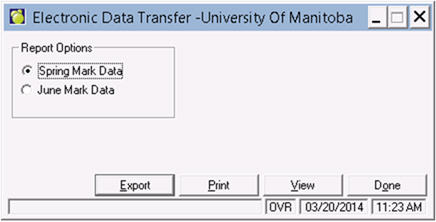
Select either Spring Mark Data or June Mark Data then click Export. A file with the default name of Spring_ Marks_####.csv or June_Marks_####.csv) will be created in the location selected by the user (it will default the school or central folder\Export\UofM). #### will be the number of the school or the division depending upon whether the file was created at the school or central office.
The comma delimited file will contain the following information for each student who has the destination school set to University of Manitoba. For each student, one line (record) will appear for each grade 12 course the student has taken or is still in the process of taking:
|
Field Name
|
Maximum Length
|
Description
|
|
MET#
|
9
|
The student’s MET# (Edit on the Enrolment tab of the student’s record).
U of MB note: Policy of returning data when there is no MET is at the discretion of division/school. We suspend record if there is no MET on our record so that it can be verified manually. It is not a require field on the MB course page of the application.
|
|
Surname
|
60
|
The student’s legal surname, if it exists, otherwise the student’s surname (Name button on the Biographics tab of the student’s record).
|
|
First Name
|
60
|
The student’s given name.
|
|
Date of Birth
|
8
|
The student’s date of birth (Edit on the Biographics tab of the student’s record)
|
|
School Number
|
4
|
The number of the school where the student is enrolled (File, School Setup, School Information, School Number).
|
|
School Name
|
30
|
The name of the school where the student is enrolled (File, School Setup, School Information, School Name).
|
|
Graduation Date
|
8
|
YYYYMMDD If the student has a diploma entered, the date of the first diploma will appear here, otherwise it is blank (Edit on the History tab of the student’s record). A blank will be interpreted as NOT GRADUATED.
A warning will appear for those students who have a blank in the June file.
|
|
Ministry Course ID
|
4
|
The first 4 characters of the course number, if it exists, otherwise the first 4 characters of the course code (File > School Setup > Courses (if reporting an interim mark) or Codes (if reporting a final mark from the student’s transcript)).
Note: if the course number is X, the course will be excluded from the file.
|
|
Ministry Level
|
3
|
The last 3 characters of the course number, if it exists, otherwise the last 3 characters of the course code (File > School Setup > Courses (if reporting an interim mark) or Codes (if reporting a final mark from the student’s transcript)).
|
|
Language of Instruction
|
2
|
The language of instruction for the course. The language is specified in File > School Setup > Classes (if reporting an interim mark) or File > School Setup > Codes (if reporting a final mark from the student’s transcript). The file will contain the MET# of the language, as defined in File > School Setup > Language of Instruction. Leading zeros will be automatically removed (e.g. 01 will appear as 1). Examples:
1 = English
2 = French
3 = German
(The values correspond to the values required for EIS reporting).
|
|
Interim Mark
|
3
|
The interim mark entered on the MB provincial report card. *
This field is only populated if the final mark is not yet available (e.g. course is not yet in the student’s transcript).
If no interim mark can be found for courses not yet completed, NM (for no mark) will appear in the file. Students in this situation will generate a warning when the file is created.
Technical description: The mark entered into the Grade topic (identifier = MBGR) for the following term depending on whether the school operates on a full year class schedule (all classes run Sept to June) or operates on a semester schedule (with or without some full year classes):
Full year only school: term identifier = MBFY2
OR
Mixed or semestered school: term identifier = MBS21
* Private schools who are not setup to use the provincial report cards will be prompted to select the term and topic where the students' second semester interim marks are located.
|
|
Final Mark
|
3
|
The final mark from transcript (History tab of the student’s record).
|
|
Date Completed
|
8
|
YYYYMMDD The cdate the course was completed (History tab of the student’s record). This field is only populated if the final mark is being reported. The transcript has the year and month, so the day will be automatically populated to the first day in the month unless it is January or June, in which case it will be the last day in the month (e.g. 31 or 30).
|