Technology Education Reports - Manitoba
Overview
This page explains how you can generate the information required for the FB 115 Series - Senior Years Technology Education Reports (www.edu.gov.mb.ca/ks4/finance/forms/public/fb115_series.xls). The FB 115 Series Excel file (fb115_series.xls) contains multiple worksheets that include the FB 115 forms that must be filled in, along with instructions and examples that clearly illustrate how the forms are to be populated.
Instructions on how to create the reports in Maplewood are included in the section titled How_to_Create_FB115_Reports. Maplewood will provide the information that the school needs in order to accurately populate the official forms in the Excel file.
There are 4 reports in the FB 115 series:
| FB 115A - Senior Years Technology Education - Eligible Unit-Credit | Reporting Date: September 30th | Due Date: October 15th |
| FB 115B - Senior Years Technology Education - Eligible Unit-Credit (Second Semester) | Reporting Date: February 28th | Due Date: March 15th |
| FB 115C - Senior Years Technology Education - Approved Programs | Reporting Date: September 30th | Due Date: October 15th |
| FB 115D - Approved Business Education and Marketing Education Programs | Reporting Date: September 30th | Due Date: October 15th |
Before creating this report, please make sure that all technology education courses offered at your school have the appropriate course category specified. Please see Course Category Setup for information on this setup. Course categories are used to determine which courses are included in each of the different FB115 forms.
Note: These reports consider eligible (supportable) students only. Non-supportable students are excluded. If a student's enrolment type is one of the following, the student will not be counted in the report:
| 210 | Non-Supportable - Inbound Foreign Exchange Pupil |
| 300 | Non-Supportable - Not in Attendance/Expected by November 30th |
| 310 | Non-Supportable - Canada Supported Pupil |
| 320 | Non-Supportable - Education Paid From Other Sources |
| 340 | Non-Supportable - First Nations Pupil |
| 390 | Non-Supportable - Temporary Resident |
Manitoba's Subject Table Handbook Technology Education contains information on technology courses. Appendix A lists the course groupings (e.g. Agriculture, Auto Body Repair, Child Care) to be used when reporting clusters in FB115A, FB115B, and FB115C. Appendix B and C correspond to the Industrial Arts and Home Economics courses that are also included in FB115A and FB115B (but not FB115C). The handbook also contains those courses that are to appear in FB115D (see the section on Business Education and Marketing Education). If any of the information provided by Maplewood does not agree with the handbook, please use the information in the subject table handbook.
In order for Maplewood to categorize the technology courses properly, each course that will appear in any of the FB115 forms must be assigned to a course category. The course category table is user defined and must be defined by the Central Office or the school. The course categories table is setup as follows:
1. Go to File, School Setup, Course Categories.
2. Add/Edit the list of course categories using the following guidelines:
Each course category must have a MET# (as explained below), a title (as explained below), and a Div# code (any unique code you want to use - example Div# are provided below for examples only)
A course category must exist for each cluster offered in your school as listed in Appendix A in the handbook. The title must correspond to the course grouping (e.g. Auto Body Repair not Heavy Industrial) and the MET# must be 004 if it is a category I or 005 if it is a category II (category I or II is listed for each course grouping in Appendix A). Here are some examples:
|
MET# |
Div# |
Title |
|
004 |
AGR |
Agriculture |
|
004 |
ABR |
Auto Body Repair |
|
004 |
CON |
Building Construction/Carpentry |
|
005 |
BCS |
Building Custodial Services |
|
005 |
ADV |
Advertising Art |
|
004 |
AUD |
Audio Recording Production and Per Performance |
|
004 |
CHI |
Child Care |
|
005 |
FCS |
Family Community Services |
A course category must exist for each combination of Category I or II for Industrial Arts (Appendix B lists the Category I and II Industrial Art Courses, however they are not classified as clusters). Here are the suggested course categories to define (MET # must be 006 for Category I and 007 for category II Industrial Arts):
| MET# | Div# | Title |
| 006 | IA1 | Industrial Arts - Category I |
| 007 | IA2 | Industrial Arts - Category II |
A course category must exist for Home Economics (Appendix C) and since all of these course are category II, the following course category is suggested (MET# must be 008):
| MET# | Div# | Title |
| 008 | HE2 | Home Economics |
Course categories must exist for the 3 types of courses reported in FB115D: Business Education, Marketing Education, and Other Approved Business Education. Here are the suggested course categories to define (MET #s must be 009, 010, and 011 respectively):
| MET# | Div# | Title |
| 009 | BE | Business Education |
| 010 | ME | Marketing Education |
| 011 | OAB | Other Approved Business |
3. Every technology course offered in the school must have a course category assigned to it, based on the course categories defined for that school. Use File, School Setup, Courses and edit each course to ensure that it has a course category defined. These categories will determine whether the course is included in each of the FB115 reports. The Subject Table Handbook Technology Education shows the courses for each category (e.g. Agriculture has courses 8880, 8881, 8000, 8001, etc). In Maplewood, most schools use a user-defined alpha code for the course code and the course number is entered in the course number field in Maplewood. Here are some examples:
|
Course |
Number |
Title |
Category |
|
FRA30S |
8055-30S |
Framing |
Building Construction/Carpentry |
|
FAM10S |
1118-10S |
Family Studies |
Home Economics |
|
GRT25G |
7952-25G |
Graphing Technology |
Industrial Arts - Category II |
|
KEY25S |
1270-25S |
Keyboarding |
Business Education |
|
RET20S |
1273-20S |
Retailing |
Marketing Education |
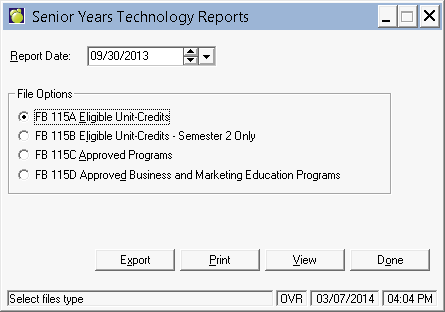
1. To access these reports, choose Reports, Department Data Transfers, Senior Years Technology Education Report. You will see this box:
2. Select one of the File Options.
3. Set the Report Date if defaulted date does not correspond to the reporting date specified by Manitoba Education. Where the reporting date falls on a weekend or holiday, the reporting date becomes the last day of school prior to the weekend or holiday.
4. Click Export to save the file.
5. Click View to see the resulting report.
6. Unfortunately, the design of the FB115 spreadsheet does not allow data to be imported into the worksheets. Use the information provided by Maplewood to populate the FB115 forms (www.edu.gov.mb.ca/ks4/finance/forms/public/fb115_series.xls). The reports include worksheets showing examples filled in for each of the reports. Please read the following notes below:
Notes:
The alpha course codes used by the school are included in Maplewood's reports to assist schools in checking the results (e.g. '1270 KEY25S - Keyboarding' will appear in the Maplewood report). The alpha course codes (e.g. KEY25S) should not be included in the official report (e.g. just include 1270 for the course number and Keyboarding for the title).
FB115A and FB115B will sort the courses by the class category. On the official report, the class categories corresponding to the cluster groupings, and Industrial Arts and Home Economics are not considered clusters, but Maplewood will report them with a cluster grouping. On the official report, these courses do not have a cluster title and are simply listed after the clusters in Appendix A. See the 115A Example for clarification.
Note: These reports consider eligible (supportable) students only. Non-supportable students are excluded. If a student's enrolment type is one of the following, the student will not be counted in the report:
| 210 | Non-Supportable - Inbound Foreign Exchange Pupil |
| 300 | Non-Supportable - Not in Attendance/Expected by November 30th |
| 310 | Non-Supportable - Canada Supported Pupil |
| 320 | Non-Supportable - Education Paid From Other Sources |
| 340 | Non-Supportable - First Nations Pupil |
| 390 | Non-Supportable - Temporary Resident |
______________________________________________________________________________
FB 115A - Senior Years Technology Education - Eligible Unit-Credits
Reporting Date: September 30th
Due Date: October 15th
Click the thumbnail below to see Example FB 115A:
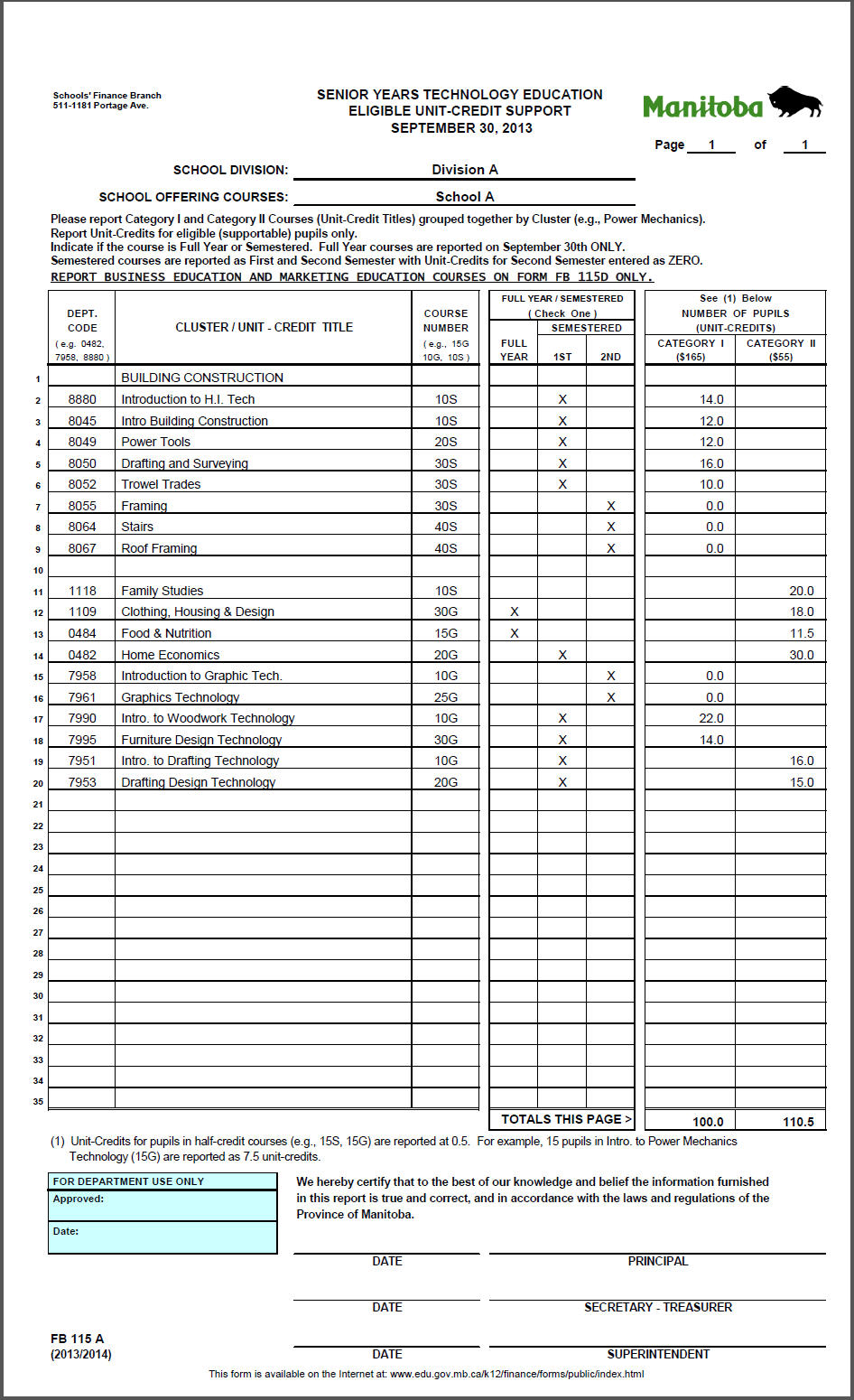
This is a report of Category I and Category II courses (unit-credit titles) grouped together by cluster for each school offering senior years technology education courses. A cluster is an approved series of courses consisting of a minimum of eight to a maximum of fourteen technology education courses. Full year courses are reported on September 30th only (FB115A). Semester 2 eligible unit-credits are reported on form FB115B, however they are also included on FB115A with zero unit-credits.
This report includes courses with course categories setup with the following MET#s:
| 004 | Cluster group titles that are category I (e.g. Agriculture) |
| 005 | Cluster group titles that are category II (e.g. Building Custodial Services) |
| 006 | Industrial Arts - Category I |
| 007 | Industrial Arts - Category II |
| 008 | Home Economics (Category II) |
The FB115A report includes this information:
Department Code (first 4 characters of the course number in the Courses table (File, School Setup, Courses))
Cluster Title (automatically populated based on the course category title)
Course Name (course code and title as entered in the Courses table)
Course Number (last 3 characters of the course number in the Courses table)
Semester (1 or 2 or B if full year (information is based on schedule assigned to the class (File, School Setup, Classes))
Category 1 Unit-Credits (number of credits for eligible students enrolled in courses with category I) *
Category 2 Unit-Credits (number of credits for eligible students enrolled in courses with category II) *
*The unit-credits are the number of students enrolled in the class multiplied by the credit value of the class. Students enrolled in full credit courses are counted as 1.0. Students enrolled in half-credit courses are counted as 0.5. The credit value is recorded in the Classes table (File, School Setup, Classes). Students enrolled in semester 2 courses are counted as 0.0 credits.
FB 115B - Senior Years Technology Education - Eligible Unit-Credits (Second Semester)
Reporting Date: February 28th
Due Date: March 15th
Click the thumbnail below to see Example FB 115B:
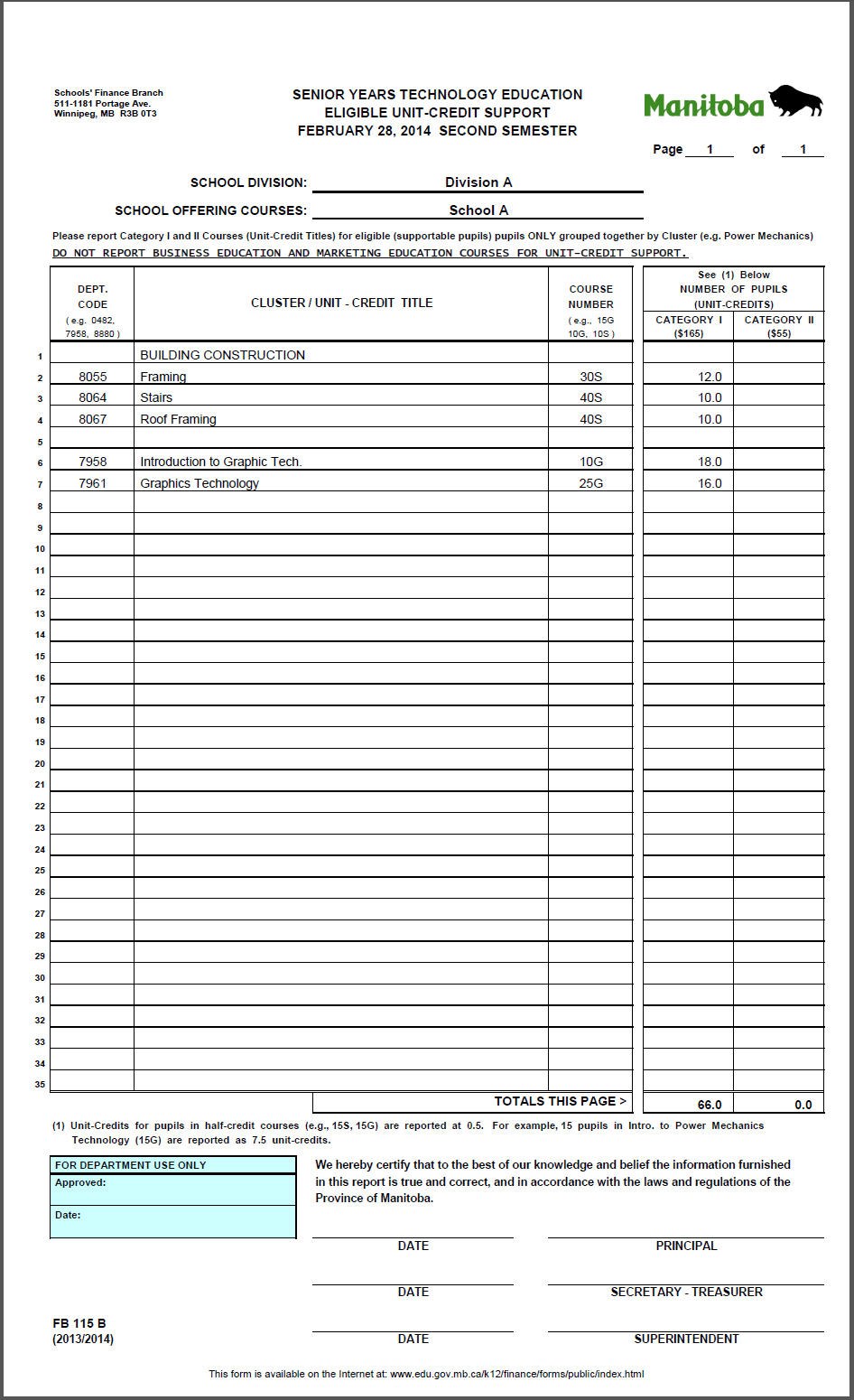
This is a report of Category I and Category II courses (unit-credit titles) grouped together by cluster for each school offering senior years technology education courses in semester 2.
This report includes courses with course categories setup with the following MET#s:
| 004 | Cluster group titles that are category I (e.g. Agriculture) |
| 005 | Cluster group titles that are category II (e.g. Building Custodial Services) |
| 006 | Industrial Arts - Category I |
| 007 | Industrial Arts - Category II |
| 008 | Home Economics (Category II) |
The FB115B report includes this information:
Department Code (first 4 characters of the course number in the Courses table (File, School Setup, Courses))
Cluster Title (automatically populated based on the course category title)
Course Name (course code and title as entered in the Courses table)
Course Number (last 3 characters of the course number in the Courses table)
Category 1 Unit-Credits (number of credits for eligible students enrolled in courses with category I)*
Category 2 Unit-Credits (number of credits for eligible students enrolled in courses with category 2)*
* The unit-credits are the number of students enrolled in the class multiplied by the credit value of the class. Students enrolled in full credit courses are counted as 1.0. Students enrolled in half-credit courses are counted as 0.5. The credit value is recorded in the Classes table (File, School Setup, Classes).
FB 115C - Senior Years Technology Education - Approved Programs
Reporting Date: September 30th
Due Date: October 15th
Click the thumbnail below to see Example FB 115C:
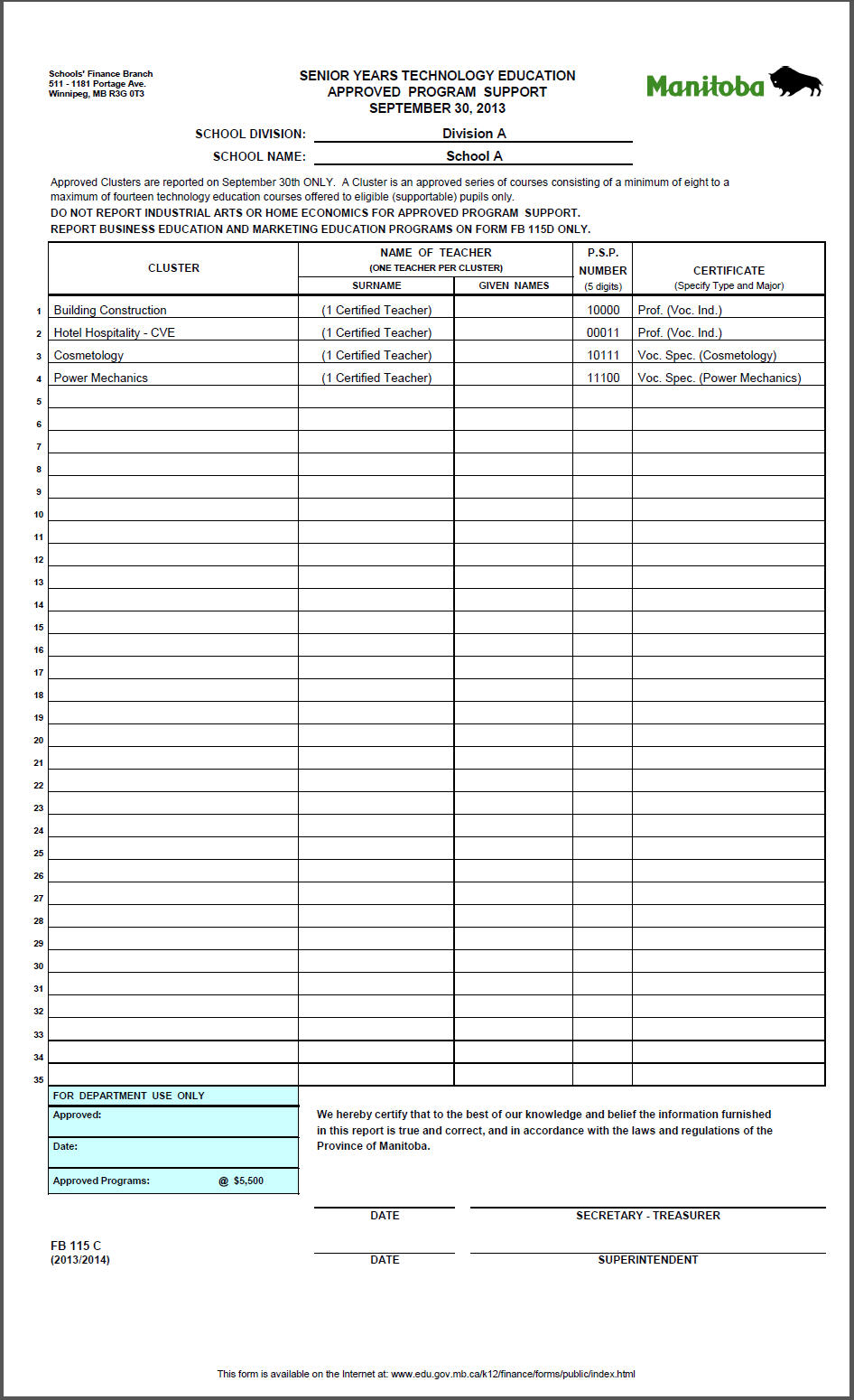
This is a report of approved senior years technology education clusters offered by the school on September 30th for eligible supportable pupils only. In addition to identifying the cluster, the report includes information with respect to the teacher(s) responsible for the programming.
This report includes courses with course categories setup with the following MET#s:
| 004 | Cluster group titles that are category I (e.g. Agriculture) |
| 005 | Cluster group titles that are category II (e.g. Building Custodial Services) |
The following information is included in the report:
Cluster Title (automatically populated based on the course)
Name of the Teacher (since only one teacher is reported per cluster, Maplewood will report the first teacher of the first class found in that cluster)
PSP Number of the Teacher (staff record, Personal, Name, PSP#)
Certificate (Type and Major) as required by the program (staff record, Certifications Tab, Certificate*)
* The teacher's certificate field uses a user-defined table definable from the Central Office or the school (Staff, Custom Fields/Tables, Certification, Certificate).
FB 115D - Approved Business Education and Marketing Education Programs
Reporting Date: September 30th
Due Date: October 15th
Click the thumbnail below to see Example FB 115D:
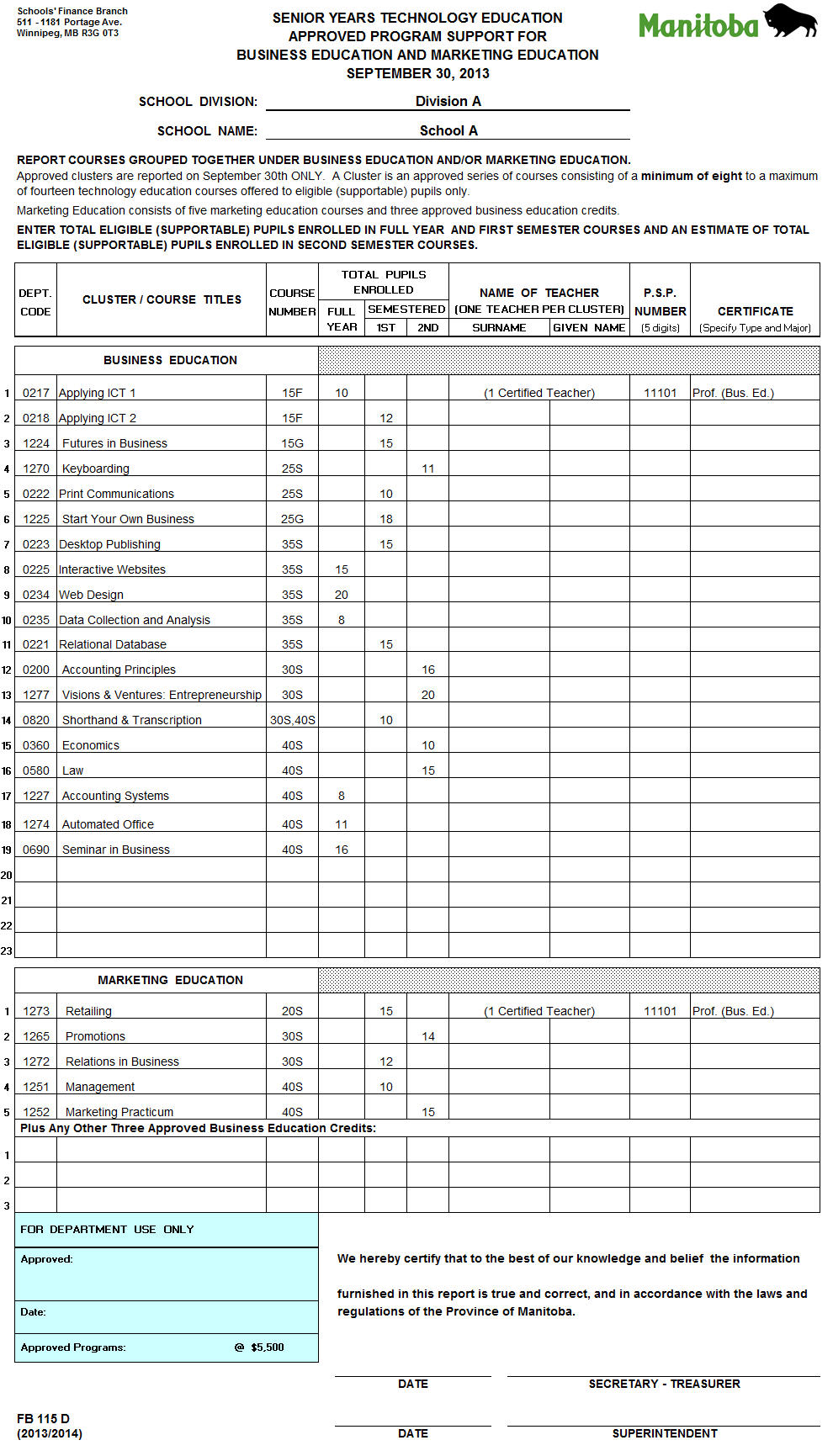
This is a report of the total number of supportable pupils enrolled in Business Education or Marketing Education courses listed on the FB 115B form. It reports full year, first semester and estimated second semester enrolment on September 30th only.
This report includes courses with course categories setup with the following MET#s:
| 009 | Business Education |
| 010 | Marketing Education |
| 011 | Other Approved Business |
The report also include information with respect to the teacher(s) responsible for the programming. The following information is included in the report:
Department Code (first 4 characters of the course number in the Courses table (File, School Setup, Courses))
Course Title (as entered in the Courses table)
Course Number (last 3 characters of the course number in the Courses table)
Total Eligible Pupils Enrolled (broken down by full year, semester 1, semester 2)
Name of the Teacher (since only one teacher is reported per cluster, Maplewood will report the teacher of the first class found in that cluster)
PSP Number of the Teacher (staff record, Personal, Name, PSP#)
Certificate (Type and Major) as required by the program (staff record, Certifications Tab, Certificate*)
* The teacher's certificate field uses a user-defined table definable from the Central Office or the school (Staff, Custom Fields/Tables, Certification, Certificate).