Nova Scotia - Data Collection For The Provincial Student Module (PSM)
Data is collected by the Department of Education four times a year, October, November, February and June. Each of the exports creates 9 data files, along with a 10th file for Graduation Eligibility for high schools in February and June only. These data files are imported into the Provincial Student Module and are used to create statistics for the entire province.
The PSM files are generated by Maplewood based on the information maintained in the students’ records. Before creating these files for the first time, refer to the “Where Found in Maplewood” column in the charts to ensure that the data has been recorded properly.
Only students who who attended the school sometime during the current school year should be included in the files. Students who NEVER showed up for classes at the beginning of the year should be deleted and moved to the Past Student records prior to creating these files. If, however, a student was registered in October and subsequently left in November, the files still include all the required information for that student, even though they are not active at the time of exports later in the year.
At the start of each new school year, please make sure that you have updated the students grades and programs (e.g. elementary, Junior High, Senior High, etc on the Enrolment tab) for the current year. When these fields are changed (either one student at a time, or in bulk using Assign All of a Field), the date of these changes are recorded. If the changes are dated during the school year, it will result in multiple Program IDs for the student, so please make sure you have accurate dates. For example, if a student changes grades on October 15th, the student is considered to have been enrolled in two different Program IDs. If a student changes grades on August 15th, it is considered as only 1 Program ID for the new school year. The Academic Year, School Code, Program Code, and Grade make up the Program ID for the student in the PSM files.
To create the files:
1. Select Reports, NS Provincial Student Module Exports to see a screen like this:
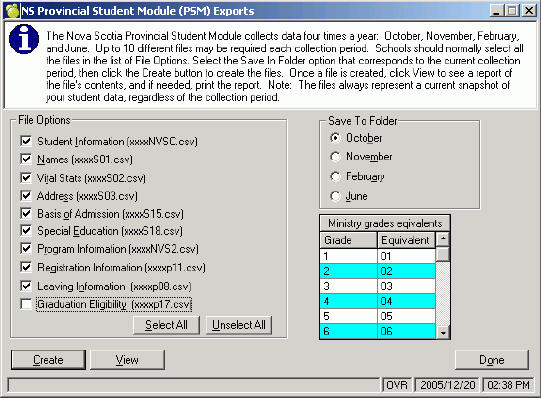
Note: Graduation Eligibility file only exists for high schools and is only required during the February and June exports.
2. Select the Save To Folder option that corresponds to the current collection period to determine where the files are saved. The contents of the files always represent a current snapshot of the data, as expected by the province. This means that if it is December and you select the October folder, the data is as of December, but it is stored in the folder for October. The folders are stored with the school’s data in the Export folder (e.g. admin\export\psm_oct).
3. Check the PSM grade equivalents to ensure that the grade in Maplewood and the equivalent PSM grade agree (e.g. grade P in Maplewood is equivalent to PR in the PSM files). If changes are needed, click the equivalent grade and choose from the drop-down list of valid PSM grades.
4. With all the defaulted file options checked, click the Create button. Note: High schools do not require a Graduation Eligibility file in October and November.
5. If a warning message appears, click Yes to view the log file showing potential student data problems such as missing postal codes. If corrections are necessary, change the data in the students’ records, then return to step 1. Note: the log file can be found in admin\logs\nsexport.log.
6. Click View to see/print the contents of any one of the generated files. The View button presents the contents of the file in a different format than if you were to open the file in Notepad.
7. Import the files into the PSM system as instructed by the Department of Education. The files are in the export\psm_mmm folder (mmm corresponds to the month).
Please refer to the chart belows for detailed information.
1. Student Information (xxxxNVSC.csv) - where xxxx is the four digit school code
-
The unique N.S. Student ID should not change as the student moves from grade to grade or school to school. If a student leaves the school and comes back, the student will use the same number.
-
If names run more then 25 characters then truncate the name.
-
Only one record per student, and this record will reflect the most current grade, program or school.
|
Field Name
|
Type
|
Length
|
Department Notes
|
Where Found In Maplewood
|
|
Student ID
|
Num
|
10
|
This is a unique 10 digit number which is generated by the Student ID Registry
|
Student Records, Enrolment tab, Edit button, MIN#.
|
|
Health Number
|
Num
|
10
|
not being collected use “”
|
|
|
Timestamp
|
Num
|
18
|
not being collected use “”
|
|
|
Surname Alpha
|
Alpha
|
25
|
legal surname of the student
|
Student Records, Biographics tab, Name button, Surname (or Legal Surname if it exists).
|
|
Given Name(s)
|
Alpha
|
25
|
legal first and Middle name of the student
|
Student Records, Biographics tab, Name button, Given Name and Middle Name(s).
|
|
Last Enrolment Year
|
Alpha
|
5
|
YY/YY the academic year starting in September 2001 and ending in June 2002 would be written as 01/02
|
Based on the school's calendar (e.g. 05/06 is sent for the 2005/2006 school calendar)
|
|
Board Code
|
Num
|
3
|
3 digit code as defined in the Student Data Dictionary
|
File, School Setup, School Information, Board Info. tab, Board Number.
|
|
School Code
|
Num
|
4
|
4 digit code as defined in the Student Data Dictionary
|
File, School Setup, School Information, School Info. tab, School Number.
|
|
Grade/Level
|
Alpha
|
3
|
3 digit code as defined in the Student Data Dictionary using the format NNX, or AAX where X is a space and N is a numeric code and A is an Alpha code.
|
Student Records, Biographics tab, Edit button, Grade (This Year). Note: When creating the PSM files, each Maplewood grade is given an equivalent PSM grade (e.g. grade P in Maplewood = PR in the file)
|
2. Names (xxxxS01.csv)
|
Field Name
|
Type
|
Length
|
Department Notes
|
Where Found In Maplewood
|
|
Student ID
|
Num
|
10
|
this is a unique 10 digit number
|
Student Records, Enrolment tab, Edit button, MIN#.
|
|
Timestamp
|
Num
|
18
|
not being collected use “”
|
|
|
Date of Name Change
|
Date
|
10
|
not being collected use “”
|
|
|
Surname
|
Alpha
|
25
|
legal surname of the student
|
Student Records, Biographics tab, Name button, Surname (or Legal Surname if it exists).
|
|
Given Name(s)
|
Alpha
|
25
|
legal first and middle name of student
|
Student Records, Biographics tab, Name button, Given Name and Middle Name(s).
|
|
Name Code
|
Alpha
|
1
|
as we are collecting legal name only, vendors can default this to L
|
"L" will always appear.
|
3. Vital Stats (xxxxS02.csv)
|
Field Name
|
Type
|
Length
|
Department Notes
|
Where Found In Maplewood
|
|
Student ID
|
Num
|
10
|
this is a unique 10 digit number
|
Student Records, Enrolment tab, Edit button, MIN#.
|
|
Timestamp
|
Num
|
18
|
not being collected use “”
|
|
|
Date of Birth
|
Date
|
10
|
date of birth for the student use the format CCYY/MM/DD for example a date of birth of June 26, 1998 would be written as 1998/06/26
|
Student Records, Biographics tab, Edit button, Date of Birth.
|
|
Gender
|
Alpha
|
1
|
either M or F
|
Student Records, Biographics tab, Edit button, Gender.
|
|
Marital Status
|
Alpha
|
1
|
not being collected use “”
|
|
|
Birth Date Verification
|
Alpha
|
4
|
a 4 digit code, as defined in the Student Data Dictionary, that will verify a students age. Only needed for primary students.
|
Student Records, Enrolment tab, Edit button, Birthdate Verification. This is based on a user-defined table accessible via Students, Custom Fields/Tables, Enrolment Tables, Birthdate Verification. The codes should correspond to:
Birt = Birth Certificates
Immi = Immigration Papers
None = No verification
Pass = Passport
|
|
Prov/country of Birth
|
Alpha
|
2
|
not being collected use “”
|
|
|
Default Key
|
Alpha
|
1
|
an upper case X is stored in this field
|
"X" will always appear.
|
4. Address (xxxxS03.csv)
|
Field Name
|
Type
|
Length
|
Department Notes
|
Where Found In Maplewood
|
|
Student ID
|
Num
|
10
|
this is a unique 10 digit number
|
Student Records, Enrolment tab, Edit button, MIN#.
|
|
Timestamp
|
Num
|
18
|
not being collected use “”
|
|
|
Address Expiry
|
Date
|
10
|
not being collected use “”
|
|
|
Postal Code
|
Alpha
|
7
|
postal code for the civic address not mailing address use the format ANA NAN
|
Student Records, Family tab, Edit button, Postal Code.
|
|
GeoCode Long
|
Alpha
|
11
|
not being collected use “”
|
|
|
GeoCode Lat
|
Alpha
|
11
|
not being collected use “”
|
|
5. Basis of Admission (xxxxS15.csv)
|
Field Name
|
Type
|
Length
|
Department Notes
|
Where Found In Maplewood
|
|
Student ID
|
Num
|
10
|
this is a unique 10 digit number
|
Student Records, Enrolment tab, Edit button, MIN#.
|
|
Timestamp
|
Num
|
18
|
not being collected use “”
|
|
|
Basis Of Admission
|
Alpha
|
4
|
not being collected use “”
|
|
|
Admission Date
|
Date
|
10
|
the date a student was first admitted to the NS school system. Use the format CCYY/MM/DD
|
Student Records, Enrolment tab, Edit button, Entry Date To This School. This date is included for all students in grade PR. For students in other grades, this date is only included when the date is during this school year and the student's origin type indicates he is from outside NS.
|
|
Transfer Origin
|
|
|
not being collected use “”
|
|
|
Transferred Credits
|
|
|
not being collected use “”
|
|
6. Special Education Class (xxxxS18.csv)
|
Field Name
|
Type
|
Length
|
Department Notes
|
Where Found In Maplewood
|
|
Student ID
|
Num
|
10
|
this is a unique 10 digit number
|
Student Records, Enrolment tab, Edit button, MIN#.
|
|
Timestamp
|
Num
|
18
|
not being collected use “”
|
|
|
Special Ed Class
|
Alpha
|
1
|
Y
|
Student Records, Enrolment tab, Edit button, Special Ed. If the Special Ed. box is checked, "Y" will appear.
|
7. Program Information (xxxxNVS2.csv)
- The Academic Year, School Code, Program Code and Grade make up the Program ID. For example a student in the academic year 2001/2002 and school 0707 grade 12 taking the English program would have a program ID of “01/020707S00512 ” in the PSM. This program Id will be included in all the program related files ( P11, P08, P17).
- There can be multiple NVS2 records for a student in any given year. If any one of the key pieces of data in the program ID change then a new NVS2 file will be created. For example, a new academic year, or the student changes grades within the current academic year, or changes programs.
- In Maplewood, program and grade changes made during the school year are automatically recorded and may be viewed/edited using the Int. Transfers button on the Enrolment tab of the student's record. When internal transfers exist, multiple records for the student will appear in the file.
|
Field Name
|
Type
|
Length
|
Department Notes
|
Where Found In Maplewood
|
|
Student ID
|
Num
|
10
|
this is a unique 10 digit number
|
Student Records, Enrolment tab, Edit button, MIN#.
|
|
Timestamp
|
Num
|
18
|
not being collected use “”
|
|
|
Academic Year
|
Alpha
|
5
|
the current academic year use the format YY/YY, the academic year starting in September 2001and ending in June 2002 would be written as 01/02
|
Based on the school's calendar (e.g. 05/06 is sent for the 2005/2006 school calendar)
|
|
Board Code
|
Num
|
3
|
3 digit code as defined in the Student Data Dictionary
|
File, School Setup, School Information, Board Info. tab, Board Number.
|
|
School Code
|
Num
|
4
|
4 digit code as defined in the Student Data Dictionary
|
File, School Setup, School Information, School Info. tab, School Number.
|
|
Program Code
|
Alpha-Nume
|
4
|
denotes the program of study for the student, a student can have more than one program code in the same school in the same academic year, codes are defined in the Student Data Dictionary
|
Student Records, Enrolment tab, Edit button, Program. This is based on a user-defined table accessible via Students, Custom Fields/Tables, Enrolment Tables, Programs. The codes should correspond to:
E005 = Elementary
E010 = Élémentaire
E015 = Elem. Immersion
J005 = Junior High
J010 = Secondaire 1 er cycle
J015 = Junior High Immersion
S005 = Senior High
S010 = Secondaire 2e cycle
S015 = Senior High Immersion
S025 = One Year Business Program
S060 = Vocational (Memorial High only)
S061 = Vocation One Year Program)
When a student changes programs, the date of the change along with the previous program is recorded and may be viewed/edited using the Int. Transfers button on the Enrolment tab of the student's record.
|
|
Grade Level
|
Alpha
|
3
|
3 digit code as defined in the Student Data Dictionary using the format NNX, or AAX where X is a space and N is a numeric cod and A is an Alpha code.
|
Student Records, Biographics tab, Edit, Grade (this year).
When creating the file, each Maplewood grades is assigned an equivalent PSM grade (e.g. Grade P in Maplewood = PR in the PSM file).
When a student changes grades, the date of the change along with the previous grade is recorded and may be viewed/edited using the Int. Transfers button on the Enrolment tab of the student's record.
|
8. Registration Information (xxxxp11.csv)
- Sept 30th Attendance, Homeroom, and Registration Date are required fields and export should fail if this data is missing.
- If the student is in attendance on the last teaching day of September, then the field September 30th Attendance is populated with a Y, if the student was not there, for any reason the field will contain an N.
- September and October attendance are required only if the value in the September 30th Attendance field is a N. If the attendance is derived from the attendance module automatically then send September and October attendance regardless of the value in the September 30th Attendance field. If not, allow for data entry in these fields.
- Excused Absence is a required field if the value in the September 30th Attendance field is N and if the attendance in either September or October is zero.
|
Field Name
|
Type
|
Length
|
Department Notes
|
Where Found In Maplewood
|
|
Student ID
|
Num
|
10
|
this is a unique 10 digit number
|
Student Records, Enrolment tab, Edit button, MIN#.
|
|
Program ID
|
Alpha-Nume
|
16
|
made up of the academic year/school code/program code/grade level (example “01/020707S00512 ”)
|
See description in Program ID (xxxNVS2.csv) file.
|
|
Timestamp
|
Num
|
18
|
not being collected use “”
|
|
|
Registration Status
|
|
|
not being collected use “”
|
|
|
Sept 30th Attendance
|
Alpha
|
1
|
Y or N
|
Student Records, Attendance tab, Edit (Edit Register if high school). Y will appear if the student was present for any portion of the day on the last school day in September. Note: if N appears here, and September and October Attendance are zero, a reason must appear in the Excused Absence field.
|
|
Sponsor
|
|
|
not being collected use “”
|
|
|
Sponsorship Amount
|
|
|
not being collected use “”
|
|
|
Sponsorship Percentage
|
|
|
not being collected use “”
|
|
|
Registration Date
|
Date
|
10
|
first day of required attendance for the current school year
|
Student's first day attending school this year. If a student's entry date to this school is prior to the first day of school (e.g. entry date is from years ago), then the first normal school day in the school's calendar is sent (File, School Setup, Calendar), otherwise the entry date to this school is used.
If the student has multiple Program IDs, the date of the program/grade transfers is used (Student Records, Enrolment tab, Int. Transfer button).
|
|
October Attendance
|
Alpha-Nume
|
4
|
number of days present in the month of Oct., use format nn.n
|
Student Records, Attendance tab, Edit. Number of days present during the month of October.
|
|
Excused Absence
|
Alpha
|
4
|
see the Student Data Dictionary for an explanation of how this field is to be used and for valid codes
|
If a student is not present on last day in Sept, and Sept attendance is 00.0), but student is expected back, this field represents the reason he's not been to school yet. First, the school must have an attendance code (Attendance, Attendance Codes) that has the ministry definition of Grant Day. The first 4 characters of the attendance code's title must represent the reason (e.g. MediCertif is the title, Z or any other unused letter is the code), Report Card = absent; register = Grant Day.) If the Sept 30th field is N, and the September Attendance field is zero, then the definition of the attendance code on Sept 30th (or last day in Sept) is considered. If the code is Grant then this Excused Absence field will contain the first 4 letters of the reason. If the first 4 letters do not match Fami, Inca, Medi, Spec, Susp, Othe, then provide a warning.
Fami = Family
Inca = Incarceration
Medi = Medical Certificate
Spec = Special Placement
Susp = Suspended for a period longer than five days
Othe = If the excuse does not fall into any of the above reason codes, use this code with the permission of the Regional Education Officer.
|
|
September Attendance
|
Alpha-Nume
|
4
|
number of days present in the month of Sept. use format nn.n
|
Student Records, Attendance tab, Edit. Number of days present during the month of September.
|
|
Homeroom
|
Alpha-Nume
|
6
|
this is reported for the September Statistic report only and it is as of Sept 30th. If the grade changes then the new homeroom will be reported on the second p11 file. If the home room is less than 6 characters then left justify.
|
Student Records, Biographics tab, Edit button, Homeroom (This Year).
When a student changes homerooms, the date of the change along with the previous homeroom is recorded and may be viewed/edited using the Int. Transfers button on the Enrolment tab of the student's record.
|
9. Leaving Information (xxxxp08.csv)
-
At the end of the school year (June file), all students have a Leaving Date. If a student is not leaving, the last school day in the calendar is automatically included.
-
In the file, the Leaving Date, Leaving Code and Planned Destination must be populated for any student who leaves the school or changes programs or grades. Maplewood automatically populates these fields.
-
At the end of the year all students must have a Leaving Date in the file. If a student is returning to this school next year, the Leaving date is the last regular school day in the calendar. If the student is in the highest grade in the school (typically grade 6 in an elementary school, grade 7 in a junior high school or grade 12 in a senior high school), the student must have a Leaving Date, Leaving Code and Planned Destination. For student moving onto a new school (elementary grade 6 into a junior high grade 7) the Leaving Date is the last day of school, the Leaving Code is Tran and the Planned Destination is "Scho". For grade 12 students, if they are graduating, then the Leaving Date is the date of graduation, the Leaving Code is "Grad" and the Planned Destination is one selected from the valid code list.
|
Field Name
|
Type
|
Length
|
Department Notes
|
Where Found In Maplewood
|
|
Student ID
|
Num
|
10
|
this is a unique 10 digit number
|
Student Records, Enrolment tab, Edit button, MIN#.
|
|
Program ID
|
Alpha
|
16
|
made up of the academic year/school code/program code/grade/level ( example “01/020707S00512 ”)
|
See description in Program ID (xxxNVS2.csv) file.
|
|
Timestamp
|
Num
|
18
|
not being collected use “”
|
|
|
Credential Received
|
Alpha
|
4
|
not being collected use “”
|
|
|
Planned Destination
|
Alpha
|
4
|
the intended destination for a student if they leave the school, graduate or change programs or grades, valid codes defined in the Student Data Dictionary
|
See chart below. Program ID changes are automatically "Prog". Students who leave this school are based on the reason for leaving (Student Records, Enrolment tab, Edit button, Destination Type).
|
|
Leaving Date
|
Date
|
10
|
the last day of attendance in a school, the date the student graduates or changes programs or grades. At the end of the year every student will have a leaving date.
|
See chart below. Program ID changes are based on the date of the change (Student Record, Enrolment tab, Int. Transfer button). Students who leave this school are based on the retirement date (Student Records, Enrolment tab, Edit button, Retirement/Transfer Date).
In the June file, the last school day in the calendar is automatically included for those students who are not leaving.
|
|
Actual Destination
|
Alpha
|
4
|
not being collected use “”
|
|
|
Leaving Code
|
Alpha
|
4
|
denotes the reason the student leaves the school, or changes programs or grades, will also indicate if the student graduated, valid codes defined in the Student Data Dictionary
|
See chart below. Program ID changes are automatically "Chan" for Change. Students who leave this school are based on the reason for leaving (Student Records, Enrolment tab, Edit button, Destination Type).
|
|
Leaving Explanation
|
Alpha
|
4
|
not being collected use “”
|
|
When a student leaves this school, the student's status must be either This Year Only (if they are leaving at the end of the current school year) or Deleted (they have left during the school year). The reason for a student's departure from school is recorded in the student's Destination/Transfer Type. This is based on a user-defined table (found under Students, Custom Fields/Tables, Enrolment Tables, Destination Types) with the following possibilities:
Destination Types:
Note: The Min.# field is a code that the Maplewood program uses to determine the type of leaving code and planned destination. There are some codes that are used by the PSM for different circumstances. To distinguish between the codes, the Min.# field used is different than the one assigned by PSM, however, the correct code will be automatically used in the file. For example, the code Othe (for Other) is used for planned destination of "Withdrew for Other/Unknown Reasons" and "Transfer to Other Training or Ed. Facility" and "Graduated - Other". Different Min.#s are necessary to enable the Maplewood system so that the appropriate Leaving Codes (Grad, Tran or Othe) can be automatically assigned.
|
Min. # (for reference only)
|
Title
|
|
Appr
|
Graduated - Apprenticeship Training
|
|
Boar
|
Transfer to another NS board
|
|
Coll
|
Graduated - Community College Outside NS
|
|
Comm
|
Graduated - NS Community College
|
|
Corr
|
Transfer to Correspondence Studies
|
|
Dece
|
Deceased
|
|
Home
|
Transfer to Home Schooling
|
|
Inca
|
Transfer to Incarceration Facility
|
|
Left
|
Graduated - University Outside NS
|
|
Medi
|
Withdrew for Medical Reasons
|
|
Othe
|
Withdrew for Other/Unknown Reasons
|
|
OthG (will automatically convert to Othe in the file)
|
Graduated - Other
|
|
OthT (will automatically convert to Othe in the file)
|
Transfer to Other Training or Ed. Facility
|
|
Priv
|
Transfer to NS private School
|
|
Scho
|
Transfer to another school (this board)
|
|
Univ
|
Graduated - NS University
|
|
Unkn
|
Graduated - Unknown Destination
|
|
With
|
Withdrew from School
|
|
Work
|
Graduated - Join Work Force
|
Here are some guidelines to follow when students leave your school.
1. Students who graduate this year and are not returning to this school next year:
-
Student's enrolment status must be either This Year Only or Deleted.
-
Student's Retirement/Transfer date must be entered (e.g. last day of school this year).
-
Student's planned destination must be selected from the list of destination types. The destination type must begin with "Graduated".
-
Student's diploma must be entered and dated for this school year.
Here are the results that will appear in the PSM file for these students:
|
Planned Destination
|
Leaving Code
|
|
Appr
|
Grad
|
|
Coll
|
Grad
|
|
Comm
|
Grad
|
|
Left
|
Grad
|
|
Univ
|
Grad
|
|
Work
|
Grad
|
|
Othe
|
Grad
|
2. Students who graduate this year but are planning to return for extra credits/improved marks:
Here are the results that will appear in the PSM file for these students:
|
Planned Destination
|
Leaving Code
|
|
Scho
|
Grad
|
3. Those who graduated last school year (or earlier), then returned to school this year and are now finished (leaving) (they have a diploma from last year):
-
Student's enrolment status must be either This Year Only or Deleted.
-
Student's Retirement/Transfer date must be entered (e.g. last day of school this year).
-
Student's planned destination must be selected from the list of destination types. The destination type must begin with "Graduated".
-
Student's diploma must be entered and dated for last school year.
Here are the results that will appear in the PSM file for these students:
|
Planned Destination
|
Leaving Code
|
|
Appr
|
Comp
|
|
Coll
|
Comp
|
|
Comm
|
Comp
|
|
Left
|
Comp
|
|
Univ
|
Comp
|
|
Work
|
Comp
|
|
Othe
|
Comp
|
4. Students who leave the Nova Scotia school system:
-
Student's enrolment status must be either This Year Only or Deleted.
-
Student's Retirement/Transfer date must be entered.
-
Student's reason for leaving must be selected from the list of destination types. The destination type must NOT begin with "Graduated"
-
Note: the planned destination will appear blank in the PSM file.
|
Planned Destination
|
Leaving Code
|
|
|
Medi (medical)
|
|
|
Dece (deceased)
|
|
|
Othe (other/unknown)
|
|
|
With (withdrew from school)
|
5. Students who transfer to another school (not post secondary):
-
Student's enrolment status must be either This Year Only or Deleted.
-
Student's Retirement/Transfer date must be entered.
-
Student's reason for leaving must be selected from the list of destination types. The destination type must NOT begin with "Graduated"
|
Planned Destination
|
Leaving Code
|
|
Boar
|
Tran
|
|
Corr
|
Tran
|
|
Home
|
Tran
|
|
Inca
|
Tran
|
|
Othe
|
Tran
|
|
Priv
|
Tran
|
|
Prov
|
Tran
|
|
Scho
|
Tran
|
6. Students who change programs or grades:
|
Planned Destination
|
Leaving Code
|
|
Prog (if changing programs)
|
Chan
|
|
Grde (if changing grades)
|
Chan
|
7. Students in the highest grade of the school but are retained rather than transferring to another school (including gr. 12’s who did not graduate and therefore have no diploma granted):
-
This is automatically populated based on the student's grade being the same as the highest grade in the school (as per Students, Custom Fields/Tables, Table of Grades).
-
If the highest grade in the school is 12, only those without a diploma are considered.
-
Note: the planned destination will appear blank in the PSM file.
|
Planned Destination
|
Leaving Code
|
|
|
NA
|
10. Graduation Eligibility (xxxxp17.csv)
- This file is only included with the February and June submissions (high schools only).
- Grad Eligibility is a required field for all grade 12 students and PSM will fail if this data is missing.
- As per recommendation by the Ministry, this setting is not automatically determined by the software. A conscientious decision on each student's graduation eligibility is expected to be made by school administrators. Maplewood is looking for G in the 4th defined character to indicate a student's Graduation Eligibility.
|
Field Name
|
Type
|
Length
|
Department Notes
|
Where Found In Maplewood
|
|
Student ID
|
Num
|
10
|
this is a unique 10 digit number
|
Student Records, Enrolment tab, Edit button, MIN#.
|
|
Program ID
|
Alpha
|
16
|
made up of the academic year/school code/program code/grade/level (example “01/020707S00512 ”)
|
See description in Program ID (xxxNVS2.csv) file.
|
|
Timestamp
|
Num
|
18
|
not being collected use “”
|
|
|
Grad Eligibility
|
Alpha
|
1
|
Y or N, required field for all grade 12's in a school
|
Student Records, Biographics tab, Edit button, Defined Character (the 4th one). If a student is in grade 12, and the 4th defined character has G then Y for Yes will appear in the file, otherwise N for No will appear.
|