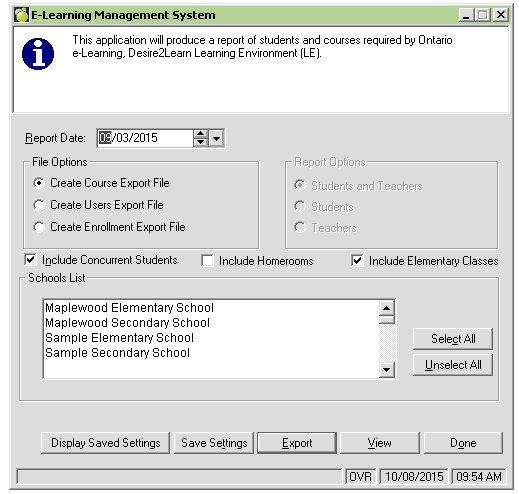
Maplewood has created a program to allow users the ability to export data from our software for use in Desire to Learn2Learn (D2L). This option is available under the Reports menu within Central Office.
Below are the 3 export files that are created and the file specifications for each. Please note all files are in XML format.
When creating these files in Maplewood, the files will be saved to the export folder area within the Central Office folder (i.e. F:\BoardName\Central\Export\LMS). This export folder will contain a folder for each export type. When exporting the data, Maplewood creates 2 files; the export file, and the '.alldone' file. File naming convention samples below:
Both of these file types (.xml and .alldone) must be uploaded to the D2L site for each export type (Courses, Users and Enrollment).
Automation of the file creation and upload to the D2L SFTP site can be set up. If you are looking to implement the automation process please contact the Maplewood Tech Team for further assistance.
Additional interface options you should know about:
Report Date: This date will be used to determine which students to include in the User and Enrollment files. Students who have a start date after the report date will be excluded. For boards using the automated file creation option, the program will use the system date of the computer that the automation process is being run on.
Include Concurrent Students: This option allows the user the ability to include/exclude concurrent students, based on the file export selected. Typically schools/boards should EXCLUDE concurrent students from the User Export, and INCLUDE concurrent students in the Enrollment Export.
Include Homerooms:
This option
should be selected for Elementary Schools that do not assign all subjects to
their students (i.e. only rotary classes are assigned to students). This allows
the homeroom teacher to be included in the export. The program will look at the
Rooms/Homerooms file, and include all rooms that have the homeroom set to Yes.
Note: If this option is selected, and multiple schools are included in the
export, only elementary schools will use this feature. Secondary schools will
only include items from the classes file.
For Combined Schools: Homeroom checkbox - program will include only elementary homerooms if this option is selected. The determination will be based on the Homeroom designation. If the designation starts with 6, 7 or 8 then the homeroom will be included in the Courses Export File. For the Enrollment Export File - if a student has a 'This Year' grade of grade 8 or less, and has a homeroom with a designation of 6,7 or 8 then the student will be included in the enrolment for that homeroom.
Include Elementary Classes: This option allows the user to exclude elementary classes in the export file (if unchecked). The default setting for this option has been set to checked.
Schools List: The Schools List contains all ACTIVE schools within the board/division. Users can multi-select a few, select just one, or select all schools that appear in this list.
Display Saved Settings: This button, when selected will display the settings (listed above) that are being used to create the file. These settings are used to during the creation of the manual files and the AUTOMATED FILE CREATION PROCESS.
Save Settings: This button, NEEDS to be selected if making any changes on the interface for EACH FILE OPTION. If the user does not select this button, then the selected changes will NOT be saved. Once selected it is recommended to choose the 'Display Saved Settings' option to ensure that the changes have been saved. Please review all 3 file settings when reviewing these changes.
File Specifications
Below are the file specifications for each export file, and where in Maplewood this information is pulled from.
Courses Export
| Field Name | Description | Maplewood |
| <enterprise> | No data required, as it is just a tag | No data required, as it is just a tag |
| <group> | No data required, as it is just a tag | No data required, as it is just a tag |
| <sourcedid> | No data required, as it is just a tag | No data required, as it is just a tag |
| <id> | This value becomes the course’s Org
Unit Code (the Course Code) within the Learning Environment. It needs to
be a unique value, is separated into seven "tokens" delimited by
underscoresand appears in the following format {Prefix}_{SEM}__{DEPT}_{CourseCode}-{BSID}_{Section#}_ELO
1st token: Prefix This value provides differentiation of Course Types. Currently there are 3 specific Course Types:
2nd token: SEM The {SEM} value must match a Semester code which already exists with the LE. See Appendix B for a list of approved Semester codes. 3rd token: NULL This Token is not being used with the ELO implementation. Please leave it empty. NOTE: The usage of two simultaneous underscores represents a NULL (empty) token. Please ensure that you use two underscores in a row. 4th token: DEPT The {DEPT} value must match a Department code which already exists within the LE. See table below for a list of approved Department from LMS and how this maps to the Maplewood values. codes. 5 th token: CourseCode-BSIDThis token is a concatenated value containing the CourseCode and the BSID. The CourseCode value is within your SIS (for example, ASM2O). This is typically a 5 or 6 character id. The {BSID} value must match a School code which already exists within the LE. Please ensure that the BSID contains 6 digits (including leading zeros). 6 th token: Section#This value is used to differentiate Sections of the same Course being offered at the same time. For example, if a high school is offering 6 different Sections of Grade 11 Algebra, then the Section# can be used to differentiate the 6 different Course Offerings needed for this CourseId. For Courses which only have one Section it is highly recommended that a value of "01" be used for the Section #. For Courses which have multiple Sections it is highly recommended that a sequence of Section # values be used in order to create one Course Offering per Section. This sequence would be: "01", "02", "03"… 7 th token: "ELO"This value is not used at all by the integration. You can choose to place any data in this field you wish to. The usage of the term "ELO" is merely a suggestion. Note: The combination of tokens 4 and 5 define the Org Unit Code of the Course Template parent for this Course Offering. Max Field Length = 50 Characters |
1ST TOKEN:
EL: is sent if the course type for the class is set to
either of the 2 e-learning options 2ND TOKEN Semester =
need to send abbreviated school year (for 2014-2015 = 1415)+ semester
class is being taught in
4TH TOKEN
5TH TOKEN 6TH TOKEN
7TH TOKEN |
| </sourcedid> | No data required, as it is just a tag | No data required, as it is just a tag |
| <description> | No data required, as it is just a tag | No data required, as it is just a tag |
| <short> | This value becomes the Name of the
Course Offering in the Learning Environment. This value is separated
into four separate areas delimited by a hyphen and appears in the
following format: {CourseCode}-{Section#}-{Course Title}-{Teacher}. Max Field Length = 128 Characters
|
Maplewood will pull this information from both the Classes file (Course Code, section and Teacher) and the Courses File (Course Title) |
| </description> | No data required, as it is just a tag | No data required, as it is just a tag |
| <timeframe> | No data required, as it is just a tag | No data required, as it is just a tag |
| <begin> |
These values determine when a course starts and ends. This affects when courses appear and disappear from a user’s My Courses widget. Traditionally, teachers can see a course before it begins, while students can only see a course between its start and end dates. This is configurable on a role-by-role basis and is left up to each individual board. | Start Date of the Class - this information is pulled from the calendar and is based on the semester/term pattern that has been assigned to the class. |
| <end>
|
These values determine when a course starts and ends. This affects when courses appear and disappear from a user’s My Courses widget. Traditionally, teachers can see a course before it begins, while students can only see a course between its start and end dates. This is configurable on a role-by-role basis and is left up to each individual board. | End Date of the Class - this information is pulled from the calendar and is based on the semester/term pattern that has been assigned to the class. |
| </timeframe> |
No data required, as it is just a tag | No data required, as it is just a tag |
| </group> |
No data required, as it is just a tag | No data required, as it is just a tag |
| </enterprise> |
No data required, as it is just a tag | No data required, as it is just a tag |
DEPARTMENT TABLE
| Secondary Departments-Name | LMS Dept CODES | MW Department Code (Board#) |
| Arts | ARTS | ART |
| Business Studies | BUS | BUS |
| Canadian and World Studies | CWS | CWS |
| Classical and International Languages | CIL | CIL |
| Computer Studies | CS | CS |
| Cooperative Education | COOP | COP |
| e-Learning Orientation | ELO | ELO |
| English | ENG | ENG |
| English As a Second Language and English Literacy Development | ESLELD | ESL |
| French as a Second Language | FSL | FSL |
| Guidance and Career Education | GUI | GUI |
| Health and Physical Education | HPE | HPE |
| Interdisciplinary Studies | IS | IS |
| Mathematics | MAT | MAT |
| Native Languages | NL | NL |
| Native Studies | NS | NS |
| Science | SCI | SCI |
| Social Sciences and Humanities | SSH | SSH |
| Technological Education | TE | TE or TEC |
| Elementary Departments Name | |
| Grade 1 | G1 |
| Grade 2 | G2 |
| Grade 3 | G3 |
| Grade 4 | G4 |
| Grade 5 | G5 |
| Grade 6 | G6 |
| Grade 7 | G7 |
| Grade 8 | G8 |
| Junior Kindergarten | JK |
| Senior Kindergarten | SK |
| Alternative Courses (non-credit) | ANC |
| Other | OTH |
| Semester Codes Semester-Name | Semester CODES |
| 1112 | 1112 |
| 1112Sem1 | 1112Sem1 |
| 1112Sem2 | 1112Sem2 |
| 1213 | 1213 |
| 1213Sem1 | 1213Sem1 |
| 1213Sem2 | 1213Sem2 |
Users Export
| Field Name | Description | Maplewood |
| <enterprise> | No data required, as it is just a tag | No data required, as it is just a tag |
| <person> | No data required, as it is just a tag | No data required, as it is just a tag |
| <sourcedid> | No data required, as it is just a tag | No data required, as it is just a tag |
| <id>
|
This value will become the user’s
OrgDefinedId.
|
Students, Enrolment, OEN Staff, MEN Note: For Staff members with an MEN and a Teach flag of N --- Maplewood will still send the staff member in the file with a Role of Teacher |
| </sourcedid> | No data required, as it is just an end tag | No data required, as it is just an end tag |
| <userid> | This value will become the user’s
Username in the LE. This Username is maintained by your board. It is an
alphanumeric field which should be an existing Username that your
board’s users are already familiar with.
If your board does not have existing Usernames, you can create them based on email addresses, user names and initials, or any other value which meets your Board’s Username requirements.
|
In Maplewood, the program will
look at custom fields for D2L user ID information. This allows the
user to select their own format for the user ID, rather than using the
Maplewood default. Please note that the naming convention of these
fields must match exactly in order to be picked up correctly in the
file. Duplicate user IDs may occur for students/teachers with the same name. When a duplicate is found the program will append with the last 4 digits of the student number (MW student number field) or if the duplicate is a staff, then it will be appended with the last 4 digits of the Staff MEN. The student/teacher will appear on a printout/log that is created at the end of the file creation. This alerts the file creator that the user ID for this member does not follow the standard format. Please ensure the printout/log is reviewed regularly. |
| <userid password="Password"> | This is an optional field that
populates the user’s initial password in the LE. A user’s password
cannot be updated through the Holding Tank process if the user already
exists. For boards using LDAP Integration, this value will not be
required.
|
In Maplewood, the program
will look at custom fields for D2L Password information.
Please note that the naming convention of these fields must match
exactly in order to be picked up correctly in the file. D2L Password field - must be set up as a TEXT FIELD - with the name of D2LPwd This field has been masked in Maplewood for security purposes. Here is how the program will work D2LPwd: If definition does not exist then the program send the user with a default password of the users birthdate (Format: MM/DD/YYYY). MAPLEWOOD NOTE: Maplewood still has concerns regarding the inclusion of this data in the export file. These concerns relate to privacy and potential security threat of exporting this non-encrypted data. |
| <name> | No data required, as it is just a tag | No data required, as it is just a tag |
| <n> | No data required, as it is just a tag | No data required, as it is just a tag |
| <family> | Legal Surname | |
| <given> | Legal Given Name | |
| <partname partnametype="Middle"> | Middle Name | |
| </n> | No data required, as it is just an end tag | No data required, as it is just an end tag |
| </name> | No data required, as it is just an end tag | No data required, as it is just an end tag |
| <email> | Email represents the External email address of the user. This field is not mandatory. | If email address exists within student address info - then send. |
| <extension> | No data required, as it is just a tag | No data required, as it is just a tag |
| <userrole> | This must map to a role which exists in your LE. This will assign the user’s role at the Organization level of the LE. | See 'Role Mapping' table below for mapping requirements from D2L |
| </extension> | No data required, as it is just an end tag | No data required, as it is just an end tag |
| </person> | No data required, as it is just an end tag | No data required, as it is just an end tag |
ROLE MAPPING
| For example: Data Extract (XML) Role | Learning Environment Role |
| _Student | _Student |
| Teacher | Teacher |
| _Elemstudent | _Elemstudent |
Enrollment Export
| Field Name | Description | Maplewood |
| <enterprise> | No data required, as it is just a tag | No data required, as it is just a tag |
| <membership> | No data required, as it is just a tag | No data required, as it is just a tag |
| <sourcedid> | No data required, as it is just a tag | No data required, as it is just a tag |
| <id> | Org Unit Code of the course the user is being enrolled into or un-enrolled from. This needs to match the <sourcedid><id> in the Course Listings XML file. | |
| </sourcedid> | No data required, as it is just an end tag | No data required, as it is just an end tag |
| <member> | No data required, as it is just a tag | No data required, as it is just a tag |
| <sourcedid> | No data required, as it is just a tag | No data required, as it is just a tag |
| <id> | Org Unit Code of the course the user is being enrolled into or un-enrolled from. This needs to match the <sourcedid><id> in the Course Listings XML file. |
Students, Enrolment, OEN Staff, MEN Note: For Staff members with an MEN and a Teach flag of N --- Maplewood will still send the staff member in the file with a Role of Teacher
|
| </sourcedid> | No data required, as it is just an end tag | No data required, as it is just an end tag |
| <role roletype=_xxxx /> | This must map to a role which exists in your LE. This will assign the user’s role at the Organization level of the LE. | where _xxxx =
The SIS Integration requires specific mapping of Role names between the Data Extract (the SIS data) and the Learning Environment. See 'Role Mapping' table for mapping requirements from D2L
|
| <Status> | This is used to add or drop a user from the course. It’s either 1 (enroll) or 0 (unenroll). | Enrolled students are sent as 1 Students who have dropped the class are sent as 0 |
| </Role> | No data required, as it is just an end tag | No data required, as it is just an end tag |
| </member> | No data required, as it is just an end tag | No data required, as it is just an end tag |
| </membership> | No data required, as it is just an end tag | No data required, as it is just an end tag |
| </enterprise> | No data required, as it is just an end tag | No data required, as it is just an end tag |