1. What is a Dual Credit
Dual credits allow students to participate in apprenticeship training and college courses. These credits can count towards their high school diploma as well as a postsecondary certificate, diploma, degree or apprenticeship certification. For example, students can take a course about entrepreneurship taught by a college professor and a high school teacher on a college campus. By passing the course, a student would earn both a high school credit and a college credit. Dual credit programs are being run across the province and most boards and colleges are currently participating. These programs are part of the School College Work Initiative funded by the Ministry of Education and Ministry of Training, Colleges and Universities.
NEW!!! Implementation in OnSIS for October 2011
1st character to indicate subject area (from the existing Ontario curriculum subject areas)
2nd and 3rd characters could have some intelligence but would avoid existing 3 character combinations (e.g. TCJ would not be used but TCA could be)
4th character would remain as 4
5th character would indicate type of dual credit
T: dual credit college delivered college course
Y: dual credit university delivered university course
Z: dual credit college delivered apprenticeship program
New code could then refer to several different courses. Course title indicates specific course: includes college name, college course title, college course code for college-delivered college courses and apprenticeship level, trade title, TCU trade code for college-delivered apprenticeship programs
First Character = 'O', 'Y' or 'Z'
Level 1 Apprenticeship dual credit courses begin with the letter ' O ' (exception to the rule is the 'OLC' - Literacy Course)
College preparatory and year one dual credit courses begin with ' Y ' Y '
The
increase in the number of college and apprenticeship courses has required
a 3rd character to be added which is 'Z'
Fourth Character = 4
Fifth Character = T
2. Setup of a Dual Credit Course
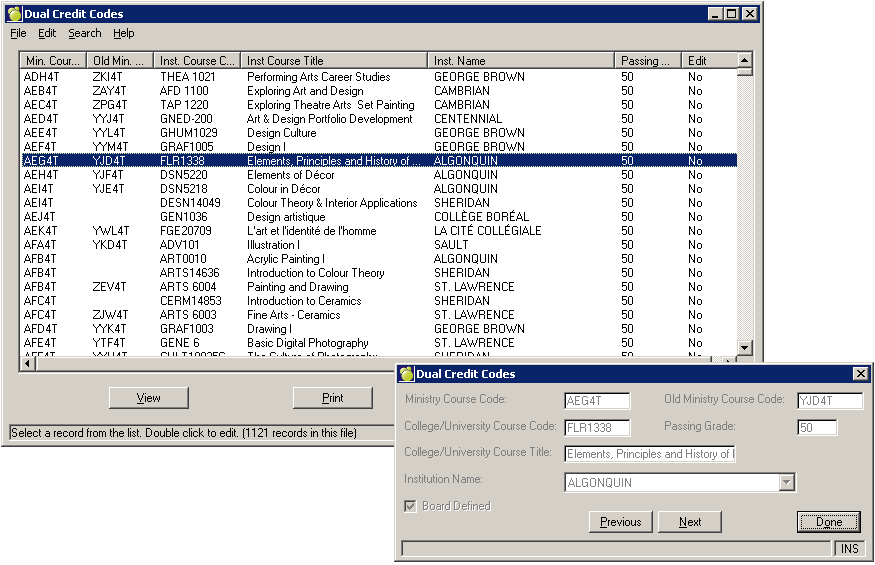
2 tables are required to complete the setup of a dual credit course within the classes file. They are ‘Dual Credit Codes’ and ‘Colleges & University Institutions’ and can be found within the school setup menu area (File, School Setup). These tables must exist (the course code must be in the courses file as well) prior to adding/editing the classes file.
The ‘Dual Credit Codes’ is a table in Maplewood (added in September 2011) that holds all of the information related to the code as it pertains to the post secondary institution.
There is an import feature, which when performed at the board level (regardless of Enterprise or Proprietary) will also import the information into each of the schools.
Enterprise customers, schools will have the entries flagged as board defined and the table is centrally maintained.
Those boards/schools still using the proprietary version of the software, the schools will have full editing rights to the table.
Here is a sample of the ‘Dual Credit Codes’ table (Enterprise, Sec. School)
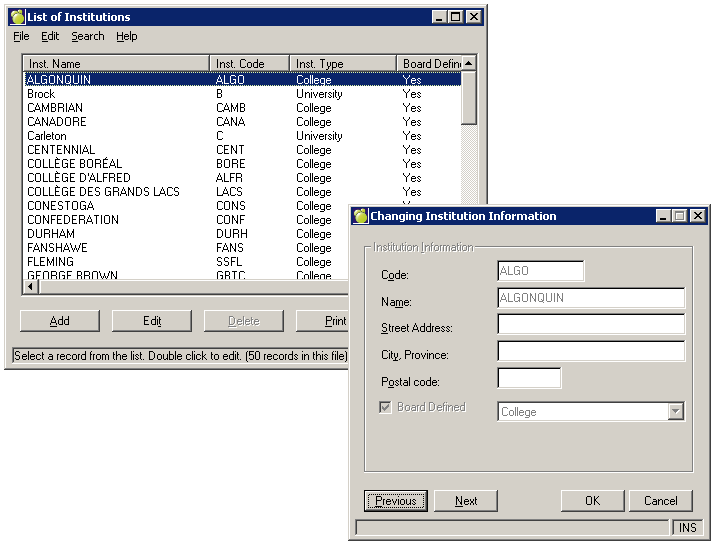
The ‘Colleges & University Institutions’ table is automatically populated at both the board and school levels with the 50 entries as defined by OnSIS.
This table is 100% modifiable at the board level and is only partially modifiable at the school level. New entries can be created at both the school and board levels. Schools are able to enter in the address information for the college or university (although this is not required).
Here is a sample of the ‘Colleges & University Institutions’ table (Enterprise, Sec. School)
Classes File
An option called 'Dual Credits' can be found within the Classes File under the 'Type of Course' area. Once the Dual Credits option is selected as the Type of Course, the 'Dual Credit' frame will become active. This is where the user is required to select a 'Dual Credit Type'. The valid types as of October 2011 are; Regular, Team Taught College Course, and Team Taught Apprenticeship Course. If the Dual Credit Type of Regular or Online is selected, then the user must enter a Dual Credit Course Association (under 'Dual Credit Course Assoc.:'). This association must have the same MIN. Code as the Course Code for the Class (see diagram below for details). The association selected will determine what information will print on the student's transcript (as this information is saved into the student's transcript area - via automatic transcript update) as well as what mark is required to pass the course (and have the credit granted).
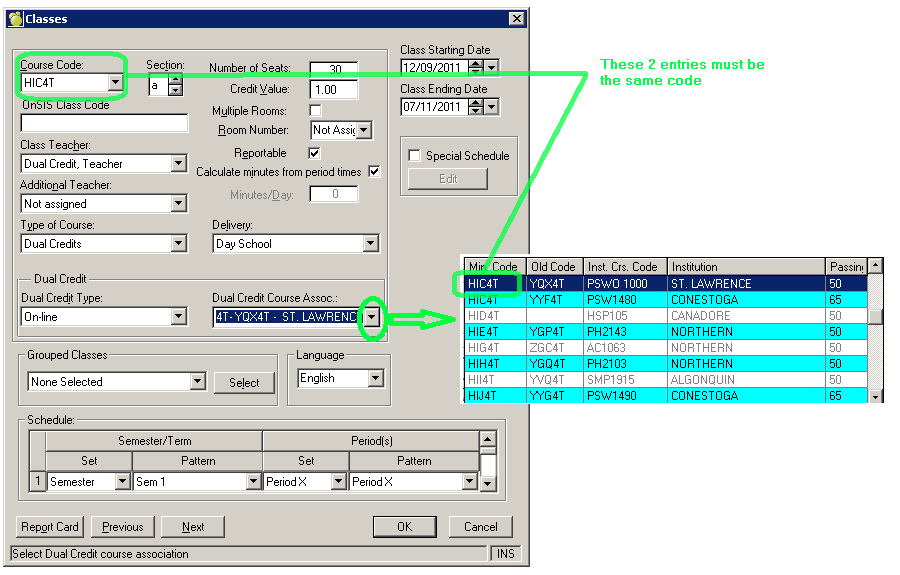
Timetabling Note: Different class sections are needed if students are taking the same dual credit course at different institutions.
Codes File
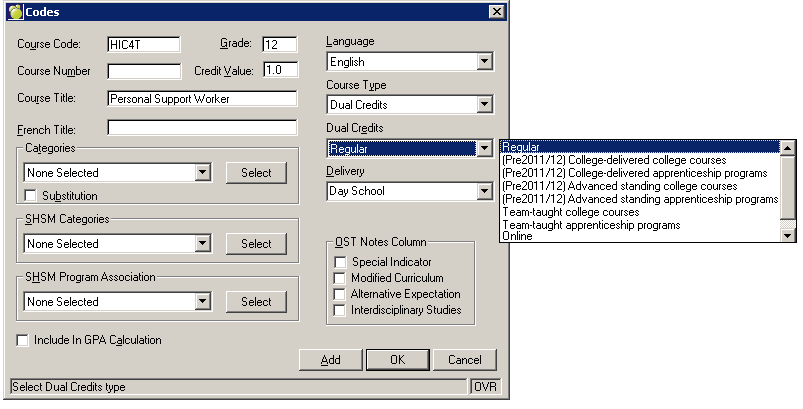
The 'Dual Credits' option is can also be found within the Codes File under the 'Course Type' area.
The add screen allows the user to select the dual credit information - however dual credit association information is not required at the Code level.
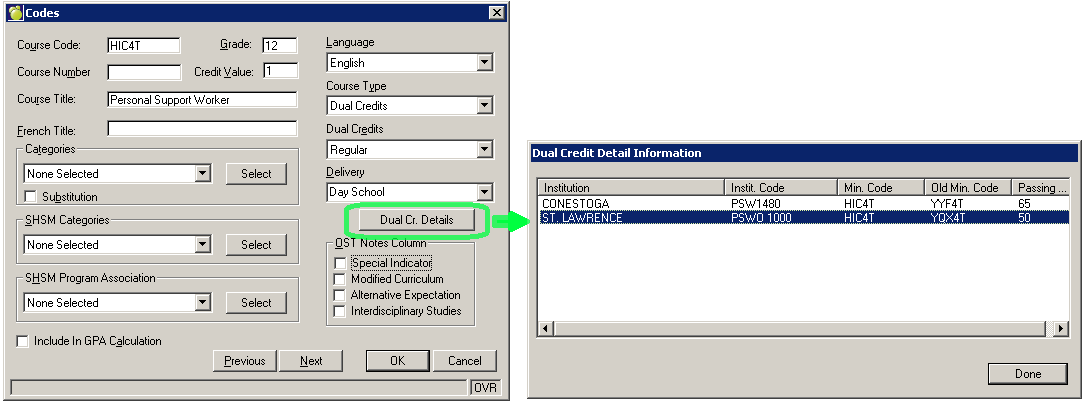
When the user views a previously entered dual credit course (File, School Setup, Codes, Edit), there is a button that appears within the edit interface of the Codes table. This new Dual Credit Details button is enabled if the course code has a 'Type of Course' of 'Dual Credit' with a 'Dual Credit Type' of 'Regular' or 'On-line'. Users will be able to view the valid dual credit associations that can be assigned to a student. This is just a viewing tool. Note: does not appear within ‘Add’ screen
The above information must be entered correctly within Maplewood
as it will be used to submit Dual Credit information to OnSIS, and is
also used in printing the OST (see below 3b).
i) Provincial Report Card
Dual Credit Courses are being populated within the Ontario Provincial Report Card based on Ministry Guidelines.
For the 2011/2012 school year and beyond, the Ontario Provincial Report Card program will perform a check to see if a class has a Type of Course = Dual Credit and a Dual Credit Type = Regular or Online. If the class passes the checks, then Maplewood will automatically populate the Report Card with the following information:
Course Title: Indicates the Course Title for the Dual Credit
Course Code: Indicates the Dual credit course code
Teacher: "College Instructor" will appear on this line if there is no teacher assigned to the class.
Percentage Grade: The percentage grade that is reported on the college record sent to the principal (which in turn must be added within Topic Based Marks for this class).
If no mark is available at the time of printing, Maplewood will automatically print a mark of 'NM' (definition = No Mark) in the percentage grade column. This mark is only valid Dual Credit courses that have a Course Type = Dual Credits and a Dual Credit Type = Regular or Online.
Credit Earned: Indicates the credit value assigned to the class (if earned)
Course Median: 'NA' appears in this box.
Comments: The following default message will appear if the teacher has not entered any comments for the student.
Report 1 = 'If you require further information, including attendance details, please contact {John Smith}, secondary school contact.
Report 2 = If you require further information, including attendance details, please contact {John Smith}, secondary school contact. In addition, refer to the college record at the completion of the dual credit course.
Where John Smith = the teacher that is currently assigned to the class in Maplewood.
If a course comment has been entered by teacher (comment must be associated to the grade - similar to regular (non dual credit) courses, then the default message will not be printed on the Report Card.
If no mark is available at the time of printing a comment will automatically appear within the comment section that states; "Instruction, evaluation and reporting are the responsibility of the college faculty. A mid-term mark is not recorded on this report card".
Attendance: "NA" will appear in these boxes. The secondary school dual credit teacher will facilitate the sharing of attendance information (but it will not be reported on the provincial report card.)
Learning Skills: The secondary school dual credit teacher will complete this section in consultation with the college professor/instructor.
Note: Prior to the 2011/2012 school year the program will check if the first character of the Course Code = 'O', 'Y', 'Z' or 'U' (with the exception of 'OLC' - Literacy Course)
Ministry Policy: Several of the dual credit courses or programs offered, have an associated credit value of 2 or more credits (for example level 1 apprenticeship programs). If a student is successful in completing some but not all of the course/program, it is possible to enter a credit value of less than the full value credit based on the list of ministry dual credit course codes. If a credit value of less than the full amount is entered, the word "partial" is to appear after the course title.
Within Maplewood: In order for this information to appear correctly on the printing of the Report Card, a new topic (e.g. Dual partial credits) must be added to the list of topics (Marks, Topic Based Marks, Define Topics). The Topic Identifier of this new entry must be entered as 'DUAL'. This topic must then be assigned to the Dual Credit Class (Marks, Topic Based Marks, Select Topics). If a value is entered in the accumulated mark column (for that topic) that value is assumed to be the credit and will be used in the credit calculation if the student has a passing mark.
Please note: that this Topic only needs to be created and assigned to dual credit classes where a student is receiving a credit value that is less than the ministry defined credit value for that course.
ii) Ontario Student Transcript
Team Taught Delivered Dual Credits: dual credit” will appear after course title on OST, “T” will appear in Notes column
College Delivered Dual Credits: The information that is to appear in the course title for all college, university and apprenticeship courses is the institution short name, the institution course title and the institution course code. Note: for college delivered apprenticeship credits, "Level 1 App" is considered the short name for these courses and therefore will appear before the course title.
For example:
Maplewood will add the College/University Name (as it appears in the Institution Table), and then append the name with a C or U (based on Institution Type selected for that College/University within the Institution Table).
For Example a student who successfully completed the dual credit course BBA4T offered at Northern College, would have the following appear on their transcript:

2011 02 12 Northern C: Introduction to Business BU1003 BBA4T 84 1.00
Policy on Partial Credits Granted:
Several of the dual credit courses or programs offered, have an associated credit value of 2 or more credits (for example level 1 apprenticeship programs). If a student is successful in completing some but not all of the course/program, it is possible to enter a credit value of less than the full value credit based on the list of ministry dual credit course codes. If a credit value of less than the full amount is entered, the word "partial" is to appear after the course title.
How this is determined in Maplewood:
For any Dual Credit Courses ( a Type of Course = Dual Credit) appearing
in the transcript/history area, Maplewood (upon printing the transcript)
will look at the default credit value within the codes file, and the credit
granted to the student for the completion of that course. If credit value
earned is less than the default credit value in the code file, then "
(Partial)" will print at then end of the course title.
Maximum 4 Credit Policy:
Ministry Policy: Students may earn no more than 4 credits through a combination of college-delivered dual credit courses and external music credits. No more than 4 should show on the transcript. If a student takes more, the extras would only appear on the college record and provincial report card but not on the OST.
For students who fall within this category, the student will have the option of determining which college-delivered dual credit courses and if applicable external music credit courses, for a maximum credit value of 4, he/she chooses to have entered on their OST. If the student declines this option, the principal/designate will enter the college-delivered dual credit courses and, if applicable, external music courses on the OST beginning with the course with the highest credit value followed by the course(s) with the highest percentage grade.
Therefore if a student’s combined courses credits exceed the maximum credit value of 4, Maplewood will reduce the credit count of the last course entered to accommodate the mandatory requirement of 4 credits. A letter 'B' will also be added to the Notes column to denote this change.
For example, if a student has completed an Apprenticeship Plus course with a credit value of 3 and the second college-delivered dual credit course has a credit value of 2, only 1 credit will be entered in the credit column on the OST for the last college-delivered dual credit course. In cases such as this, “B? will be placed in the note column next to the course to indicate that the student successfully completed the college-delivered dual credit course; however, only partial credit value was entered on the OST to comply with the maximum credit value of 4 for college-delivered dual credit courses and external music courses.
Maplewood will look at the Codes File for determination of which dual credit courses are to be included in the 4 credit maximum. Only Codes that have a 'Course Type' of 'Dual Credit', and a 'Dual Credit' definition of 'Regular' or 'Online' (Prior to the 2011/2012 school year the program will look for 'college-delivered college courses' or 'college-delivered apprenticeship programs') will be included in the 4 credit Maximum calculation (any other Dual Credit definitions in the code file are excluded from the 4 credit maximum).
PLEASE NOTE the differences between these 2 policies. In the first policy, the student does not earn the entire number of credits that are granted for the course - and therefore has only partially completed the course. The second policy - the student earns he entire number of credits allowed for the course, but due to the 4 credit maximum, not all of the credits will appear on the OST (however the total credits granted will appear on the Provincial Report Card and the College Record).
iii) OnSIS and Dual Credits
OnSIS is accepting these dual credit courses in 1 of 2 ways.
1) Class Enrolment
a) If the class has a Type of Course = Dual Credit and a Dual Credit Type = Regular or Online and is marked as reportable, and has a teacher (with a valid MEN), then the dual credit class will be sent in the student class enrolment file with a CLASS_TYPE of R (Regular).
b) If the class has a Type of Course = Dual Credit and a Dual Credit Type = Regular or Online and is marked as reportable, and has a teacher with a role of U, then the dual credit class will be sent in the student class enrolment file with a CLASS_TYPE of NE (No Educator).
2) Other Courses - If the course only exists in the transcript (and not in the student timetable) then the course is reported through Other Credits. Only classes that have been completed by 'This School' will be sent in the OnSIS file.