The Ministry has recently made changes to the requirements for reporting students who have been suspended or expelled. These new changes include:
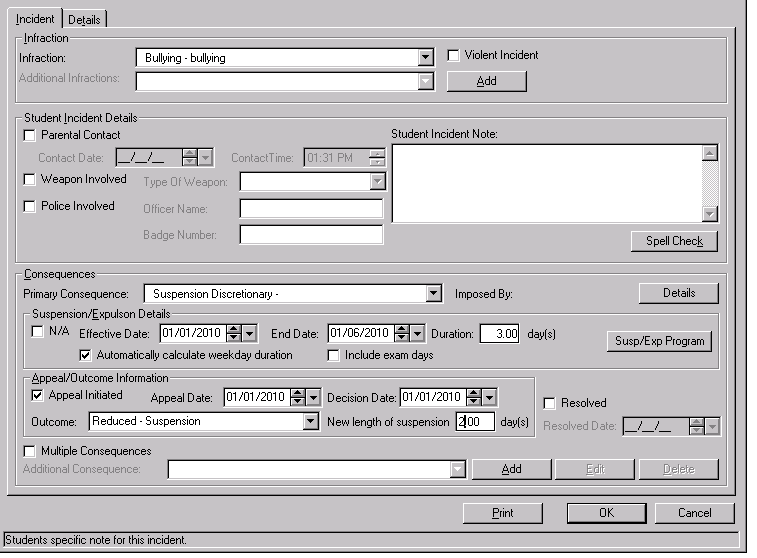
Maplewood has made changes to the software to accommodate the tracking of this new information. Within the Edit of the Student Incident, you will now see there is a new button within the Suspension/Expulsion Details area called Susp/Exp. Program. This button will only be active if the student has a consequence of Suspension (Discretionary or Mandatory) or Expulsion.
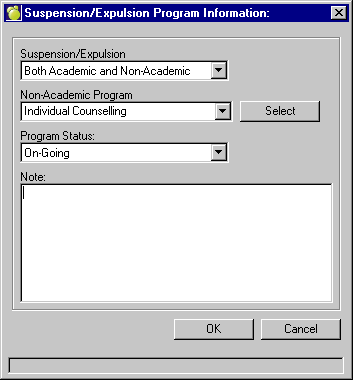
When selecting this new option, the screen below will appear. A description of each field is available below.
Suspension/Expulsion:
Two program options will exist: "Academic Only" and "Both Academic and Non-Academic".
If a student is suspended for 11 days or more, or the student was expelled, then the 'Suspension/Expulsion Program' type must be 'Both Academic and Non-academic'.
Non-Academic Program:
This field will only be active if user selects the ‘Both Academic and Non-Academic’ option.
This field is a multi-select field, where users are able to select as many programs that the student is enrolled in.
The Non-Academic Program Table is a user defined table, which can be accessed under Incidents, Define Non-Academic Program Categories. The OnSIS code entered for these user defined entries must be between 01 and 06. Maplewood has pre-populated this table with the Ministry's options which are currently:
01 - Anger Management (e.g. conflict resolution, problem solving)
02 - Drug/Alcohol
03 - Family Counselling (e.g. problem solving, decision making)
04 - Other
05 - Life Skills (e.g. healthy lifestyle, decision making, time management, problem solving, decision making)
06 - Individual Counselling
Program Status:
When a Suspension/Expulsion Program is specified for a student, the Program Status must be selected from these possibilities:
Completed: The student successfully met the objectives of the program according to the program provider. Valid for Expulsion only.
Attended: According to the program provider, the student attended the program, but may not have completed the program. Valid for Suspension only.
On-going: The student's enrolment in the program is continued past June 30 of the school year. Valid for both suspensions and expulsions.
Did not attend: The student refused to attend the program or indicated interest in the program but never showed up. Valid for both suspensions and expulsions.
No Longer Attending: The student attended/participated in some parts of the program but did not meet the objectives of the program according to the program provider and the student is no longer attending. Valid for Expulsions only.
The Program Status pull-down options will only display valid entries based on the consequence that the student has been assigned.
If student has a consequence of expulsion then the user will only be able to select from the following options:
Completed
On-going
Did not attend
No Longer Attending
If student has Suspension selected then the user will only be able to select from the following options:
Attended
On-going
Did not attend
Note: A note area has also been added for the school's own use to record information about the program.