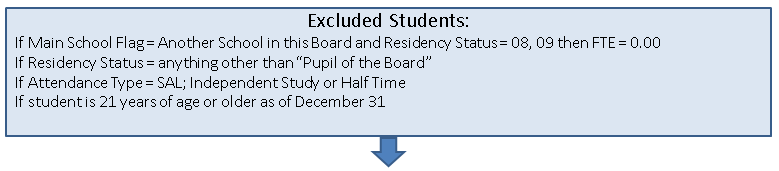
Starting in 2013-14, the category of “high credit” day school Average Daily Enrolment (ADE) will be introduced to identify the portion of a pupil’s credits that exceed the 34 credit threshold.
What is a High Credit? High credits are the number of non-exempt credits above the 34 credit threshold, including where the pupil has the potential to earn the 34th credit in the semester / year.
In general, boards will be asked to determine the proportion of total credits taken in the day school that are high credits and apply that proportion to the total minutes of instruction in the pupil’s timetable. This calculation will allow for a distinction between regular minutes of instruction and high credit minutes of instruction for each of the October 31st and March 31st count dates. The minutes will then be used to calculate regular day school FTE and high credit day school FTE.
Determining Students High Credit FTE
Follow the steps below to determine if student is exempt from the High Credit FTE policy, and how to calculate the FTE if they are not.
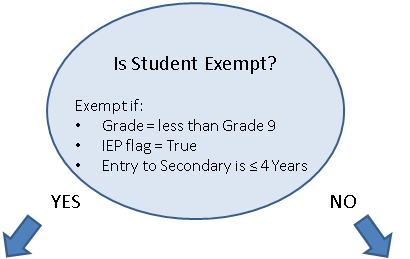
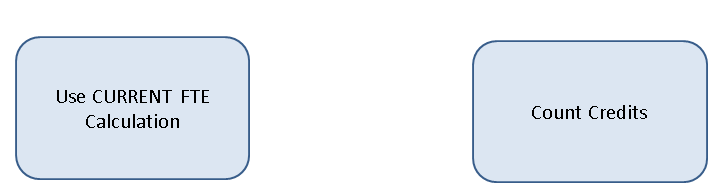
How to count credits for High Credit FTE calculation
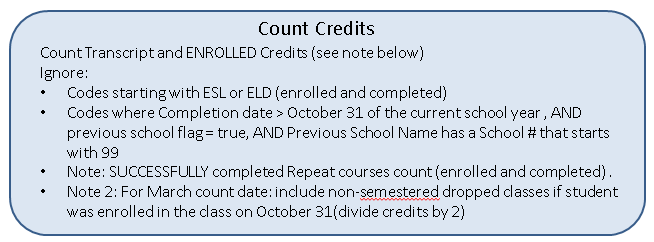
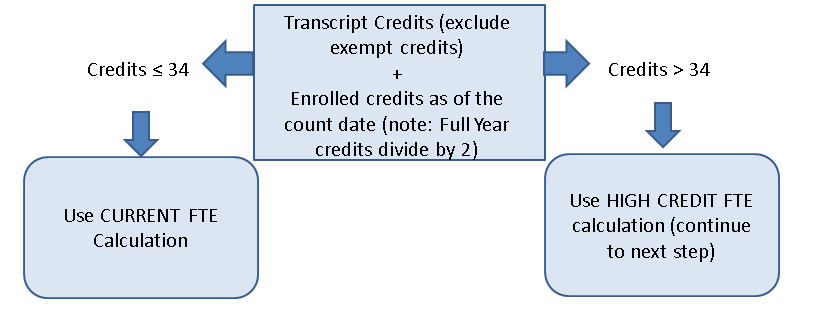
How to Calculate a Student's High Credit FTE
Step 1: Calculate the proportion of High Credits
Number of High Credits
If Transcript (non-exempt) Credits is ≥ 34 then all currently enrolled courses = HIGH CREDITS
or
If Transcript (non-exempt) Credits is < 34 and transcript + enrolled credits is greater than 34 then HIGH CREDITS = Transcript + Enrolled (divide full year by 2) - 34
Number of Enrolled Regular Credits
Total Enrolled Credits – Enrolled High Credits
High Credit Proportion
HIGH CREDIT PROPORTION = Total Number of Enrolled High Credits
Total Number of Enrolled Credits
= xx.xx %
Step 2: Determine the proportional day school minutes of instruction
For each count date, multiply the high credit proportion (previous page) by the total minutes of instruction per day in the pupil’s timetable to calculate the high credit minutes of instruction. The remainder are regular minutes of instruction.
Total Minutes of Instruction: Count the pupil’s total number of day school minutes of classroom instruction per day as of the count date
High Credit Minutes: Multiply the pupil’s total day school minutes (from above) by the high credit proportion (previous page) for the count date
Regular Minutes: Subtract the pupil’s high credit day school minutes from the pupil’s total day school minutes for the count date
Step 3: Calculate the Day School FTE
Regular Day School FTE
If Regular Minutes of Instruction (from Step 2) is at least 210 minutes per day, then Regular day school FTE = 1.0
High Credit FTE (Student will fall into one of the 3 options below):
If Regular Minutes of Instruction (previous page) is at least 210 minutes per day, then High Credit day school FTE = 0.0
If TOTAL Minutes of Instruction (previous page) is at least 210 minutes per day, then High Credit day school FTE = 1.0 – Regular Day School FTE
If TOTAL Minutes of Instruction (previous page) is at less than 210 minutes per day, then
High Credit day school FTE = High Credit Minutes of Instruction per Day
Total Minutes of Instruction per Day
Reports
The report option (under the Reports menu) will assist users in identifying which students have a High Credit FTE. The report option is called 'High Credit FTE Report'. When this option is selected the following screen will appear:
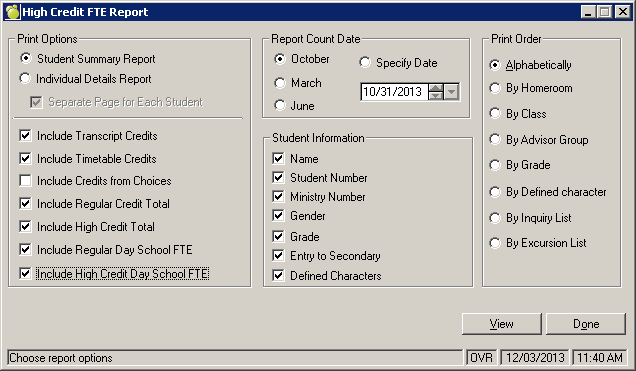
Print Options
There are 2 print options, a student summary report and an individual details report.
The Summary report will give you a list of all students (in a Print Lists format) with columns for Regular minutes, High Credit Minutes, Regular Day School FTE and High Credit Day School FTE.
The Detail report will allow to print the details on the student including the total number of transcript credits, enrolled credits, any exemptions of enrolled credits and how the calculation of the High Credit FTE occurs (very similar to the steps mentioned above).
When generating these reports, the print order recommended is 'By Grade'. Choosing individual grade, and grade 12 only. As this will represent the grade in which your students who have high credits will generally occur.
Users can choose a specific report date, or can use the standard ministry count dates.
Note: Please ensure that all FTE placeholder classes that should count toward the student's FTE has a credit value (other than zero) associated with the class in the classes file (File, School Setup Classes).