The Ontario School Board Insurance Exchange (OSBIE) is the main supplier of property and liability insurance to school boards in Ontario. Schools are required to submit an Incident Report Form whenever an insurable incident occurs on school property.
The information on the Incident Report form is collected to provide evidence to assist in defending a claim on behalf of a school board. It is also used by OSBIE to create province-wide statistics on high risk activities or locations. Even if an accident does not appear to be serious, it is still important to complete an incident report form.
Rather than submitting paper copies of the OSBIE incident reports, the report is submitted electronically. Once the report is entered in Maplewood, there is a button to submit the report. Providing you have an internet connection, the report can be automatically sent to OSBIE. If the report cannot be submitted electronically, the OSBIE report must be directly inputted into the OSBIE online incident report.
If your schools are using the web service (checkbox is selected)– the URL (in the Host Address field) should have .asmx as the last 4 characters (i.e. https://osbie.prosoftech.com/Default.asmx ). If you are not using the web service (checkbox is NOT selected) - the URL should have .ashx as the last 4 characters. Please note that as of July 2013 the only way users will be able to submit to OSBIE electronically will be through the web service.
To access the OSBIE Incident Reports, choose Reports, OSBIE Incidents.
If prior incidents exist, they will be listed as shown here.
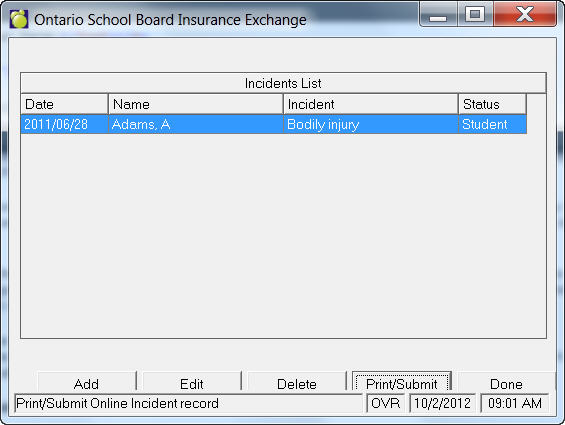
Click Add to add a new incident, or click Edit to modify the information for an existing incident. Click here for detailed information on the contents of an incident.
Click Delete to remove an incident. OSBIE strongly suggests that no school retain this information. By keeping this information on file, the school and the school board must comply with any requests under the Freedom of Information Act. Disclosure could impair any current or potential legal proceedings. In any case, refer to your school board policies and procedures in order to determine if you must keep a hard copy.
Click Print/Submit to print a copy of the report or to submit a report directly to OSBIE via the internet. Once you've clicked this button, highlight the incident(s) to be printed or submitted by clicking each incident. Then, click Print to print the report, View to preview the report, or Submit to send the report to OSBIE.
Note, if the submission failed, ensure that you have internet connection. If a successful submission is not possible, use the online incident reporting feature to re-enter the incident directly at the OSBIE website.
Incident Details
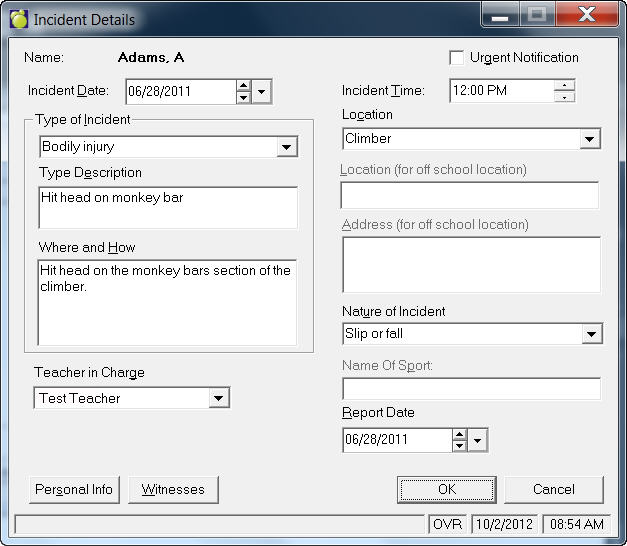
When adding a new incident, a warning message will appear informing you to contact OSBIE immediately if a student has been admitted to a hospital or fatally injured. When you click OK on this message box, indicate if the incident involves a Student, Parent, Volunteer, or Visitor. If it’s a student, select the student’s name and then the personal information will be automatically populated. If it’s not a student, enter the last name, first name, address, phone number, birthdate, and gender. Then click OK and proceed to complete the incident report. This is a sample report:
Date and Time
The date and time is imperative. If you are unsure about the exact time, OSBIE recommends that you provide an estimate.
Type of the Incident
Select from the drop-down list - Bodily or Property Damage.
Type Description
OSBIE recommends that you describe the severity of the injury or damage. Indicate what part of the body was injured and provide a detailed description of the injury - be specific. If you describe the victim as sustaining a head injury, when the student scraped his/her forehead, it creates an inaccurate description of the seriousness of the injury - BE AS CLEAR AS POSSIBLE.
Where and How
Facts of the incident should be input in this field. Brief, concise statement of facts only.
Example: John Smith collided with another player while playing football and broke his left leg.
Teacher In Charge
If the incident involves a student of the school, select the teacher in charge from the drop-down list.
Location
Select a location from the drop-down list.
Address
If the location is Out of School, then enter a street address where the incident occurred. This could be an off-school site such as a field trip location.
Nature of Incident
Select from the drop-down list. If the incident was a result of a Sport Injury please identify the name of the sport (i.e. baseball). If the incident does not fit in the suggested categories, specify briefly in the Other Types Description (this field replaces the Name of Sport field).
Witnesses
If there are witnesses, click the Witnesses button and fill in name, age, address, and telephone information.
Personal Information
To edit the personal information, click Personal Info. Enter Name, Address, Telephone, Birthdate, Male/Female, Grade, and Parent information in the spaces provided.