This feature is for Ontario users only. According to the Ministry Ontario Student Record (OSR) guidelines,
The office index card provides the school with immediate access to information about a student (i.e. in the case of an emergency, to assist in locating the student or parent(s)/guardian(s)). It will remain at the school during the period in which the student is enrolled at the school. The card is not filed in the OSR folder and is not transferred with the OSR when the student transfers from the school. When a student transfers to another school, or to a private, federal, or First Nation school, or retires from school, the office index card will be stored at the sending school or at a central record office provided by the board. The contact person regarding the collection of this information is the principal of the school.
Maplewood has created a standard Office Index Card based on the sample provided in the OSR Gudielines. Schools are not required to use this format, they are able to create their own template, as long as it includes all of the required elements above.
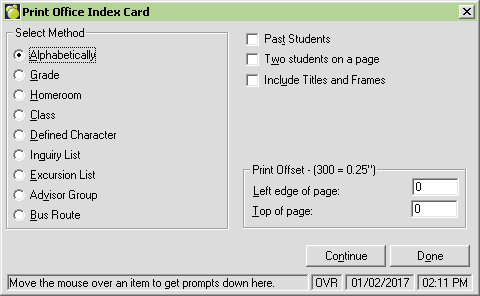
To print the Office Index Card based on the Maplewood template, choose Reports, Print Office Index Card.
Once you have chosen a print order (within the Select Method area), select the Continue button.
Note: Use the Print Offset boxes to fine tune the position of your printout on the page.