Overview
Throughout the school year, Ontario Secondary schools are required to send information to the Ministry of Education's Student Information System (SIS).
|
|
Date |
File Name |
|
1. Send October 31st Enrolment |
(November) |
S######.113 |
|
2. Send Retirement/Transfer Data |
(November) |
S######.123 |
|
3. Send Continuing Education/Night School Marks |
(February) |
S######.243 |
|
4. Process Information on Ministry Extract Disk |
(June) |
S######.253 |
|
5. Send Day School Marks |
(July) |
S######.203 |
|
6. Send Continuing Education/ Night School Marks (Semester 1 & 2) |
(July) |
S######.243 |
|
7. Send Continuing Education/Night School Marks (Semester 3 - If Applicable) |
(August) |
S######.243 |
|
8. Send Summer School Marks |
(August) |
S######.253 |
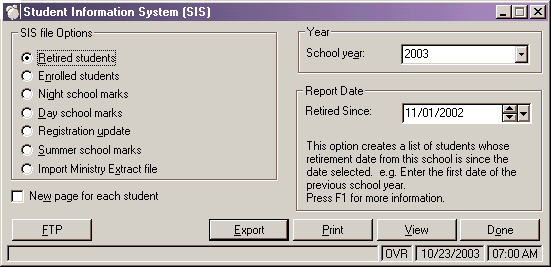
To find the programs required to create and process the SIS files choose Reports, SIS. The following form will appear:
Retired Students
This allows you to create a file with all the students who either transferred or retired since the date of the previous year's enrolment file to October 31st of the current year. Enter the current school year (e.g. for 2003-2004 school year, enter 2003), and the report date. This will send those student's whose retirement date from this school is since the date selected. e.g. Enter May.16/2003 to get a list of all students who have retired since this date.
Enrolled Students
The ministry requires Ontario schools to send information on those students currently enrolled in their schools on October 31st. Enter the current school year (e.g. for 2003-2004 school year, enter 2003), and the report date. This will send those student's whose enrolment date to this school is on or before the date selected.
Day school marks
Final marks are sent to the ministry using this option. A file is created with the current year's final marks and diploma information. This must be done before transferring to the next school year.
Note: Automatic Transcript Update must be completed before creating this file. Marks for first semester may be sent in March and final marks for the year are normally sent the 1st week of July.
Enter the current school year (e.g. for 2003/2004 school year, enter 2003), and the report date. This option will print a list of students with their credit information (including marks) for all those credits which have been achieved on or later than the date chosen.
Night School / Summer School
These options work the same as "Day School Marks" however, they create only one file to send to the ministry.
Registration Update
Though no longer a required file to be sent (usually in March) to the Ministry of Education, the Registration Update option has remained in Maplewood for those schools who still wish to send an update file. This is a file that is created for only those students whose basic enrolment and retirement information has changed since the last time you sent a file to the ministry. Enter the current school year (e.g. for 2003-2004 school year, enter 2003), and the last submission date. This option will print a list of students whose retirement or entry dates have changed as of the date you specify (which should be the last time you sent registration information to the ministry).
Import Ministry Extract File
The ministry will read the information you have sent to them and in June (usually) will send a Ministry Extract File to each school. This allows schools to update their student's records with the Ministry Identification Number (MIN) that have not been previously assigned to students.
Once you have the dates selected, select on Export to create the file. The default file name for the Ontario Ministry of Education is shown.
Once the file has been created, you can view it and print it. To make changes to the file, do so in Students Records and remember that after each change you make you will have to choose Export again (and will have to replace the new file with the old one).
To send the file to the ministry, select on the FTP button.
|
Information Sent |
Where it is found in Maplewood |
|
School Number |
File, School Setup, School Information, School Number |
|
Ministry Identification Number |
Enrolment, Edit, Ministry Number. Note: OEN is not to be included in this export (Page 50 of SIS Manual) |
|
School Student Number |
Biographics, Name, Student Number Note: If you assign a student to a number that is already used, a warning is produced. Therefore duplicates should not normally occur. |
|
Legal Surname |
Biographics, Name, Legal Surname (if different from usual surname) |
|
Legal Given Name(s) |
Biographics, Name, Given Name and Biographics, Name, Middle Name(s) |
|
Gender (M or F) |
Biographics, Edit, Gender |
|
Birthdate |
Biographics, Edit, Birthdate |
|
Language of Instructional Unit |
File, School Setup, School Information, Configuration Tab, School Language |
|
Student's Residential Postal Code |
Family, Student, Edit, Postal Code |
|
Status in Canada |
Enrolment, Edit, Citizenship To modify/setup table, choose Students, Custom Fields/Tables, Enrolment Tables, Citizenship |
|
Entry Year to Canada |
Enrolment, Edit, Entry Date to Canada |
|
Language First Spoken and Still Understood |
Enrolment, Edit, First Language To modify/setup table, choose Students, Custom Fields/Tables, Enrolment Tables, First Languages |
|
Source Code |
Enrolment, Edit, Origin Type To modify/setup table, choose Students, Custom Fields/Tables, Enrolment Tables, Origin Types |
|
Student's Entry Date to this School |
Enrolment, Edit, Entry Date to This School |
|
Retirement/Transfer Destination Code |
Enrolment, Edit, Destination Type To modify/setup table, choose Students, Custom Fields/Tables, Enrolment Tables, Destination Types |
|
Retirement/Transfer Date |
Enrolment, Edit, Retirement Date |
Day School Final Mark Gathering File
|
Information Sent |
Where it is found in Maplewood |
|
School Number |
File, School Setup, School Information, School Number |
|
Ministry Identification Number |
Enrolment, Edit, Ministry Number. Note: OEN is not to be included in this export (Page 50 of SIS Manual) |
|
School Student Number |
Biographics, Name, Student Number Note: If you assign a student to a number that is already used, a warning is produced. Therefore duplicates should not normally occur. |
|
Legal Surname |
Biographics, Name, Legal Surname (if different from usual surname) |
|
Legal Given Name(s) |
Biographics, Name, Given Name and Biographics, Name, Middle Name(s) |
|
Gender (M or F) |
Biographics, Edit, Gender |
|
Birthdate |
Biographics, Edit, Birthdate |
|
Diploma/Certificate Code |
History, Edit, Diplomas, First To modify/setup table, choose Marks, Define Diplomas |
|
Month of Issue of Diploma/Certificate |
History, Edit, Diplomas, First, Date |
|
Ontario Scholarship Recommendation |
Automatically calculated when the export file is generated. How it works: An Ontario Scholar is a student who obtains an aggregate mark (total of all marks) of 480 in his top 6 Scholar Credits. This means that there is no rounding up to get 80% from 79.9%. The credits also means that the marks are weighted by credit value (eg: 6 credits could be 7 courses - 5 full credit courses and 2 half credit courses). Note: a scholar course is defined by the Ministry of Education as;
|
|
Status in Canada |
Enrolment, Edit, Citizenship To modify/setup table, choose Students, Custom Fields/Tables, Enrolment Tables, Citizenship |
|
Ontario Secondary School Literacy Requirement |
Student, View, Ontario Report Card Details, Literacy and/or Student, History, OLC4O appears (within the transcript/history record) with a passing mark |
|
Community Involvement Indicator |
Student, View, Ontario Report Card Details, Community Involvement |
Course-Mark Data
|
Common Course Code |
History, Edit, Course |
|
Course Repeat Indicator |
Repeat Indicator for SIS - Indicates if the course the student has completed THIS YEAR is a REPEAT of course for which a mark has previously been reported to the ministry. If a course being reported this year already appears in the student’s transcript (on an earlier date) the current course is sent as a repeat. (REGARDLESS OF MARK)
|
|
Course Language of Instruction |
File, School Setup, Codes, Edit, Language |
|
Course Delivery |
File, School Setup, Codes, Edit, Type, Delivery |
|
Course Scheduling Indicator |
Automatically calculated when the export file is generated. Calculation is as follows: If Number of semester < 2 , then Course Scheduling Indicator =0 If Month of Completion (from History, Edit, Date) < 3 then Course Scheduling Indicator =1 If Month of Completion (from History, Edit, Date) >7 then Course Scheduling Indicator =2
|
|
Credit Value |
History, Edit, Credit |
|
Final Mark |
History Edit, Mark |
|
Compulsory |
History, Edit, Compulsory (Comp.) |
|
Substitution |
File, School Setup, Codes, Edit, Substitution (checkbox under Categories) |
Continuing Education/Night School Registration & Final Marks Gathering File
|
Information Sent |
Where it is found in Maplewood |
|
School Number |
File, School Setup, School Information, School Number |
|
Ministry Identification Number |
Enrolment, Edit, Ministry Number. Note: OEN is not to be included in this export (Page 50 of SIS Manual) |
|
School Student Number |
Biographics, Name, Student Number Note: If you assign a student to a number that is already used, a warning is produced. Therefore duplicates should not normally occur. |
|
Previous Legal Surname |
Maplewood does not currently export this information |
|
Legal Surname |
Biographics, Name, Legal Surname (if different from usual surname) |
|
Legal Given Name(s) |
Biographics, Name, Given Name and Biographics, Name, Middle Name(s) |
|
Gender (M or F) |
Biographics, Edit, Gender |
|
Birthdate |
Biographics, Edit, Birthdate |
|
Student's Residential Postal Code |
Family, Student, Edit, Postal Code |
|
Status in Canada |
Enrolment, Edit, Citizenship To modify/setup table, choose Students, Custom Fields/Tables, Enrolment Tables, Citizenship |
|
Entry Year to Canada |
Enrolment, Edit, Entry Date to Canada |
|
Language of Instructional Unit |
File, School Setup, School Information, Configuration Tab, School Language |
|
Language First Spoken and Still Understood |
Enrolment, Edit, First Language To modify/setup table, choose Students, Custom Fields/Tables, Enrolment Tables, First Languages |
|
Date of First Registration in this School |
Enrolment, Edit, Entry Date to This School |
|
Diploma/Certificate Code |
History, Edit, Diplomas, First To modify/setup table, choose Marks, Define Diplomas |
|
Month of Issue of Diploma/Certificate |
History, Edit, Diplomas, First, Date |
|
Ontario Scholarship Recommendation |
Automatically calculated when the export file is generated. How it works: An Ontario Scholar is a student who obtains an aggregate mark (total of all marks) of 480 in his top 6 Scholar Credits. This means that there is no rounding up to get 80% from 79.9%. The credits also means that the marks are weighted by credit value (eg: 6 credits could be 7 courses - 5 full credit courses and 2 half credit courses). Note: a scholar course is defined by the Ministry of Education as; · Any Grade 12 university preparation, university/college preparation, and/or college preparation courses authorized under OSS · Any Ontario Academic Courses (OACs) authorized under OS;IS |
Course-Mark Data
|
Common Course Code |
History, Edit, Course |
|
Course Repeat Indicator |
Repeat Indicator for SIS - Indicates if the course the student has completed THIS YEAR is a REPEAT of course for which a mark has previously been reported to the ministry. If a course being reported this year already appears in the student’s transcript (on an earlier date) the current course is sent as a repeat. (REGARDLESS OF MARK) |
|
Course Language of Instruction |
File, School Setup, Codes, Edit, Language |
|
Course Scheduling Indicator |
Automatically calculated when the export file is generated. Calculation is as follows: If Number of semester < 2 , then Course Scheduling Indicator =0 If Month of Completion (from History, Edit, Date) < 3 then Course Scheduling Indicator =1 If Month of Completion (from History, Edit, Date) >7 then Course Scheduling Indicator =2 |
|
Credit Value |
History, Edit, Credit |
|
Final Mark |
History Edit, Mark |
|
Compulsory |
History, Edit, Compulsory (Comp.) |
|
Substitution |
File, School Setup, Codes, Edit, Substitution (checkbox under Categories) |
Summer School Registration and Final Mark Gathering File
|
Information Sent |
Where it is found in Maplewood |
|
School Number |
File, School Setup, School Information, School Number |
|
Ministry Identification Number |
Enrolment, Edit, Ministry Number. Note: OEN is not to be included in this export (Page 50 of SIS Manual) |
|
School Student Number |
Biographics, Name, Student Number Note: If you assign a student to a number that is already used, a warning is produced. Therefore duplicates should not normally occur. |
|
Previous Legal Surname |
Maplewood does not currently export this information |
|
Legal Surname |
Biographics, Name, Legal Surname (if different from usual surname) |
|
Legal Given Name(s) |
Biographics, Name, Given Name and Biographics, Name, Middle Name(s) |
|
Gender (M or F) |
Biographics, Edit, Gender |
|
Birthdate |
Biographics, Edit, Birthdate |
Course-Mark Data
|
Common Course Code |
History, Edit, Course |
|
Course Repeat Indicator |
Repeat Indicator for SIS - Indicates if the course the student has completed THIS YEAR is a REPEAT of course for which a mark has previously been reported to the ministry. If a course being reported this year already appears in the student’s transcript (on an earlier date) the current course is sent as a repeat. (REGARDLESS OF MARK) |
|
Course Language of Instruction |
File, School Setup, Codes, Edit, Language |
|
Course Delivery |
File, School Setup, Codes, Edit, Type, Delivery |
|
Credit Value |
History, Edit, Credit |
|
Final Mark |
History Edit, Mark |