You can produce a variety of printouts from the timetable created for next year. Choose to print it now or after next years information has been transferred to this year by using Scheduling, Print Timetables.
Print Timetable Information
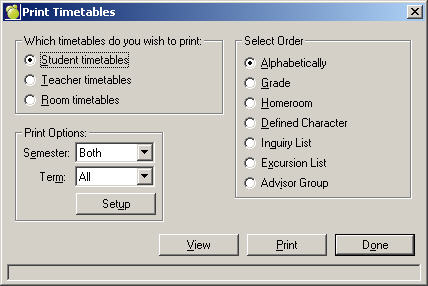
Timetables may be printed for students, teachers or for rooms. Choose Scheduling, Print Timetables and select an option: Student, Teacher, or Room Timetables.
Choose Scheduling, Print Timetables and select the timetable you wish to print by selecting the Student Timetables, Teacher Timetables, or Room Timetables option button.
Select the semester and term (if applicable) from the drop-down arrow. Select a print method: Alphabetical, Grade, Homeroom, Defined Character, Inquiry List, Excursion List or Advisor Group. Click View if you would like to preview the printout on-screen before printing.
Click Print to begin printing, Done to return to the main Administration System.
Print Class Lists
Class Lists may be printed for the whole school, or individually and may include many different pieces of information on the students by clicking on the appropriate tabs and selecting the desired information. Choose Scheduling, Print Lists, Class Lists. See Print Lists for more information.
Print Homeroom Lists
Homeroom Lists may be printed for the whole school, or individually and may include many different pieces of information on the students by clicking on the appropriate tabs and selecting the desired information. Choose Scheduling, Print Lists, Homeroom Lists. See Print Lists for more information.