Homerooms should be assigned when you complete student scheduling, before the current school year begins or just before semester changes.
Choose Students, Assign Homerooms and use one of these assignment methods.
Assign Homerooms and transferring topic-based marks/comments. If a school has topic based achievement information associated with homerooms, and the school uses Students, Assign Homerooms to change the students' homerooms, topic based achievement will be transferred to the new homeroom if there is an exact match between the terms and topics assigned to the former and the new homeroom. If the homerooms have different terms/topics, the student will not be assigned to the new homeroom, unless there is a check in the box labeled "Continue to assign homerooms if the new homeroom does not have same terms and topics as former homeroom". If this box is checked, only those terms and topics that match will be transferred
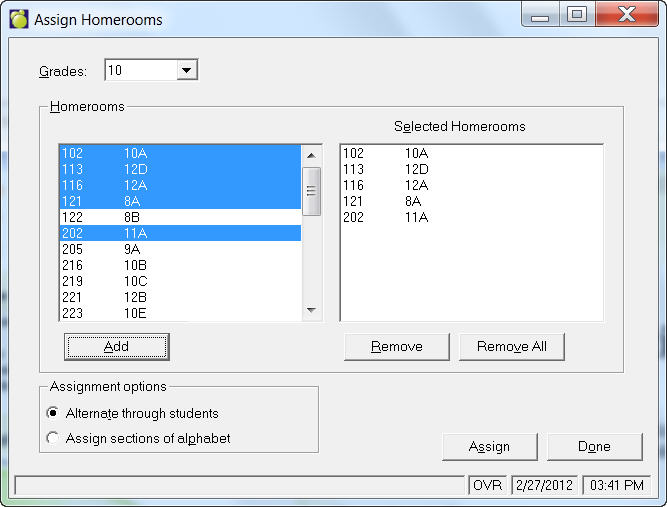
The Sequential By Grade choice will assign homerooms to students of a specific grade. The homerooms to which these students may be assigned must be indicated by entering the homeroom numbers or designations of the desired homerooms. For example, if there will be three homerooms for the grade nine students, the three homerooms must be selected from the list of homerooms. If the selected grade nine homerooms are 9A, 9B, and 9C, all the grade nine students will be evenly distributed among these homerooms.
The distribution of the students into the homerooms may be accomplished by two different methods. The distribution methods are determined by the following choices:
This method of homeroom distribution places the students in homerooms by rotating sequentially through the alphabet. Using the same example, the first student alphabetically by surname would be placed in homeroom 9A, the second student in 9B, the third student in 9C, the fourth student in 9A, the fifth student in 9B, and so on, until all the grade nine students have been assigned to homerooms. The resulting homerooms may be similar to the following:
| Homeroom 9A | Homeroom 9B | Homeroom 9C |
| Aaron, Tony | Abbott, June | Acorn, Timothy |
| Andrews, Lynne | Brady, Ricky | Chambres, Mathew |
| Douglas, Helen | Egan, Michael | Henshaw, Sarah |
| Jackson, Patrick | Jones, Brent | MacDonald, Jeff |
| Mitchell, Chris | Parker, Sandra | Redding, Cindy |
This method of homeroom distribution places the students in homerooms by rotating sequentially through the alphabet. Using the same example, the first student alphabetically by surname would be placed in homeroom 9A, the second student in 9B, the third student in 9C, the fourth student in 9A, the fifth student in 9B, and so on, until all the grade nine students have been assigned to homerooms. The resulting homerooms may be similar to the following:
This method of homeroom distribution places the students in homerooms using sections of the alphabet. Using the same example, the first 1/3 of the students alphabetically by surname would be placed in homeroom 9A, the second 1/3 would be placed 9B, and the last 1/3 would be placed in 9C. The resulting homerooms may be similar to the following:
| Homeroom 9A | Homeroom 9B | Homeroom 9C |
| Aaron, Tony | Egan, Michael | Redding, Cindy |
| Abbott, June | Henshaw, Sarah | Saunders, John |
| Acorn, Timothy | Jackson, Patrick | Smith, Sean |
| Andrews, Lynne | Jones, Brent | Smith, Wayne |
| Brady, Ricky | MacDonald, Jeff | Twiddle, Susan |
| Chambres, Mathew | Mitchell, Chris | Walker, Jennifer |
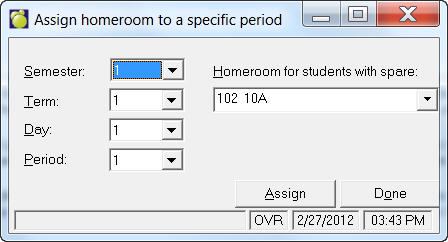
This choice will assign homerooms to students according to the room they occupy in a specific period of their timetable. The semester, term, day and period of the classes from which the homerooms will be assigned must be entered. Since some students may not be in a class during the desired period (e.g. supervised study students), a homeroom number to be assigned to these students must also be entered. Select a Semester, Term, Day, Period and Homeroom For Students With A Spare from each of the designated drop-down lists and click Assign.
For example, if a student is taking MAT1A1b during the specified period, his or her homeroom will be the room in which MAT1A1b is taught. If MAT1A1b is taught in room 25, the student's homeroom number will be 25. The homeroom designation will depend on the homeroom designation recorded in the Room/Homeroom File.
If a student has a spare, a designated 'spare' homeroom will be designated. If a student has a class in the specified period but the class's room is not flagged as a homeroom, the student will be assigned the 'spare' homeroom. The program will provide a list of rooms that should be flagged homeroom as well as provide the list of students who have been assigned the spare homeroom but who have a class in the specified period.
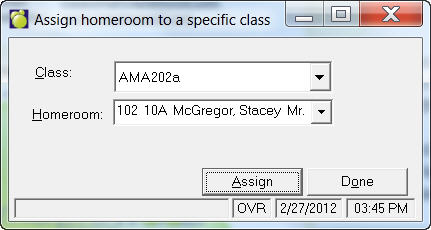
This option will assign the same homeroom to all students in a particular class if all students in the school are to have homerooms assigned on the basis of class location. Select a Class and Homeroom from the drop-down lists and click Assign.
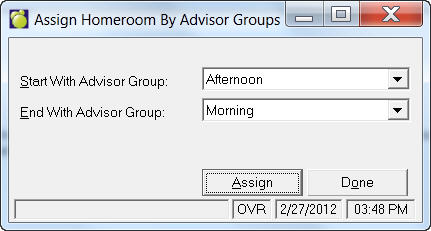
The program will assign the student(s) the Advisor Group's room. Should the room for an advisor group not be a designated homeroom, the program will create a report informing you the current (or next year's) room(s) that require to be flagged homeroom. The report will also list the affected students.
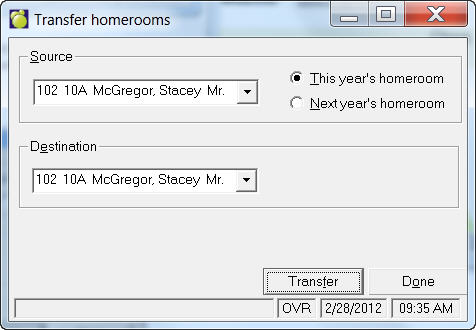
The Transfer choice will assign the students from one current or scheduling homeroom to another current homeroom. The homeroom from which the students will be transferred must be entered. Then the homeroom to which the students will be transferred must be entered. The students will then automatically have their homeroom numbers changed.
For example, the students in homeroom 25 may be transferred to homeroom 26 using the Transfer option. If there were students previously assigned to homeroom 26, homeroom 26 will contain the students from homerooms 25 and 26. Homeroom 25 will no longer contain any students.
Once the students have been transferred, there is no distinction between the newly transferred students and the original students. Therefore, care must be taken not to transfer a homeroom to one which will be subsequently transferred. Starting the homeroom transfers with the senior students will normally avoid this problem.
Note: If you wish to transfer students from one current or scheduling homeroom to another scheduling homeroom, use the Transfer choice in the scheduling Assign Homerooms.
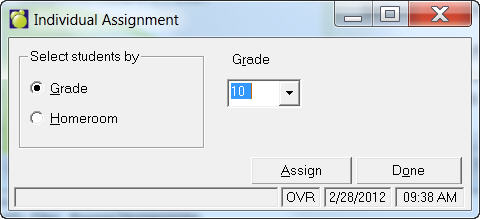
The Individual Assignment feature will display students' names, one at a time, for individual homeroom assignment. Choose Students, Assign Homerooms, Individual Assignment.
Notes: If working in Scheduling, you will be able to choose either this year's or next year's grade/homeroom. The only difference is the students who are prompted.
Before assigning homerooms, be sure that Room/Homeroom files have the correct homeroom teachers and room numbers. Here are the menus to find the files:
For the current year's room/Homeroom file choose File, School Setup, Rooms/Homerooms.
For next year's Room/Homeroom file, choose Scheduling, Modify Files, Rooms/Homerooms.
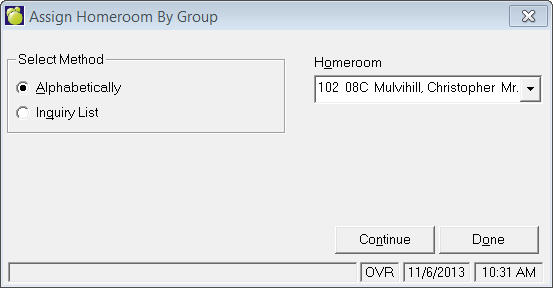
The Group Assignment feature gives the user the option to select the students Alphabetically or by an Inquiry list. When the alphabetical option is selected, the students may be either in a range or "by group". By group allows the user to select any random collection of students by selecting the students to be included, one at a time.
First select the method and then a Homeroom.
Click Continue and either a student selection box or Inquiry selection box will appear.