The types of contacts are defined in Central Office and a student can
have a separate record for each contact type.
Contacts can be classified as the emergency contact and an order can be
given to each contact to determine priority. For address information among
contacts, if contacts have the same address information, and one of the
contacts is modified, the user now has the information required to make
an informed decision and flexibility to select within a new detailed dialogue
box which other contacts, and/or siblings they would like to apply those
address changes to (siblings are considered if the contact whose address
is changing is shared with siblings).
Changes that apply to siblings will now prompt the user with a more detailed
message box to select which siblings the changes are to be applied. Generally,
this applies to contacts that are the same between siblings. If the siblings
appear in the list as "unchecked", this indicates they have
different information for that contact, and the user can now select to
apply the changes to that sibling, or leave them as is (by leaving them
unchecked).
Additionally, if adding a new contact to a sibling, the information can
now be copied to other siblings, even if they do not have the specified
contact (it will be added), or have different information for the same
contact. A message will be presented asking if the user would like to
update the siblings. If the sibling is not checked in the list, this indicates
they do not have the contact (or have different information). If the user
checks off that sibling in the list, the contact is added/updated for
that sibling. If it is left unchecked, no changes are made for that sibling.
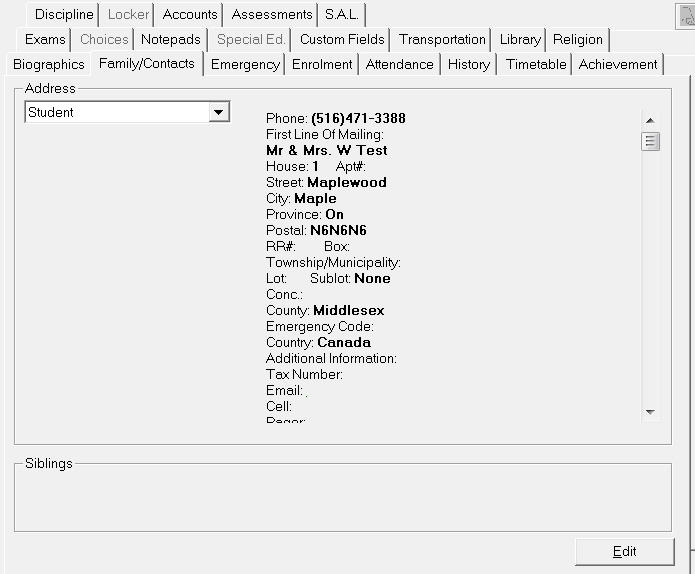
To access the Family tab, choose Students, select student, then click the Family tab.
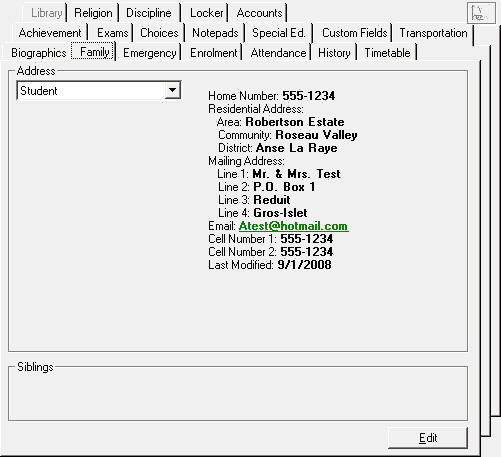
The family tab for Caribbean Community and Common Market users will be slightly different:
Edit - To change Family information, click the Edit button. Using the tabs on the edit window.
Use the Student, Father, Mother, Guardian, Perm. Address, Emergency Contact and Doctor tabs to complete the student's family records. There is also an Additional Information area for other pertinent family information such as e-mail address, cell, pager, and permanent address.
This tab can be used for storing address information that normally applies to the family, but may be different from the current family information (students in boarding school with parents who are working abroad etc.).
The e-mail address in these fields will be used with the E-mail templates program and the Report Builder program when sending reports and information home to either parents or students.
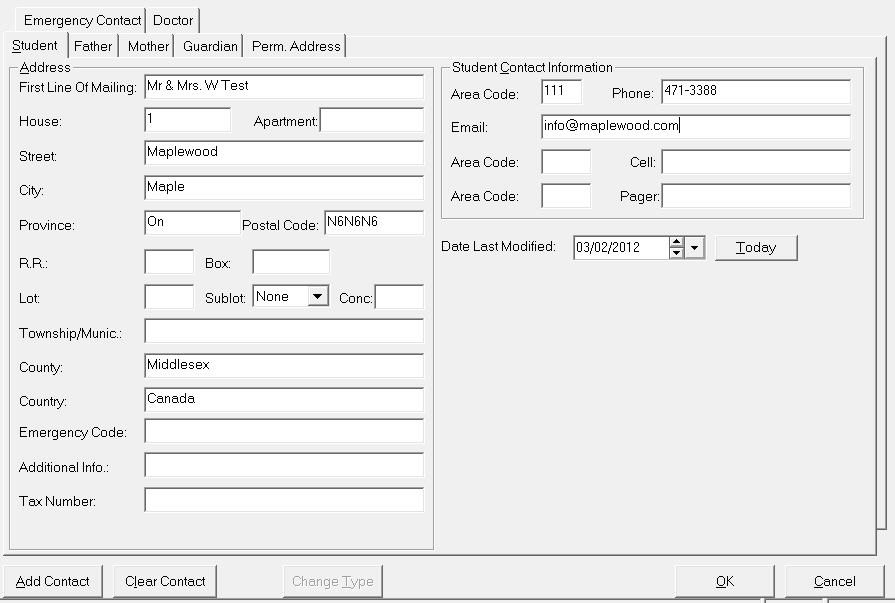
First Line Of Mailing, House, Apartment, Street, City, Province, Postal Code, Phone, Rural Route, Box Number, Lot, Sublot, Concession, Township/Municipality, County, Emergency Code, Tax Number and the Date this information was last modified. There is also an Additional Information area for other pertinent family information not provided for in this editing area.
The Edit Parents program now allows the entry of 12 digits, numbers and letters, into the postal code field. Some schools have students whose address and parent/guardian addresses are not in Canada, e.g., students from Asia have postal codes that are all alpha or alpha numeric, but not the same format/order as Canadian postal codes.
Manitoba users editing window will be slightly different. For address you can include information for Site, Compound, Group, R.R., Box, Quarter, Sec, Township, Range and Meridian.
The Edit Parents program now allows the entry of 12 digits, numbers and letters, into the postal code field. Some schools have students whose address and parent/guardian addresses are not in Canada, e.g., students from Asia have postal codes that are all alpha or alpha numeric, but not the same format/order as Canadian postal codes.