To print this year's timetables choose Students, Print Timetables.
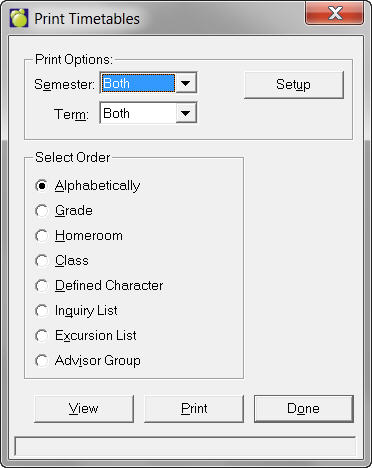
Semester and Term: Select from the semesters and terms
in your school system.
Select Order:
Select the way by which you want Timetables printed:
- Alphabetically
- Grade
- Homeroom
- Defined Character
- Inquiry List
- Excursion
List
- Advisor Group
Print Options
Options
Tab
Click the Setup button, and click the Options tab to see this setup
window:
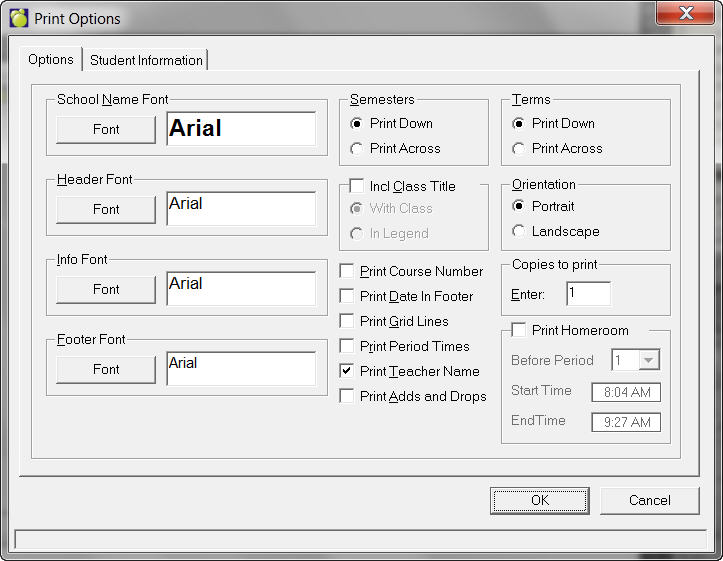
- Select School Name, Header and Info
fonts.
- Print Semesters Across or Down
- Click the check box to include the
Class Title.
Below, use the With Class option to print the Timetable with the class
or use In Legend to print a list of Timetables at the bottom of the
page.
- Choose Landscape or Portrait.
- Select the number of copies to print.
- As options, you now can Print the
Course Number, the Date in the Footer, Grid Lines (boxes around your
information on the printout) and Period Times.
- Print Homeroom. Check this box and
specify to print Before a Specific Period, and then enter the Start
and End Times.
- Print Adds and Drops - Only the add/dropps
for the applicable semester(s) will be reported. e.g. TT for Sem 1,
only add/drops that occurred for that semester will appear.
Note: Homeroom Time can only be edited if Print Period Times is selected.
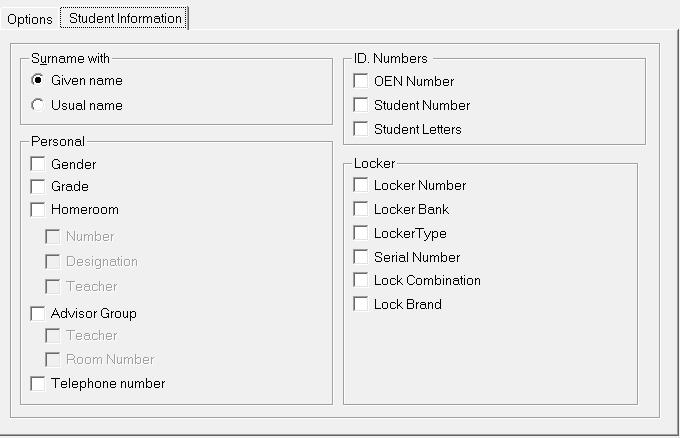
Student Information Tab
Click the Setup button, and click the Student Information tab to see
this setup window:
Surname With - Select either to include the Given or Usual Name
Personal - Select to include any of the following: Gender, Grade, Homeroom
Number, Homeroom Designation, Homeroom Teacher, Advisor Group Teacher,
Advisor Group Room Number, Telephone Number, OEN Number, Student Number
and Student Letters.