Grade 3 Assessment
Designed to assist with the production of the Ontario Provincial Report Card 9 – 12 and transcripts, this area provides all the supplementary necessary fields for program modifications, community involvement, literacy test and accommodations required for the test.
To enter Ontario Report Card Details, access the Student Record Main screen by choosing Students, Student Records. Select a student, and choose View, Ontario Report Details & EQAO Tests. This information is also accessible through Classroom Manager and the Online Student Administration. A screen will appear with six tabs: Program, Community Involvement and Literacy Component.
Your ability to edit Assessment tabs (grade 3, 6, 9 Math) depends upon the student's grade level:
E.g., a student in grade four will not have the Grade 6 Assessment and Grade 9 Math tabs. Similarly, a student in a grade ten will not have edit access to previous years' Assessment tabs. The Assessment tabs contain accommodation information that is to be sent to EQAO prior to the standard testing of a given grade level. After the student has completed that grade level, the tab can no longer be edited. The accommodations can be referred to for information purposes.
To print Ontario Report Cards, choose Marks, Print Report Cards.
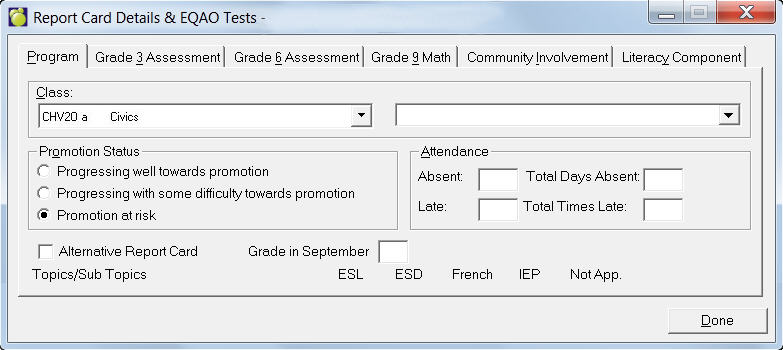
This tab is designed to record changes made to a student’s learning expectations for a course. Throughout the report card, check boxes exist to indicate whether the curriculum expectations for a student have been changed and/or whether a student is in special language programs. Topics-based Marks must be set up for the student in order to see the Program tab.
This information must be recorded on a class by class basis. Simply
select the class from the pull down and check the appropriate box(es)
IEP, ESL or ESD. To select another class press the P or N buttons or select
the class from the Class pull down.
IEP
If the student is working towards a credit for the course and the curriculum
expectations have been changed this should be checked. Please consult
with the school and/or Ministry if unsure whether or not to check this
box for a student.
ESL or ESD
Students in the early stages of English as a Second Language (ESL) or English
Literacy Development (ELD) programs may need program adaptations in a
class. If a student is enolled in an English as a Second Language (ESL)
or English Literacy Development (ELD) program check the appropriate box(es).
Please consult with the school and/or Ministry if unsure whether or not
to check this box for a student.
Grade 3 Assessment
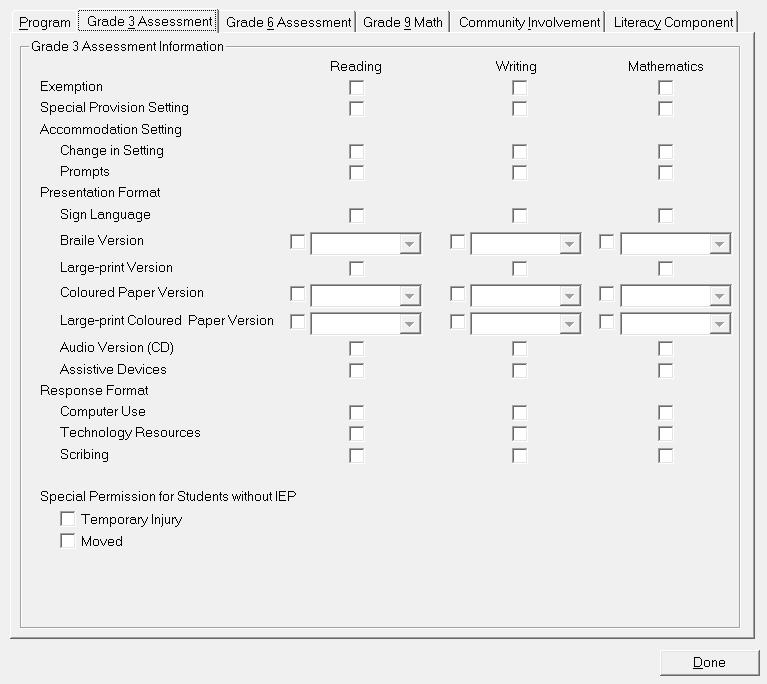
Specify Exemption, Setting, Presentation Format, Response Format and Special Permissions options for each of Reading, Writing and Mathematics.
Grade 6 Assessment
This tab is identical to the Grade 3 Assessment tab.
Grade 9 Math
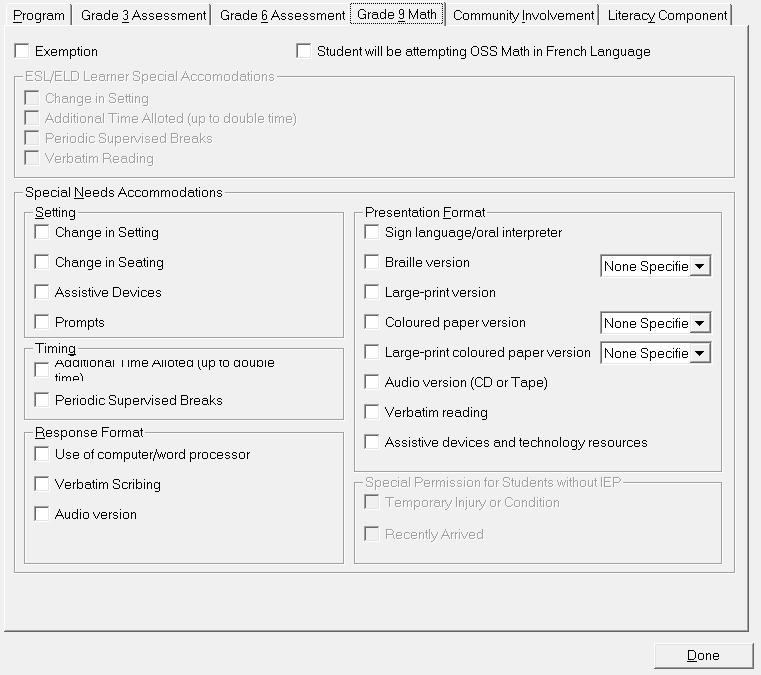
Specify Exemption and Special Needs Accommodations for Grade 9 Math. Note the Grade 9 tab is editable for anyone in grade 9 or higher (it isn't limited to grade 9 students since grade 10 student might be taking grade 9 math).
Check the Student will be attempting OSS Math in French language if applicable.
As part of the OSS graduation requirements, each student enrolled as of
September 1999 must complete 40 hours of community involvement. When completed,
the check box on the Ontario Student Transcript will be checked. This
information is also sent to requesting agencies (OCAC, OUAC, SIS).
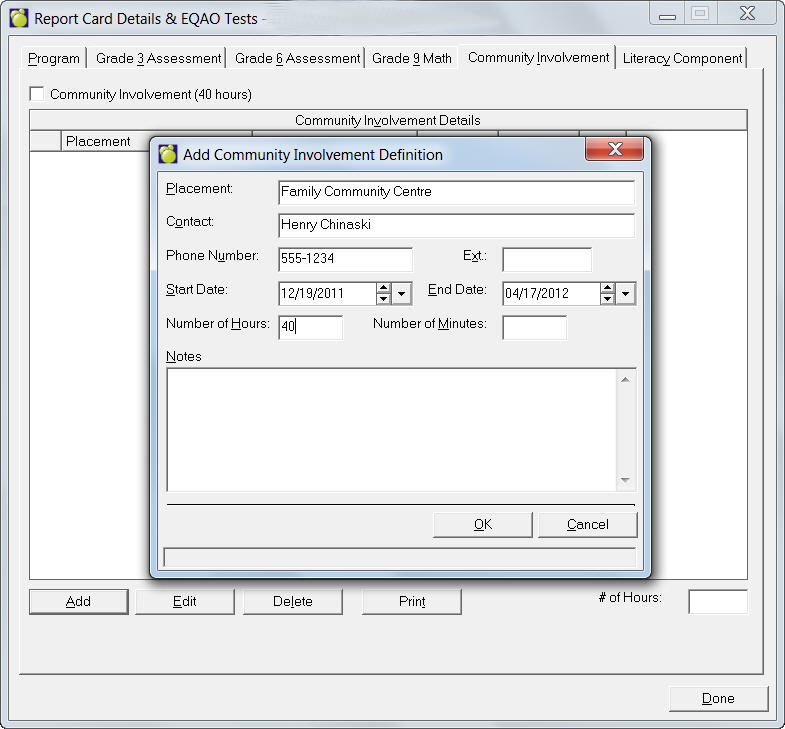
A school can simply check the Community Involvement (40 Hours) box when complete or they may record each entry. As the hours accumulate, a running total will print on the Ontario Provincial Report Cards 9 – 12 Credit Summary Page.
Enter a new placement below by clicking Add and entering the specifics. To Edit the placement, Contact, Start or End Date and Hours by clicking the Edit button. To delete an existing placement select the Placement and click Delete. Below is a sample Community Involvement editing screen.
As part of the OSS graduation requirements, each student enrolled as of September 2000 must pass the Ontario Secondary School Literacy Test as a requirement in order to graduate, commonly referred to as the Grade 10 literacy test. This area has been expanded to allow for the additional fields requested for the EQAO export and other reporting agencies.
Ontario Report Card Details, Ontario Literacy Component options for students enrolled as of September 1999 and having successfully completed OLC40*
Previously, students with OLC4O and CCL4O (literacy) courses we automatically changed to English or French as the completion status in Ontario Report Card Details. Now, these students will start being flagged as Not Applicable with a non-participation status of OSSLC.
(OLC4O*, or CCL40*, or CCL4O*) will affect the Literacy Completion status as follows:
Transcript program will now need to look at both the Completion Status
as well as the Non-participation status to determine which option to print
on the transcript.
Completion Status = Not Applicable
Non-participation Status = Exempted
Community Involvement is checked Completed
Completion Status = Not Applicable
Non-participation Status = Deferred
then no checkbox should be selected
Completion Status = Not Applicable
Non-participation Status = OSSLC
and student has successfully completed OLC4O* or OLC40* within the transcript
then English checkbox should be selected
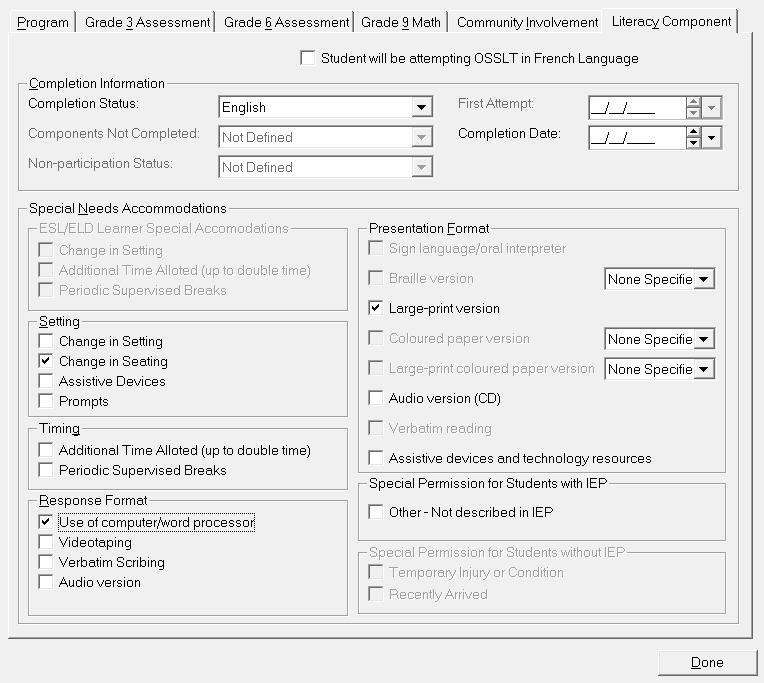
Check the Student will be attempting the OSSLT in French language if applicable.
Under Completion Information, use the drop-down list to select a Status: Incomplete, English, French, Not Applicable, or Not Reported. If the Literacy Component has been successfully completed (English or French), the Completion Date field will become active, please specify this information.
If Incomplete has been selected, the Components Not Completed field will become active, please select from the drop-down list to select the missing component; Both Reading and Writing, Reading Only or Writing Only. The student has attempted the literacy component and within the tab activates the "Not Completed Portion" pull down menu.
If Not Applicable has been select in the Completion Status field, then the Non-participation Status field becomes active. Select the appropriate reason of Exempted, Deferred or OSSLC (refers to the Literacy coarse OLC4O. Students who are taking this course do not have to write exam). Specify any Special Provisions and/or Special Needs Accommodations by clicking the appropriate checkboxes.
Not Reported - means that we don't know if they have or not - or that they haven't attempted it. - and does not activate any other (inactive) fields.
1) Completed - English (E), French (F), Both (B), OSSLC English (O), OSSLC
French (S)
2) Not Applicable (N)
3) Incomplete (I)
4) Not Reported (NULL, A)
Change Type
Data Cleanup
New stored procedure dbo.spmw_Student_Sync_Data_ON