How to Run an Appraisal Cross Reference Update
This screen runs using today’s date, it accommodates for those employees whose position(s) may change during a period when an appraisal record is still open, (e.g. a status of Active). Records can be updated immediately or at a later date, both options generate the Employee Cross Reference Update report.
Use the following steps to Run an Appraisal Cross Reference Update:
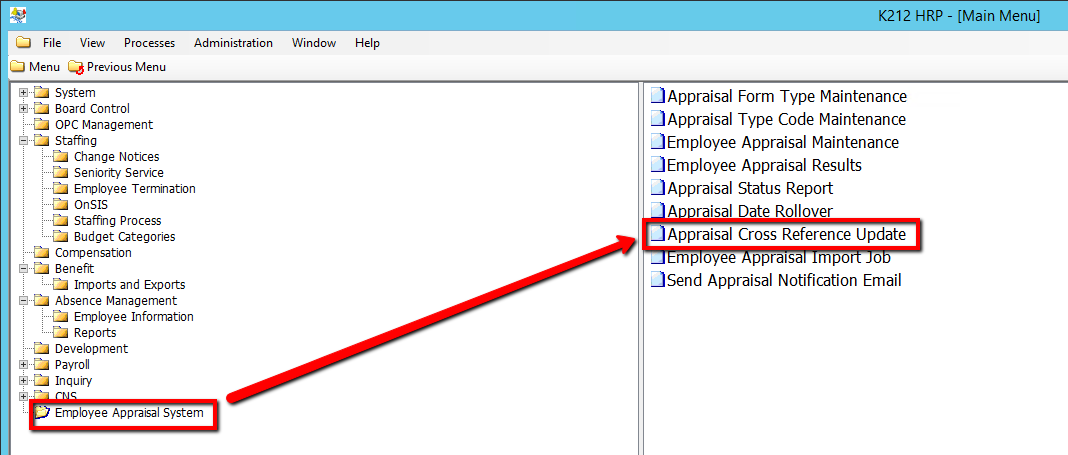
1. Click on Employee Appraisal System.
2. Click on Appraisal Cross Reference Update.
.png)
3. Select a Update Appraisal Records? value (i.e N)
This field identifies if the Employee Appraisal records will be updated. ‘No’ will run the batch process and generate the report without updating employee records. ‘Yes’ will run the batch process, generate the report and update the employee appraisal records. Default is set to ‘No’.
4. Select a Move if Different Employee Group? value (i.e N)
Allows users to specify whether or not the cross reference process should move an appraisal to another position if the position is in a different employee group.
5. Select a Move if Assigned or Started? value (i.e N)
Allows users to specify whether or not the Cross Reference process should move to another position if it has already been assigned and/or the form has been started.
6. Select a Clear Appraiser ID if Different Position? value (i.e N)
Allows user to specify whether or not the Appraiser ID should automatically be cleared if it is assigned to a different position.
7. Click the Submit button at the top of the menu bar to begin the Update process
