How To Setup the Criteria for an Emailing List
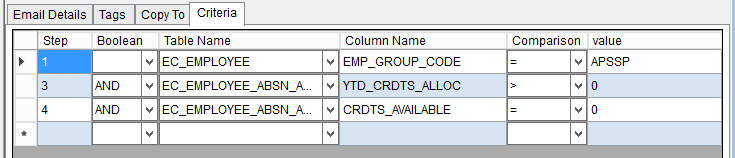
This tab is used to Add/Modify & displays the criteria used to determine the list of employees to send the email to as defined in the email text tab.
Use the following steps to Setup the Criteria for an Emailing List:
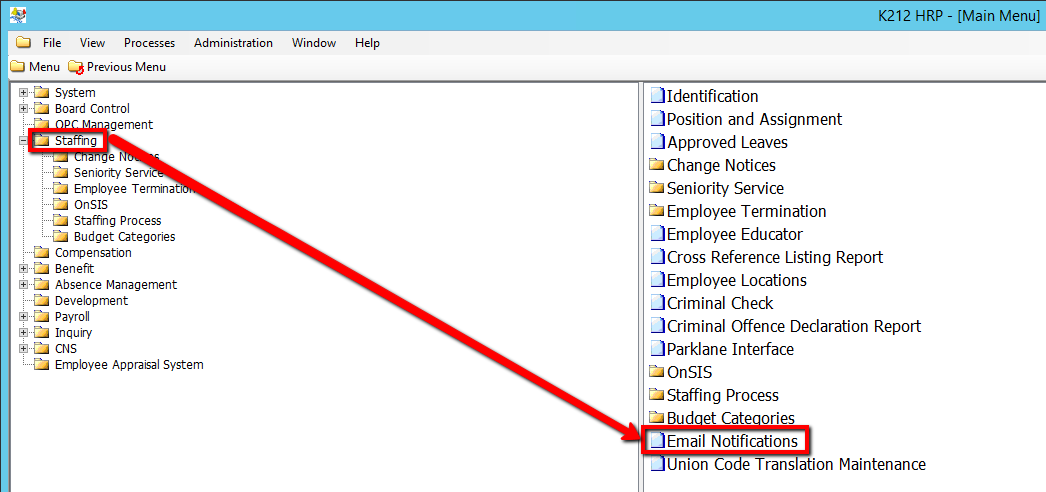
1. Click on Staffing.
2. Click on Email Notifications
3. Click the Find button at top of the menu bar to see all current Records in the database.

4. If K212 HRP dialog box displays, click Yes to continue.
.png)
5. Select the Record that needs to be edited or right-click the grid below Step and select New Record to add a new record
.png)
6. Enter a valid Step Number (i.e 1).
7. Enter a valid Boolean value or select a value from the drop-down (i.e ASP)
9. Enter a valid Table name value or select a value from the drop-down (i.e EC_EMPLOYEE)
10. Enter a valid Column Name value or select a value from the drop-down (i.e EC_ABSENCES)
11. Enter a valid Comparison value or select a value from the drop-down (i.e '=')
12. Enter a valid Value (i.e ALP)
13. Click the Save button.
