How to Mass Update OPC Position Records
This screen is used to make mass changes to OPC records (EC_POSITIONS) and employee position records (EC_EMPLOYEE_POSITIONS).
Changing one of these fields will result in a new Position ID being created since it is a key value to define a position. The original position ID will be terminated with a termination date = effective date & less 1 day.
•Employee Group *
•Job Code *
•Establishment Code *
•Location Code *
USING THIS MODULE MAY AFFECT RECORDS AND PAY RUN: Administrators need to coordinate with payroll and other functional departments, prior to doing any mass changes on positions. Changing certain data may affect pay run.
Use the following steps to Mass Update OPC Position Records:
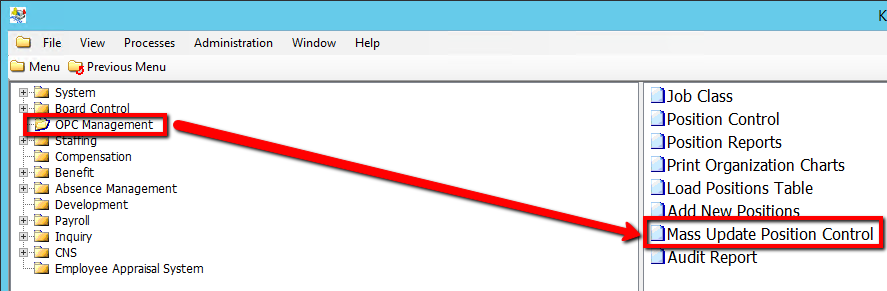
1. Click on OPC Management
2. Click on Mass Update Position Control
.png)
3. Enter a Search parameter, such as Position ID or Job Code (If applicable)
To View ALL Employee's, Simply click the Find button, with no parameters entered.
4. Click the Find button at top of the menu bar to see all relevant records in the database.

5. Select a current Position ID to Mass Update
6. Select a Field to Update value
7. Enter a New Value
8. Select a Create New Employee Position Record? value
9. Select a Create New OPC Position Record? value
10. Enter an Effective Date value
11. Select a Submit Mode value (i.e Trial)
Selecting 'Trial' mode will generate a test document of all updated records when submitted, but will not actually update the records within the database until submitted in 'Update' Mode.
12. Select the Submit Indicator as Y (This will enable the system to Update selected records)
13. Click the Save button to save your changes

14. Click the Submit button to Mass Update Records
.png)
15. Confirm the changes on the report generated in the Process Monitor