How to Run a ELP Eligible Employee Report
The Earned Leaves Processing screen will run two reports.
•The first report is to determine the Total Absences by Union Code (as selected on the Earned Leaves Configuration Screen).
•The second report, ELP Eligible Employees will compare Total Absences by Union Code to the Average FTE and Minimum Factor to determine if an employee is eligible for the Earned Leaves Plan.
•The Total Absences By Union Code report for the prior year must be run before running the ELP Eligible Employees Report. i.e. If you are running the ELP Eligible Employees Report for Sept 1, 2015 to Aug 31, 2016, then there must be data in EC_EARNED_LEAVES for that Union Code for the Sept 1, 2014 to Aug 31, 2015 dates.
Use the following steps to Run an ELP Eligible Employee Report:
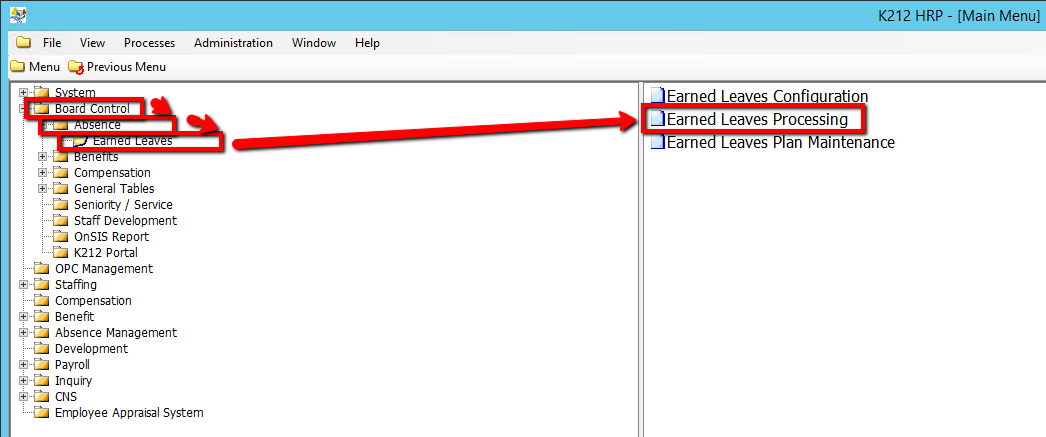
1. Click on Board Control
2. Click on Absence
3. Click on Earned Leaves
4. Click on Earned Leaves Processing
.png)
5. Select a Select Report to Run value (i.e ELP Eligible Employees)
6. Select a Start Date value
7. Select an End Date value
8. Select a Union Code value
9. Select a Submit Mode value (i.e Trial)
Selecting 'Trial' mode will generate a test document of all updated records when submitted, but will not actually update the records within the database until submitted in 'Update' Mode.
10. Click on the Submit button to generate the report (Consult the user guides for more information about each field)
.png)